
Instagram Action Blocked: Why It Happens, How Long It Lasts
Instagram action blocked? Learn the real triggers, how long blocks last, what to do in the first 72 hours, and how to request a review in Account Status.
An Instagram action block is a temporary limit on one or more things your account does, usually following, liking, commenting or messaging, while the rest of the account keeps working. It is triggered when activity looks automated or spam-like, most often bursts of repeated actions or a third-party app logged in with your password. Instagram publishes no fixed duration. Stop the blocked action, remove connected apps, and check Account Status.
Many of the pages ranking for this error come from proxy and automation vendors, and their fixes are really instructions for hiding automation better. This guide covers what the message means, what Instagram has actually published about limits (very little), how long blocks tend to last, what to do in the first 24 to 72 hours, how to request a review in Account Status, and how an action block differs from a shadowban.
Facts in this guide were checked in October 2026. Instagram renames menus often, so if a path looks slightly different in your app, look for the same words nearby.
What does "action blocked" mean on Instagram?
"Action blocked" means Instagram has stopped your account from repeating a specific action for a period of time, not that the account is banned. You can usually still open the app, browse, post and read messages, but one button fails every time you tap it.
The wording has changed over the years. The current popup most people see reads "Try Again Later. We restrict certain activity to protect our community. Tell us if you think we made a mistake." Older versions said "Action Blocked" or "We limit how often you can do certain things on Instagram to protect our community," and some older builds showed a "Feedback Required" message. They all describe the same family of limits: a rate or behavior control applied to your account's outgoing actions.
Three details matter more than the wording: which action fails, whether it fails on every post or only some, and whether Account Status lists anything. A comment that fails only on one creator's posts is usually that creator's comment settings, not a block on you, so test the same action on an ordinary post before concluding anything.
Action block, feature restriction, shadowban or disabled account: which one do you have?
These four states feel similar but have different causes and exits. Tell them apart by what still works and what Account Status says.
| State | What you see | Account Status | Typical cause | What actually helps |
|---|---|---|---|---|
| Action block (rate limit) | "Try again later" when you follow, like, comment or DM; everything else works | Often shows nothing | Bursts of repeated actions, automation, a third-party app using your login | Stop the action, remove apps, wait, return slowly |
| Feature restriction | A feature is unavailable, sometimes with an end date | Listed under features you can't use, sometimes with a review option | A rule violation, or activity classified as one | Read the reason, request a review if offered, wait out the window |
| Reduced recommendations (what people call a shadowban) | Everything works, but reach from non-followers drops | Professional accounts can see recommendation eligibility | Content or account flagged against Recommendation Guidelines | Edit or remove flagged content, request a review |
| Disabled or suspended account | Login replaced by a disabled or suspended notice | Not reachable in the normal way | Serious or repeated violations, or a security event | Follow the on-screen review path only |
If only interactions fail, you are in the first or second row. If interactions work and only reach is down, you are in the third row; our guide to Instagram shadowbans and how to recover covers that case in depth.
There is a fifth possibility: a compromised account. If you see likes, follows or comments you never made, someone else is acting as you, and the block is a symptom. Security comes first in that case.
What triggers an Instagram action block?
The triggers are almost all about how your account behaves, not what you post. Instagram does not publish its detection rules, so this list combines what its help center says with patterns that are widely reported.
Bursts of the same action. Following dozens of accounts in a few minutes, liking a long run of posts in a hashtag, or unfollowing a batch of people in one sitting is the classic trigger. Say you run a ceramics studio account with 1,800 followers and spend a Sunday evening following 150 local accounts in twenty minutes to announce a market stall. Nothing in that is malicious, but fast, repetitive actions aimed at strangers are exactly what a follow-for-follow bot produces.
Repetitive comments and messages. Pasting the same comment ("Love this! Check my page") on many posts, or sending the same DM to many strangers, looks like spam to any filter.
Third-party apps that hold your password. This is the cause Instagram itself names most clearly. Its help page on restrictions for data scraping lists, among the reasons its systems may flag an account, giving your username and password to a third-party app or website, and it gives as the example apps that offer likes or followers on Instagram. Follower trackers, "who unfollowed me" apps, auto-likers and old-style schedulers that ask for your login all fall in this group; our breakdown of free Instagram followers offers and scams shows how these apps use the access you hand them.
Automation in general. Instagram's Terms of Use prohibit creating accounts or accessing or collecting information in unauthorized ways, and they spell out that this includes "creating accounts or collecting information in an automated way without our express permission." Auto-like extensions, scripts and phone farms all count.
Unusual logins and new accounts. Many devices, odd locations or data center IPs, and brand-new or recently changed accounts, are widely reported alongside blocks. Instagram does not publish these as rules, so the table marks them as patterns rather than confirmed triggers.
| Trigger | How it shows up | Confirmed by Instagram? |
|---|---|---|
| Giving your password to a growth, tracker or auto-like app | Blocks with no burst on your side; actions you didn't make | Yes, named in the help center |
| Automated access (scripts, extensions, bots) | Repeated blocks, sometimes escalating | Yes, prohibited by the Terms of Use |
| Fast bursts of follows, likes, unfollows | Block appears mid-session on that one action | Consistent with the error text; exact rate not published |
| Identical comments or DMs to strangers | Comment or DM blocks, comments hidden | Consistent with spam policies; thresholds not published |
| Unusual logins (many devices, odd locations, data center IPs) | Blocks plus security prompts | Not confirmed, widely reported |
| New account or recent account changes | Lower tolerance in the first weeks | Not confirmed, widely reported |
What are Instagram's limits on likes and follows?
Instagram does not publish hourly or daily limits for likes, follows, comments or messages, so any precise number you read is someone's estimate. The one hard cap that is widely cited from Instagram's help center is on the total size of your following list: 7,500 accounts. That is a ceiling on how many accounts you can follow at once, not a daily rate.
Vendor pages are full of figures like "150 follows per day" or "60 likes per hour." Those are guesses from their own tests, often on automated accounts, and they contradict each other from site to site. Instagram has every reason not to publish real thresholds: a published limit is a target bots can run just underneath.
The more honest model is that limits are not a single number. They appear to vary with account age, history and how unusual the current activity is compared with that history. An account that has liked twenty posts a day for three years and suddenly likes 400 in an hour looks different from one that has always been very active by hand.
Use a human pace as your benchmark instead: spread outreach across the day, write comments specific to the post, and never let software act through your login. Our guide to writing Instagram comments that actually help reach covers outreach that does not look like spam.
How long does an Instagram action block last?
Instagram does not publish a duration for action blocks, so the honest answer is: as long as Instagram decides, and the only authoritative figure is one Instagram shows you. If Account Status or the popup states an end date, that date is the answer for your account.
When no date is shown, the pattern that users and community reports describe is broadly consistent. A first, light block on a single action often clears within hours to a few days if you stop the action completely. Blocks that come back, blocks that cover several actions at once, and blocks on accounts connected to automation tend to last longer and can escalate into listed feature restrictions. These are observations from many accounts, not rules, and you will find people who were blocked for a week on their first strike and others who were clear by the evening.
Two behaviors reliably make it worse: retrying the blocked action, which repeats the behavior that caused it, and continuing to run whatever app caused it. If a block lasts well beyond a week with no end date and nothing in Account Status, look for a connected app you forgot, check login sessions, and consider whether it is a bug (see the troubleshooting table below).
Test this on one post before you scale
The cheapest way to check the logic above is a small order on a single post, then compare the outcome against your own Insights data.
Why most "action block fixes" online are really about evasion
A large share of the advice ranking for this error comes from companies that sell proxies, antidetect browsers, automation tools or account "warming" services. Their fixes (rotate residential IPs, spoof device fingerprints, warm up accounts with gradually increasing actions) are designed to make automated behavior look human so it gets past detection. That is a solution to their customers' problem, which is running automation at scale, not to yours.
If you are a normal person or business who got blocked, you do not need a residential proxy. You need to stop whatever is acting like a bot on your account and let Instagram see normal behavior again. A proxy or new device fingerprint on an account already under suspicion adds unusual login signals, the opposite of what you want. And since the Terms of Use prohibit automated access without permission, a tool built to make automation undetectable is a tool for breaking the terms more quietly.
The same applies to "unblock services." Nobody outside Instagram can lift a restriction, and anyone asking for your password or login codes to "remove a block" is adding another unknown login to a flagged account, or taking it. Instagram's help page on unauthorized activity on your profile is direct about this: apps you give your login to can gain complete access to your account.
What to do in the first 24 to 72 hours
The first three days are about removing the cause and letting the account look normal again: security first, then diagnosis, then patience.
- Stop the blocked action completely. Do not test it every hour. Leave it alone for at least a full day; browsing and posting your own content are fine.
- Remove every third-party app with access. Revoke any app or website you ever gave your login to, check app and website permissions in your settings and Accounts Center, and uninstall browser extensions that touch Instagram.
- Change your password. Revoking an app does not help if it still knows your password.
- Check where you're logged in. In Accounts Center, under password and security, log out of any session you don't recognize. Unknown sessions plus activity you didn't make means the account may be compromised.
- Turn on two-factor authentication. Instagram's help center explains how to set it up with an authentication app such as Google Authenticator or Duo Mobile, which requires a code whenever someone logs in from an unknown device.
- Open Account Status. If nothing is listed, you most likely have a plain rate limit. If something is listed, the next section applies.
- Use the "Tell us" option once, if it is offered. Use the popup's "Tell us if you think we made a mistake" link once, with a short, factual note, and only if you genuinely did nothing unusual.
- After the block clears, come back slowly. For the first week, do a fraction of your usual outreach, spread across the day, then build back up over the following weeks.
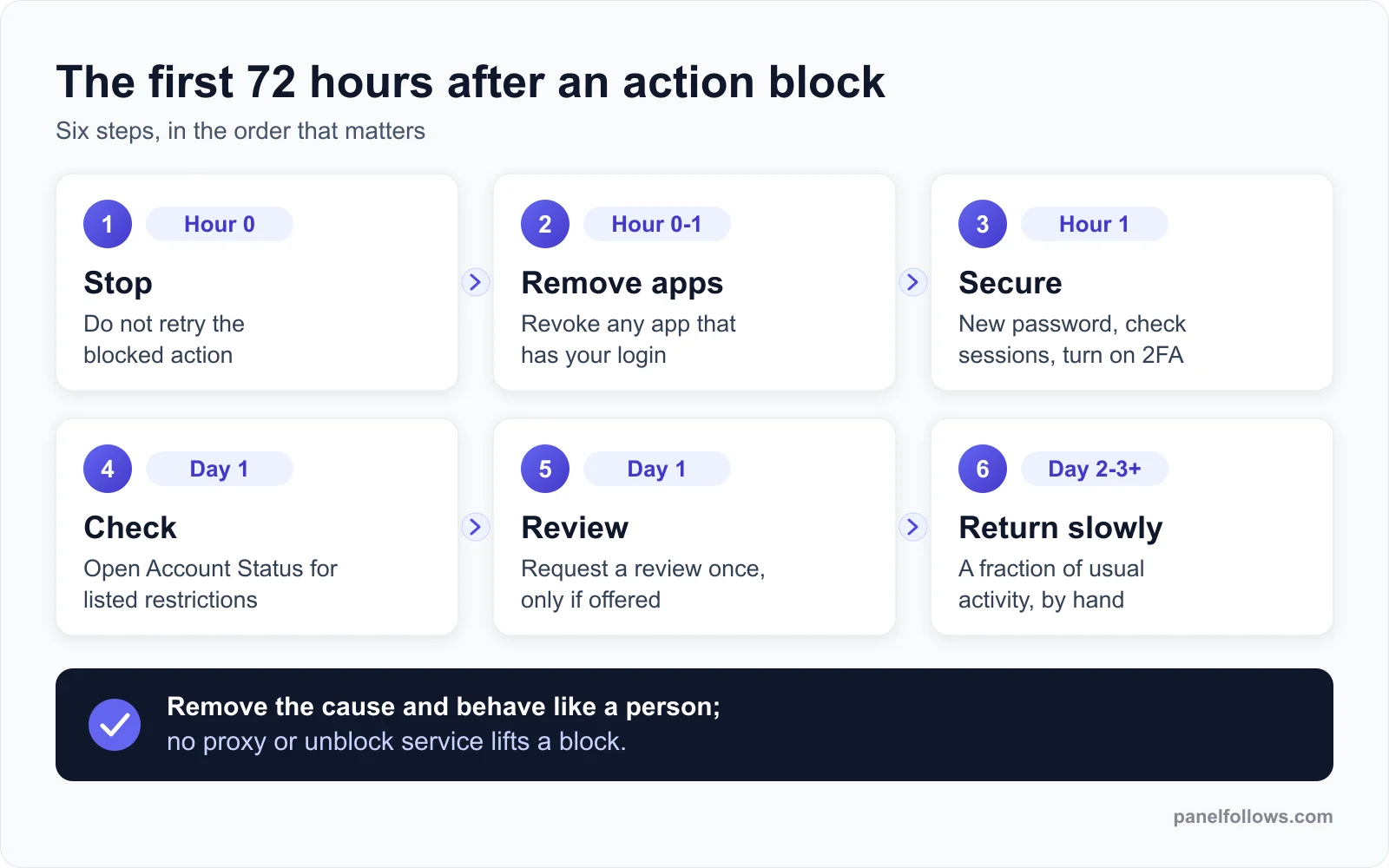
Security first, then diagnosis, then patience: the order matters more than any trick.
A common mistake in this window is switching to a second account and repeating the same burst there. You can end up with two blocked accounts on the same device.
How to check Account Status and request a review
Account Status is Instagram's own record of enforcement on your account, and it is the only place that can confirm a restriction, tell you its reason and give you a review button. Instagram's help page on checking your Account Status describes it as the place to see whether something you posted goes against the Community Standards and whether it may lead to restrictions such as features you can no longer use.
To open it on the mobile app:
- Go to your profile and tap the menu (three lines) in the top right.
- Scroll down to the section called More info and support.
- Tap Account Status.
Depending on your account type, you will see sections for removed content, features you can't use, recommendation eligibility and, for creators who earn on Instagram, monetization. A clear state everywhere means no recorded policy action you can appeal. It does not mean you aren't rate-limited; plain action blocks often leave no trace there.
If an item is listed with an option to request a review or disagree with the decision, use it. Keep it short and factual: what you were doing, that you did not use automation (only if true), and that you have removed any connected apps and secured the account (if you did). Submit once. Instagram's Terms of Use count groundless appeals and reports as misuse of those channels, so ten copies of the same appeal do not help and could hurt.
Reviews take as long as they take, and some restrictions expire before a review is answered. If the action fails without any popup, or the app crashes, that may be a bug; use the separate "Report a problem" flow in Instagram's help settings for glitches, not for restrictions.
Fixes that waste time or make the block worse
Most circulated "quick fixes" are useless, helpful only for a different problem, or counterproductive. Here is how they sort out.
| Popular fix | Does it help? | Why |
|---|---|---|
| Delete and reinstall the app | Rarely | The block is on the account, not the app; helps only with bugs |
| Clear cache, update the app | Only for bugs | Worth one try if the action fails without a restriction message |
| Switch from Wi-Fi to mobile data, or use a VPN | No, and can hurt | Adds a new network signal to an account already under scrutiny |
| Log in on a different phone | No, and can hurt | Same account, new device: more unusual-login signals |
| Wait and retry every hour | Hurts | Each attempt repeats the behavior that caused the block |
| Switch to a professional or personal account | Not as a fix | Changes account features, not enforcement history |
| Report a problem repeatedly | Hurts if used for appeals | Meant for bugs; repeated groundless reports are against the terms |
| Pay an "unblock service" | No, and risky | Only Instagram can lift a restriction; sharing your login invites a takeover |
| Remove connected apps, change password, enable 2FA | Yes | Removes the most common cause and stops it recurring |
| Stop the action and return slowly | Yes | Gives the system normal behavior to observe |
The pattern: changing how your account looks (new IP, device or account type) without changing how it behaves does not help. Removing the behavior or the tool behind it does.
Does buying followers or likes cause an action block?
Usually not directly, but it is not risk-free, and it is against Instagram's rules either way. An action block limits the follows, likes and comments your account sends out. Followers or likes arriving from elsewhere are not your account acting, so they are not the classic trigger for a "try again later" popup.
The direct link appears when the service needs your login. A "growth" app that asks for your password grows your account by using it, following, liking and commenting from your profile in bulk so some people follow back. That is exactly what action blocks exist to stop, and it is the cause Instagram's help center names.
Incoming purchased engagement carries different risks. Instagram prohibits inauthentic engagement and removes followers and likes it judges inauthentic, so drops are common; we explain how that works and what refill guarantees cover in why followers drop and how refills work. No seller can honestly call it safe or promise you will never see a consequence.
If you do decide to use a panel, the minimum standard is that it only needs a public link or username and never asks for your password. Panel Follows works that way: orders take a link or username, and we never log into your account. Our Instagram follower quality buying guide covers what you get at different quality levels, and the free Instagram followers sample lets you see delivery for yourself on a small fixed amount without a password or sign-up. It is a sample, not a growth method, and it does nothing for an existing action block.
How is an action block different from a shadowban?
An action block stops you from doing something; a shadowban, in the sense people use the word, stops other people from seeing what you post. They are diagnosed and fixed in different places.
Instagram does not use the word "shadowban" for its own systems. What it offers instead is recommendation eligibility. As TechCrunch reported in December 2022, Instagram expanded Account Status so that professional accounts can see whether their content is eligible to be recommended to non-followers in places like Explore, Reels and feed recommendations, see samples of content that may go against the Recommendation Guidelines, and edit or delete it.
If a button fails with a popup, follow the 72-hour plan above. If every button works but non-follower reach collapsed, check the recommendation section in Account Status; if it is clear, the problem is more likely content performance than enforcement. Our guide to how the Instagram algorithm ranks content is the place to start in that case.
The two can overlap: a follow-unfollow app can cause action blocks and, over time, recommendation problems. Removing the app fixes the cause of both.
How to keep action blocks from coming back
Accounts that never see this error are not using a secret limit. They behave like people, don't give their login to tools, and don't share one password across a team. A practical routine:
- Do outreach in short sessions. A few minutes at a time, several times a day, on posts you actually looked at, with comments that could only belong under that post.
- Use official connections only. Tools that connect through Meta's own login screen, where you approve permissions on an Instagram or Facebook page, are a different category from tools that ask you to type your password into their form. Never give a tool your password directly.
- Give team members their own access. For agencies and businesses with several people posting, use Meta's official business tools to grant access instead of sharing one password. Our playbook on scaling a social media agency covers multi-client access in more detail.
- Keep two-factor authentication on, permanently. It turns a leaked password from an account takeover into a failed login attempt.
- Check Account Status once a month. It takes thirty seconds and tells you about problems before they compound.
If you relied on an auto-liker or follow-unfollow app, expect growth to slow when you stop. That is the true baseline the app was hiding.
Open your account and order in minutes
Signing up is free and takes two steps. Top up with card, bank transfer or crypto, place your order and track delivery from the dashboard.
Frequently asked questions
How long does an Instagram action block last?
Instagram does not publish a standard duration. If Account Status or the popup shows an end date, that is the answer for your account. Without one, light first-time blocks commonly clear within hours to a few days once you fully stop the action, while repeated blocks or blocks linked to automation apps tend to last longer. Retrying the action is the behavior most often reported to extend it.
What does "Try again later, we restrict certain activity to protect our community" mean?
It means Instagram has limited one or more actions on your account, usually following, liking, commenting or messaging, because the activity looked automated or spam-like. Your account is not disabled, and other features normally keep working. The fix is to stop the blocked action, remove any third-party apps you gave your login to, change your password, check Account Status, and return to normal activity gradually once the limit lifts.
How many accounts can I follow per day on Instagram?
Instagram does not publish a daily or hourly follow limit, so any specific number you read online is an estimate, usually from automation vendors testing their own tools. The widely cited published cap is that you can follow a total of 7,500 accounts. In practice, limits appear to depend on account age and history, so the most reliable benchmark is a human pace spread across the day rather than a target number.
Can I appeal an Instagram action block?
You can appeal when Instagram gives you a channel for it. The popup's "Tell us if you think we made a mistake" option sends feedback, and items listed in Account Status often have a request review option. Plain rate limits frequently leave nothing in Account Status to appeal, in which case waiting is the only path. Submit any appeal once, keep it factual, and avoid repeated reports, which the Terms of Use treat as misuse.
Why am I action blocked when I haven't done anything unusual?
The most common explanation is that something else is acting from your account: an old follower tracker, auto-liker or scheduler you once gave your password to, or a person who has your login. Check active sessions in Accounts Center, revoke third-party access, change your password and turn on two-factor authentication. Less often, a block follows a burst you didn't notice, such as accepting and following back many accounts at once.
Is an action block the same as a shadowban?
No. An action block stops your account from doing something, such as following or commenting, and shows an error popup. What people call a shadowban is reduced distribution of your content to non-followers, with no popup at all. Instagram handles the second through recommendation eligibility, which professional accounts can check in Account Status. Both can come from the same automation, but they are diagnosed and fixed in different places.
Can repeated action blocks get my Instagram account disabled?
They can be a step on that path. A single rate limit is a warning-level measure, but repeated blocks show a pattern, and accounts that keep running automation can move on to listed feature restrictions and, in persistent cases, account removal. The reliable way to stop escalation is to remove the tool or behavior causing the blocks, not to find a way around detection.
Do bought followers trigger an Instagram action block?
Not usually by themselves, because an action block limits actions your account sends out, and incoming followers are not your account acting. The real trigger is any service that needs your password and performs follows, likes or comments from your profile. Buying engagement still goes against Instagram's rules, and inauthentic followers can be removed, so it is never risk-free. If you use a panel at all, choose one that only needs a public link.
Sources and further reading
- Check your Account Status on Instagram: where Account Status lives and what it shows.
- Instagram Terms of Use: rules on automated access and misuse of appeal channels.
- Why your account has been restricted for data scraping: reasons accounts get flagged, including sharing your login with growth apps.
- What to do if your Instagram profile posts unauthorized content: guidance on third-party apps and securing an account.
- Use an authentication app for two-factor authentication on Instagram: step-by-step setup for app-based login codes.
- Instagram's new transparency tools (TechCrunch, December 2022): Account Status expanded to show recommendation eligibility.