
Facebook Professional Mode vs a Page: Which Grows Faster
Facebook professional mode (now pro mode) explained: what changes, how to turn it on, how it compares with a Page, and the privacy tradeoffs to check.
Facebook professional mode (which Meta now labels "pro mode") is a free setting that adds creator tools to your existing personal profile: a public follower audience, content and audience insights, moderation tools and access to monetization if you qualify. It does not create a new account. A Facebook Page is a separate entity built for brands and teams. For a solo creator, pro mode usually starts faster. For a business, a Page usually scales better.
This guide covers what changes on your profile, how to turn the setting on, how professional mode followers work, a side-by-side comparison with a Page, what monetization it really unlocks, and the privacy tradeoffs most setup guides skip. It ends with a decision matrix and a 30-day plan so you can test the choice on your own account.
Facts in this guide were checked in October 2026. Where Meta has not published a rule or number, we say so, and where third-party guides disagree, we point that out.
What is Facebook professional mode?
Facebook professional mode is a setting on a personal profile that adds professional tools to the profile you already have. Meta's help center describes it as a way to build a professional presence from your Facebook profile, and states that you do not create a new profile when you turn it on. Your friends, your photos and your history stay where they are.
The name has changed. Meta's current help pages call the feature pro mode, while most of the internet (and many app versions) still say professional mode. They are the same thing. If you search your menus for "professional mode" and only see "pro mode", or the other way around, you are looking at the right option.
Meta tested professional mode with a small group of creators first. Then, as Social Media Today reported in late 2022, it opened the feature to creators globally. Many people were already building audiences on personal profiles and did not want to restart on a Page with zero followers. Meta's business help page notes these tools were previously available only on Pages.
If you have seen the phrase Facebook creator profile, it usually means the same thing: a personal profile in professional mode. It is not a separate product, and it is different from a Page that uses the "Digital creator" category.
What changes when you turn on professional mode?
Turning on professional mode adds a follower audience, insights, safety tools and discovery eligibility. Your friends list and existing content stay the same. Meta lists the changes in its help article, and the table below separates that official list from effects people report in practice.
| Area | What happens | Source |
|---|---|---|
| Friends and existing posts | Stay the same | Meta help center |
| Insights | You can view content and audience insights | Meta help center |
| Safety | Access to enhanced safety features such as Moderation Assist (comment filtering) | Meta help center |
| Discovery | Your content becomes eligible for discovery opportunities on Facebook | Meta help center |
| Monetization | Available if you are eligible, not automatic | Meta help center |
| Friend limit | Pro mode is Meta's suggested route to connect beyond the 5,000 friend cap | Meta help center |
| Professional Dashboard | A new hub for tools, insights and monetization status appears | Widely reported, matches Meta's tool descriptions |
| Unaccepted friend requests | People who send a request may start following your public posts | Reported by news coverage, see the followers section |
The discovery row matters most. A normal profile mostly reaches friends and friends of friends. A profile in pro mode lets your public posts be recommended to people who have never heard of you. That is the growth upside, and as covered later, it is also the privacy cost. We found no place where Meta claims a ranking boost. Being eligible for discovery is not the same as being promoted, and posts still compete on how people react to them.
How to turn on professional mode on Facebook
You turn on professional mode from your own profile page, not from the main settings menu. Meta's business help center gives these steps, and they work in the app and on desktop:
- Go to your Facebook profile.
- Below your profile header, tap or click Options on the right. On many app versions this is a three-dot (...) button next to "Edit profile".
- Tap or click Turn on pro mode (older versions say "Turn on professional mode").
- Tap Turn on to confirm, then complete the short setup flow.
Meta says you can turn it on or off at any time, so this is not a permanent decision.
If the option is not showing
Meta does not publish a full list of reasons the option might be missing, so treat this as a troubleshooting order rather than official causes:
- Update the Facebook app, since menu labels change between versions.
- Look for both labels, "pro mode" and "professional mode".
- Try a desktop browser if the item does not load in the app.
- Check Account Status in your settings for restrictions, which can block optional features.
Before you tap the button, do the privacy review described further down. It is much easier to do before strangers can follow you than after.
How do professional mode followers work?
Professional mode followers are people who see your public posts in their feeds without being your friends. They cannot see anything you share with Friends only. Followers are a one-way connection, while friends are two-way and capped.
The cap is the first practical reason people switch. Facebook allows up to 5,000 friends, and Meta's help article on friend requests lists turning on pro mode as the way to connect with more than 5,000 people. Past that point, new people can still follow you.
The second effect surprises people. A WRDW "What the Tech" report from August 2026 says someone who sends you a friend request may automatically start following your public posts, even if you never accept the request. So your follower count can grow from requests you ignore, and those people can still see everything you post as Public.
Here is how the two audiences compare once pro mode is on:
| Friends | Followers | |
|---|---|---|
| Connection | Mutual, you approve it | One-way, they choose it |
| Limit | 5,000 | No cap stated by Meta |
| Sees Friends-only posts | Yes | No |
| Sees Public posts | Yes | Yes, in their feed |
| Can message you | Yes | Depends on your message settings |
| Counts toward monetization thresholds | Not clearly documented by Meta, check your dashboard | Yes, as reported by third-party guides |
About the last row: third-party guides rarely explain how friends count toward thresholds, so trust the number in your Professional Dashboard over the one on your profile header. Also, silent followers are not neutral. A large audience that never reacts makes every post look weaker, as our guide to engagement rate and how to calculate it explains.
See live pricing in the panel
Unit prices for follower, like, view and engagement services are listed live. Registration is free and you can browse the list before adding any balance.
Facebook professional mode vs a Page: the full comparison
The core difference is that professional mode is you, while a Page is something you run. Pro mode is tied to one real person, under that person's name, with one login. A Page can use a brand name, can be managed by several people with different access levels, and exists separately from anyone's friends list.
| Factor | Profile in pro mode | Facebook Page |
|---|---|---|
| What it represents | You, as a person | A brand, business, organization, public figure or creator |
| Name | Your real name, under Facebook's authentic name rules | Any brand or business name within Page rules |
| Starting audience | Your existing friends, from day one | Zero, until people follow or you invite them |
| Friends | Yes, up to 5,000 | No friends, followers only |
| Followers | Yes, alongside friends | Yes |
| Private posting | Yes, choose Friends per post | No, Page posts are public |
| Team access | Effectively one person, one login | Multiple people with separate access levels |
| Ads | Limited, check boost options in your app | Full Ads Manager and Business Suite workflow |
| Monetization | Eligible surface under Meta's partner policies | Eligible surface under Meta's partner policies |
| Insights | Professional Dashboard | Business Suite and Page insights |
| Number you can have | One personal profile | Several Pages per person |
| Separation of personal life | Mixed in one place | Separate from your profile |
On monetization, the two are now equal on paper. Meta's Partner Monetization Policies list public content on Pages and on profiles in professional mode as eligible surfaces. They also state that profiles outside professional mode are not eligible at all. So if you want to earn from content on your own profile, pro mode is required.
On team access, they are very different. On a profile you are the only operator, and giving a freelancer your personal login hands them your private messages and your whole account. If more than one person will ever work on the account, that alone points to a Page. Agencies with many clients run into this all the time, and our multi-client agency playbook covers how access is usually split.
Which one grows faster: professional mode or a Page?
If you already have a network, a profile in pro mode usually grows faster at the start. It begins with an audience and turns extra friend requests into followers, while a Page starts from zero. Over the long run, a Page tends to do better for businesses because it supports ads, teams and a brand name. Meta has not published any reach comparison between the two, so nobody can honestly quote you a percentage.
The mechanics explain most of the difference. On day one your profile has your friends, and a new Page has nobody. Both formats can have public content recommended to non-followers, and Meta does not say either gets priority. People often respond more readily to a person than to a logo. And if your plan includes advertising, a Page connects to the full ad tools, which can outpace organic growth on any profile.
Say you are a real estate agent with 1,800 friends, mostly local, and you want to post market updates. Pro mode lets that existing network see and share your posts from day one, and new contacts can follow you without your approval. A new Page would start at zero and need invitations, cross-posting or ad spend just to reach people who already know you.
Now say you run a bakery with two staff who post daily specials, and you want to run local holiday ads. A Page is the better fit even though it starts slower, because staff should not be logging into the owner's personal profile.
The short answer: a personal brand grows faster where the person already has trust. A business grows more steadily where several people can work on the account and money can be spent on reach.
What monetization does professional mode actually unlock?
Professional mode makes your profile eligible to apply for Facebook's monetization tools, but it does not pay you anything by itself. You still have to meet age, country, policy and audience requirements for each tool.
Meta's partner policies set the baseline. You must post content on an eligible surface, which includes profiles in professional mode. You must also live in an eligible country, and any connected financial accounts must be in an eligible country too. Changing your location or payout country can remove access.
The thresholds for each tool are where sources get messy. Meta adjusts them, rolls programs out by invitation, and shows eligibility inside your Professional Dashboard rather than on one public page. Below is what current third-party guides report. Treat it as a starting point, not a rule:
| Tool | Requirement reported in 2026 | Reported by |
|---|---|---|
| All monetization | 18 or older, eligible country, compliant with Partner and Content Monetization Policies | SocialPilot, consistent with Meta's policy page |
| Stars (fan tips) | 500+ followers for 30 consecutive days | SocialPilot |
| Reels and video monetization | 5,000+ followers, 60,000 minutes viewed in the last 60 days and at least 5 active videos (Reels can count) | SocialPilot, confirm the current version in your dashboard |
| Content Monetization program | Described as invite-based, check the dashboard | Buffer's monetization guide |
| Subscriptions | Not fully rolled out for pro mode profiles, around 250 return viewers reported | Metricool |
The minutes-viewed requirement is what filters out most people. Five thousand followers who do not watch will not produce 60,000 minutes. WRDW's report reaches the same conclusion: for most people, earnings are likely to be small or nothing.
If you are comparing Facebook payouts with other platforms, our breakdowns of the TikTok Creator Rewards Program and YouTube Partner Program requirements follow the same logic: the follower count is the easy part.
The privacy tradeoffs most guides skip
The biggest privacy change in professional mode is not that your posts become public. It is that public posts now get distributed. On a regular profile, a Public post mostly reaches your friends, any followers you have allowed, and people who go looking for it. After pro mode, the same post becomes eligible to be recommended to strangers, and your follower audience can grow quickly. The same post reaches a very different crowd.
News coverage says pro mode does not change the audience of each post automatically, so you still choose Friends or Public every time. Some guides, including Buffer's monetization guide, say the profile becomes public by default. Both can be true, because the follow setting opens up while each post keeps its own audience. Since sources describe the default differently, check the audience selector yourself.
These are the gaps people most often miss:
- Old public posts. Years of Public posts become something a follower audience can scroll through. Facebook's privacy settings can limit the audience of past posts in one step.
- The one-tap mistake. As WRDW warns, the real risk is forgetting to check the audience. A vacation photo shared as Public while you are away tells strangers your house is empty.
- Children and family. Photos of kids, school uniforms and recognizable home exteriors should stay Friends-only on a profile strangers can follow.
- Tags and ignored requests. Friends who tag you in public posts put you in front of your followers, and people you never accepted may still follow you.
- Strangers in your inbox. More visibility brings spam comments, scam messages and impersonation attempts, so set up Moderation Assist and message request settings on day one.
- One login, no delegation. If you share your password so someone can help post, they get access to your private life too.
The 10-minute review to do before you switch:
- Limit the audience for past posts if you have a long public history.
- Set your default audience for new posts to Friends, then make individual posts Public on purpose.
- Review "Who can follow me" and your follower settings.
- Turn on profile and tag review, and check who can send you message requests.
- View your profile as a stranger would to confirm what is visible.
If you mainly use Facebook to share family photos and keep up with friends, the tradeoff is often not worth it. Pro mode is for people who want strangers to see their work.
Who should use professional mode, a Page, or both?
The decision comes down to three questions: is the account a person or a brand, will anyone besides you run it, and do you plan to spend on ads? The matrix below maps common situations to the format that usually fits.
| Your situation | Best fit | Why |
|---|---|---|
| Solo creator posting under your own name | Pro mode | Starts with your network, monetization eligible, no second account to manage |
| Freelancer or consultant (coach, photographer, realtor) | Pro mode, Page later | Personal trust drives business, add a Page when ads or help are needed |
| Local business with staff | Page | Brand name, multiple people, ads and inbox tools |
| Brand or online store | Page | Separation from any one person's account, full ad workflow |
| Musician or artist with a band name | Page for the project, pro mode for yourself if useful | The project outlives any one member's profile |
| Mostly family and friends use | Neither, keep a normal profile | The privacy cost outweighs tools you will not use |
| Agency managing clients | Pages | Access can be granted and revoked without sharing logins |
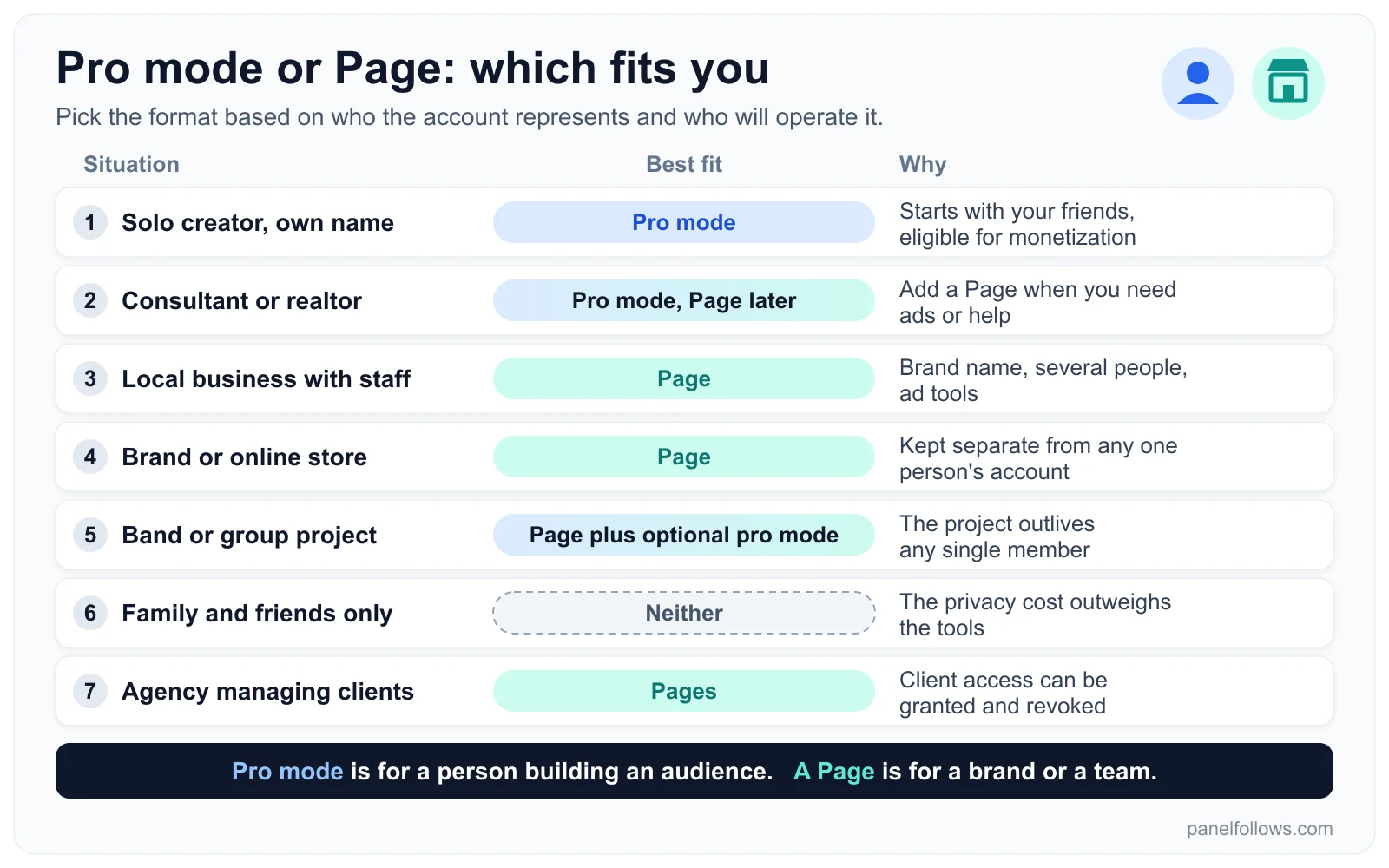
Pick the format based on who the account represents and who will operate it.
Running both is allowed and common. Pages are created and managed by people with personal accounts, so a creator can keep a pro mode profile for personal-brand posts and a Page for a business or project. The trap is posting the same content on both. That splits your audience and confuses people about where to follow you, so give each one a different job.
What happens when you turn professional mode off?
You can turn pro mode off at any time from the same profile menu, and your friends, posts and messages stay where they are. What you lose is the professional layer: the dashboard, insights, discovery eligibility and any monetization tied to the profile.
Third-party walkthroughs add details that Meta's public pages do not spell out, and they do not all agree. Tony Akubo's guide reports that you lose access to past analytics data when you switch off. Several guides say your follow setting can stay Public after you turn pro mode off, so people may still be able to follow your public posts. Others say the follow option disappears.
Because the sources disagree, do three things before switching off:
- Export or screenshot any insights you care about, since you may not get them back.
- Read the confirmation screen Facebook shows you, which lists what will change on your current app version.
- After switching, check your follower settings and set "Who can follow me" to Friends if you want a fully personal profile again.
If you earn through Stars or video monetization, switching off ends eligibility on that profile, because Meta's policies say profiles outside professional mode cannot monetize.
Should you buy followers for a pro mode profile or a Page?
For a pro mode profile you plan to monetize, buying followers is a bad idea. For a Page, it makes sense only in narrow cases. Meta's rules prohibit artificially inflating engagement, and its monetization policies look at the quality of your audience, not just its size. Purchased followers do not watch videos, so they add nothing toward minutes-viewed thresholds and they lower your engagement rate.
The narrow case is a brand-new business Page that looks empty when real customers land on it, usually right before you start running genuine ads. A modest follower base can make the Page look established. It still carries platform risk, it will not make anything go viral, and it never replaces real posting. If you go that route, choose a service with a refill period, start small, and first read our explanation of why followers drop and how refills work.
Panel Follows lists Facebook followers and other Facebook services in its Facebook SMM panel. Each service shows its start time, speed, minimum and maximum, and refill terms. Ordering only needs a public link, and no password is ever requested. If you want to see how delivery works before spending anything, the free services page has small samples for selected services. None of that replaces the organic plan below.
A 30-day plan to test professional mode on your own account
The only reliable way to know whether pro mode grows your audience is to measure it, because Meta publishes no benchmarks. This plan ends the month with numbers instead of guesses.
- Day 0. Do the privacy review above. Write down your friend count, follower count and the average reactions on your last ten public posts.
- Day 1. Turn on pro mode. Set up Moderation Assist and check the Professional Dashboard for monetization status.
- Days 1 to 14. Post publicly three to five times a week on one clear theme. Keep personal posts Friends-only so they do not mix into your public data.
- Day 14. In insights, compare reach from non-followers with reach from followers (your friends usually count among your followers). If almost all reach comes from people already connected to you, discovery has not picked you up yet. That usually points to the content, not the setting.
- Days 15 to 28. Focus on the format that earned the most shares and comments. On Facebook, the dashboard's view and minute metrics are most useful for Reels and short video.
- Day 30. Compare follower growth, average reactions and minutes viewed against day 0. Then decide: keep pro mode, add a Page for a business side, or switch off and restore your settings.
Our guide on reading views, reach and impressions is written for Instagram, but the same difference between reach and impressions applies to Facebook insights.
Open your account and order in minutes
Signing up is free and takes two steps. Top up with card, bank transfer or crypto, place your order and track delivery from the dashboard.
Frequently asked questions
Is Facebook professional mode the same as a Page?
No. Professional mode is a setting on your personal profile, so it stays tied to your real name, your friends and your single login. A Page is a separate entity that can use a brand name, be run by several people with different access levels and use the full ad tools. Both are eligible for monetization under Meta's partner policies, but they suit different situations: pro mode for individuals, Pages for businesses and teams.
Is professional mode now called pro mode?
Yes. Meta's current help center articles use the label "pro mode", while many app versions and most guides still say professional mode. Both names refer to the same feature with the same tools: a follower audience, insights, moderation features and monetization eligibility. If you cannot find one label in your profile menu, look for the other one, and update the app if neither appears.
Does turning on professional mode make my profile public?
Not entirely. Each post keeps its own audience, so you can still share with Friends only. What changes is that anyone can follow you and see your public posts in their feed, and those posts become eligible to be recommended to strangers. Some guides say the switch makes the profile public by default, so check your default audience and follower settings yourself right after turning it on.
Can I go over 5,000 friends with professional mode?
The 5,000 friend cap still applies, but Meta's help center points to pro mode as the way to connect with more people beyond that limit. Once you are in pro mode, additional people can follow you instead of becoming friends, and followers see your public posts. Friends-only posts stay limited to your friends list, so followers will never see those.
Will I lose my followers if I turn off professional mode?
Your friends, posts and messages stay after you switch off. Most third-party reports say existing followers stay too, although guides disagree on whether new people can keep following you. What you lose is the Professional Dashboard, insights, discovery eligibility and monetization on that profile, and some guides report that past analytics data cannot be recovered. Your follow setting may stay Public, so review it afterward if you want a fully personal profile again.
Can I make money with professional mode right away?
No. Turning it on only makes your profile eligible to apply. You still need to meet Meta's Partner and Content Monetization Policies, live in an eligible country and reach each tool's thresholds. Third-party guides currently report 500 followers for Stars, and 5,000 followers plus 60,000 minutes viewed in 60 days and several active videos for video monetization. Some programs are invite-based, so your Professional Dashboard is the place to check.
Should a small business use professional mode or a Page?
Most small businesses are better off with a Page. A Page can use a brand name, lets staff help without sharing anyone's personal password, and connects to the full advertising tools. Professional mode fits a business only when the business is essentially one person whose name is the brand, such as a consultant, coach or real estate agent. Even then, many add a Page once they hire help or run ads.
Can I have professional mode and a Page at the same time?
Yes. Pages are created and managed from personal accounts, and turning on pro mode does not stop you from running one or more Pages. Many creators use a pro mode profile for personal-brand content and a Page for a business or project. Give each one a distinct purpose, because posting identical content on both splits your audience and makes it harder for people to know where to follow you.
Sources and further reading
- Turn pro mode on or off for your Facebook profile: Meta's help center article on what stays the same and what changes with pro mode.
- How to turn on pro mode for your Facebook profile: Meta business help with the official steps for turning it on.
- Unable to send or accept a friend request on Facebook: Meta's explanation of the 5,000 friend limit and the pro mode option.
- Partner Monetization Policies: Meta's rules on eligible surfaces, countries and policy compliance for monetization.
- What the Tech: Should you turn on Facebook's Professional Mode?: WRDW news coverage from August 2026 focused on privacy tradeoffs.
- Meta Opens Up Facebook's Professional Mode to All Creators Globally: Social Media Today on the 2022 global rollout.
- How to Monetize Your Profiles with Facebook's Professional Mode: SocialPilot's 2026 summary of reported monetization thresholds.
- FB Professional Mode: Worth it?: Independent walkthrough covering the on/off steps and lost analytics after switching off.