
Is X Premium Worth It? Tiers, Checkmarks and Reach Compared
Is X Premium worth it? Compare Basic, Premium, Premium+ and the new X Subscription plans on reach, the checkmark, editing and payouts, and when to skip it.
X Premium is worth it if you post on X to build an audience, find clients or earn payouts, because the paid tiers buy you three real things: the blue checkmark, higher placement for your replies, and eligibility for creator payouts. It is not worth it if you mostly read, post now and then, or expect the badge to prove who you are. The checkmark shows a subscription, not a verified identity.
This guide compares the tiers by use case: creator, business and casual user. It covers reach, editing, longer posts and the checkmark. It also explains a change many older reviews miss. In October 2026, X folded Premium into a bundle called The X Subscription, so new buyers now see a different menu from existing subscribers. You will find a step-by-step route to the checkmark, an honest read on the "reply boost," the payout math, and a 30-day test you can run on your own account before you commit to an annual plan.
Facts in this guide were checked in October 2026. Prices change by country and over time, so this guide links to X's own pricing pages instead of quoting numbers that may be out of date by the time you read this.
One note up front: Panel Follows sells services for X, and none of them are needed for anything in this guide. Later on, a section explains why bought engagement and the checkmark get in each other's way.
What changed in October 2026: X Premium is now part of The X Subscription
X Premium still exists, but new customers now buy it inside The X Subscription, a single plan that covers X, Grok and Cursor. X's help center now opens its Premium page with a note saying exactly that: every paid plan includes X Premium benefits on the X account you connect, and existing subscribers keep their plan, price and features until they choose to switch (About X Premium).
According to xAI's documentation, new customers, including anyone who only has a free X account, start on The X Subscription (What is The X Subscription?). The bundle has five individual plans: Free, Plus, Premium, Super and Ultra. The documentation for X Premium customers sets out the X side of the bundle: Free gets standard X, Plus gets "a checkmark, creator tools, and fewer ads on X," and Premium, Super and Ultra get full X Premium+ benefits (X Premium customers moving to The X Subscription).
So there are now two menus:
- Legacy tiers (Basic, Premium, Premium+) for people who were already subscribed. They continue unchanged.
- Bundle plans (Plus, Premium, Super, Ultra) for new buyers. Super and Ultra add AI usage, not extra X features.
There is a naming trap to watch for. "Premium" on the new bundle is not the same product as legacy "Premium." The new bundle Premium carries Premium+ level X benefits plus a large AI allowance. When someone online says "X Premium is worth it," check which Premium they mean.
There is also some leftover inconsistency. X's help page still advertises localized pricing "starting at" the Basic tier, while xAI's pricing page says new self-serve customers choose from the bundle plans (Pricing). Before you buy, trust what your own subscribe screen shows.
What does each X Premium tier actually include?
Each tier adds features on top of the one below. On the legacy menu, Basic covers writing tools, Premium adds the checkmark and creator access, and Premium+ adds an ad-free feed, the biggest reply prioritization and the heaviest AI features. The table below uses the feature lists on X's help center for the legacy tiers and xAI's own wording for the bundle plans.
| Feature | Legacy Basic | Legacy Premium | Legacy Premium+ | Bundle Plus | Bundle Premium and up |
|---|---|---|---|---|---|
| Edit post (1-hour window) | Yes | Yes | Yes | Described as Premium benefits | Yes (Premium+ level) |
| Longer posts (up to 25,000 characters) | Yes | Yes | Yes | Described as Premium benefits | Yes |
| Long video uploads (about 3 hours, 8GB, 1080p) | Yes | Yes | Yes | Described as Premium benefits | Yes |
| Reply prioritization | Yes | Larger | Largest | Not itemized by xAI | Premium+ level |
| Blue checkmark (after review) | No | Yes | Yes | Yes | Yes |
| Ads | Standard | About 50% fewer in Home timelines | Ad-free across most of X | Fewer ads | Premium+ level |
| Creator payouts and subscriptions | No | Can apply | Can apply | "Creator tools" | Yes |
| ID verification option | No | Yes | Yes | Not itemized | Not itemized |
| Media Studio | No | Yes | Yes | Not itemized | Not itemized |
| X Pro, SuperGrok | No | No | Yes | No | Yes |
A few details from X's feature list are worth knowing before you pay for them:
- Edit post gives you one hour to make a limited number of changes, and only to original posts and quotes. You cannot edit replies.
- Longer posts can be read by everyone. Only subscribers can write them.
- Long video uploads are listed for x.com and the iOS app only.
- Fewer ads on Premium apply to the For You and Following timelines, not to ads on profiles, in replies, promoted trends or promoted accounts. That benefit also only starts after your checkmark is applied.
- Articles, X's long-form format, is described inconsistently on the help page. It appears in the Premium+ summary and also in the list for Premium and Premium+. If Articles is your reason to buy, check your plan before paying.
xAI has not published a line-by-line feature map for Plus in the documents we read. Its own wording is "a checkmark, creator tools, and fewer ads." Third-party reviews list more, but treat those lists as unconfirmed until the subscribe page shows them.
How much does the X blue checkmark cost?
The cheapest way for a new buyer to get the blue checkmark is the Plus plan on The X Subscription. Existing subscribers can get it on legacy Premium or Premium+. Legacy Basic does not include a checkmark at any price. X publishes localized prices by country on the X Premium help page, and xAI lists bundle prices on its pricing page. Check both, because they now describe different products.
Three cost details catch people out:
- Web and app prices can differ. X's pricing table is labeled as web pricing, and prices exclude tax such as VAT. App store purchases are billed by Apple or Google, which also matters if you later switch or ask for a refund.
- Annual billing is cheaper per month but locks you in. Buy monthly until you have tested whether the subscription moves anything for you. The 30-day test later in this guide shows how.
- The checkmark can be removed without a refund. X says it can remove your checkmark at any time, at its sole discretion, without a refund, including when you break its terms (About X Premium).
If you were already subscribed, compare like with like. On the old menu, the checkmark came with legacy Premium. On the new one it comes with Plus, which also includes AI usage you may or may not want.
Is the blue checkmark the same as being verified on X?
No. X's own help center says the blue checkmark means the account has an active X Premium subscription and meets eligibility requirements, and that it "does not mean that the account has been ID verified" (About X Blue Checkmark). Identity is a separate label.
There are now four different signals, and people confuse them all the time:
| Signal | What it means | How you get it |
|---|---|---|
| Blue checkmark | Paid subscription plus a basic eligibility review | Premium, Premium+, or a paid bundle plan |
| "ID verified" label | You gave X a government-issued ID | Optional, for Premium and Premium+ subscribers |
| Gold checkmark | A verified organization | Premium Business |
| Grey checkmark, affiliate badge | Government or multilateral body, or an account tied to a verified organization | Premium Organizations, or affiliation through a business |
X's Premium Business page says any organization that buys Premium Business gets a gold checkmark and a square avatar, and that its main account and affiliates get Premium+ benefits. It is priced for organizations, far above any individual plan.
The old notability-based verification is gone. X began winding down its legacy program on April 1, 2023, and accounts verified under the old criteria (active, notable and authentic) lost the checkmark unless they subscribed. X no longer accepts applications under those criteria.
The EU adds one more wrinkle. X's help center says that after a European Commission decision of 5 December 2025, which found the blue checkmark misleading under the Digital Services Act, X stopped calling blue checkmark users "verified" in the EEA and now calls them "Premium" users. X says it is appealing. If your audience is mostly European, the badge reads as a subscription label there, not as an endorsement.
If you came here from Instagram, the logic is similar but not identical. Our guide on how to get verified on Instagram, notability versus paying walks through Meta's version.
How to get verified on X, step by step
To get the blue checkmark on X, subscribe to a plan that includes it and pass X's eligibility review. X's published criteria are short: a complete profile, recent activity, a confirmed phone number, no recent identity changes, and no signs of deception or platform manipulation.
- Complete your profile first. You need a display name and a profile photo. Set them now, because changing them later restarts the review.
- Be active. X requires the account to have been active in the past 30 days to subscribe.
- Confirm a phone number. All subscribers must do this at sign-up.
- Do not touch your name, photo or handle. Changing any of them removes the checkmark until X reviews the account again, and you cannot make further changes during that review.
- Clean up anything that looks like manipulation. The criteria exclude accounts with signs of being misleading or deceptive, or of platform manipulation and spam. See the section on bought engagement below.
- Subscribe on the web to a plan with the checkmark: Plus or higher if you are new, legacy Premium or Premium+ if you already subscribe.
- Wait for the review. Every other feature works right away. The checkmark appears only after X confirms the account meets the criteria.
- Optionally apply for ID verification if you want proof of identity on your profile. It gives you an "ID verified" label after you submit a government-issued ID, and it is a separate step from the checkmark.
Notice what is missing from that list: follower count, notability and press coverage. A 40-follower account that meets the criteria gets the same blue mark as a famous one. That is exactly why the badge alone carries less trust than it used to.
See live pricing in the panel
Unit prices for follower, like, view and engagement services are listed live. Registration is free and you can browse the list before adding any balance.
Does X Premium increase reach? What the reply boost really does
X officially promises one reach feature: reply prioritization. Basic gets some, Premium gets "larger," and Premium+ gets "largest." X does not promise more distribution for your ordinary posts. The boost is real but narrow. It changes where your reply sits under someone else's post, not whether your own post goes viral.
X's help center FAQ on prioritized ranking says subscription status is one input among several when it decides which replies rank higher. The others include whether the original author replied to you and whether the reader follows you. In practice, a thoughtful reply from a subscriber near the top of a large account's thread can be seen by thousands of people who would never have scrolled down to it.
Three further mechanics affect reach indirectly:
- Verified-only replies. Some accounts limit replies to verified accounts. Without a checkmark, you cannot join those threads at all.
- Who counts as an audience. Creator payouts are calculated on impressions from Premium users (more on that below). For monetization, the question is not how many people see your posts but how many paying subscribers do. Subscribing yourself does not change who sees you. It only makes you eligible to be paid for those views.
- The 2023 code release. When X open-sourced parts of its recommendation code in 2023, analysts found ranking multipliers for subscriber accounts, as summarized in this Growth Method analysis. That code is now years old. X has not confirmed current weights, so treat any specific multiplier you read as historical.
You will also see third-party studies claiming Premium accounts get several times the median reach of free accounts. Be careful with those. They compare people who chose to pay with people who did not, and people who pay usually post more, reply more and take X more seriously. The subscription and the effort arrive together, and the studies cannot fully separate them. Your own before-and-after test is a better guide than anyone's average.
The honest summary: if your growth strategy is replying to bigger accounts in your niche, Premium moves the needle. If you post into the void and never reply to anyone, a checkmark will not fix that. For the metrics worth watching while you test, our guide to engagement rate and how to calculate it covers the denominators that matter.
X Premium vs Premium Plus: which tier fits which user?
Legacy Premium is the tier most individual creators need. Premium+ makes sense only if you use its AI features heavily or want an almost ad-free feed. On the new bundle, Plus is the creator tier and bundle Premium is mostly an AI purchase that happens to include Premium+ X benefits. xAI says that if you hold Premium+ today, you need bundle Premium or higher to keep those benefits after switching.
Here is how that plays out by use case:
| You are... | Best fit | Why | Skip if... |
|---|---|---|---|
| Mostly reading, rarely posting | Free | Nothing paid improves a feed you only consume | Ads drive you mad and you would pay to remove them |
| Posting occasionally, hate typos | Free, or legacy Basic if you already have it | Editing and long posts are the whole value | You expect reach from it |
| A creator growing through replies | Plus (new) or legacy Premium | Checkmark, larger reply prioritization, payout eligibility | You will not reply daily |
| A creator close to the payout thresholds | Plus at minimum | Payout programs need a paid plan | You are far from 500 verified followers |
| A heavy Grok or Cursor user who also posts | Bundle Premium or higher | AI usage is the real purchase, and Premium+ X benefits come with it | You never open Grok or Cursor |
| A freelancer or consultant using X for leads | Plus (new) or legacy Premium | Visible replies in client conversations | Your clients are not on X |
| A company or organization | Premium Business | Gold checkmark, affiliates for staff accounts | You are a solo brand with one handle |
One business caveat: xAI's documentation talks about connecting a "personal X account" to receive bundle X benefits. If you run a brand handle rather than a personal one, confirm it qualifies before paying, or look at Premium Business.
Say you run a two-person bookkeeping studio. Your clients find you through referrals, and you post on X about once a week. In that case Plus mostly buys a badge you do not need, and the money is better spent elsewhere. Now say you are a freelance product designer who spends 30 minutes every morning replying to founders in your niche. The reply placement is exactly the thing you are trying to buy, and one client inquiry a year would cover the cost many times over.
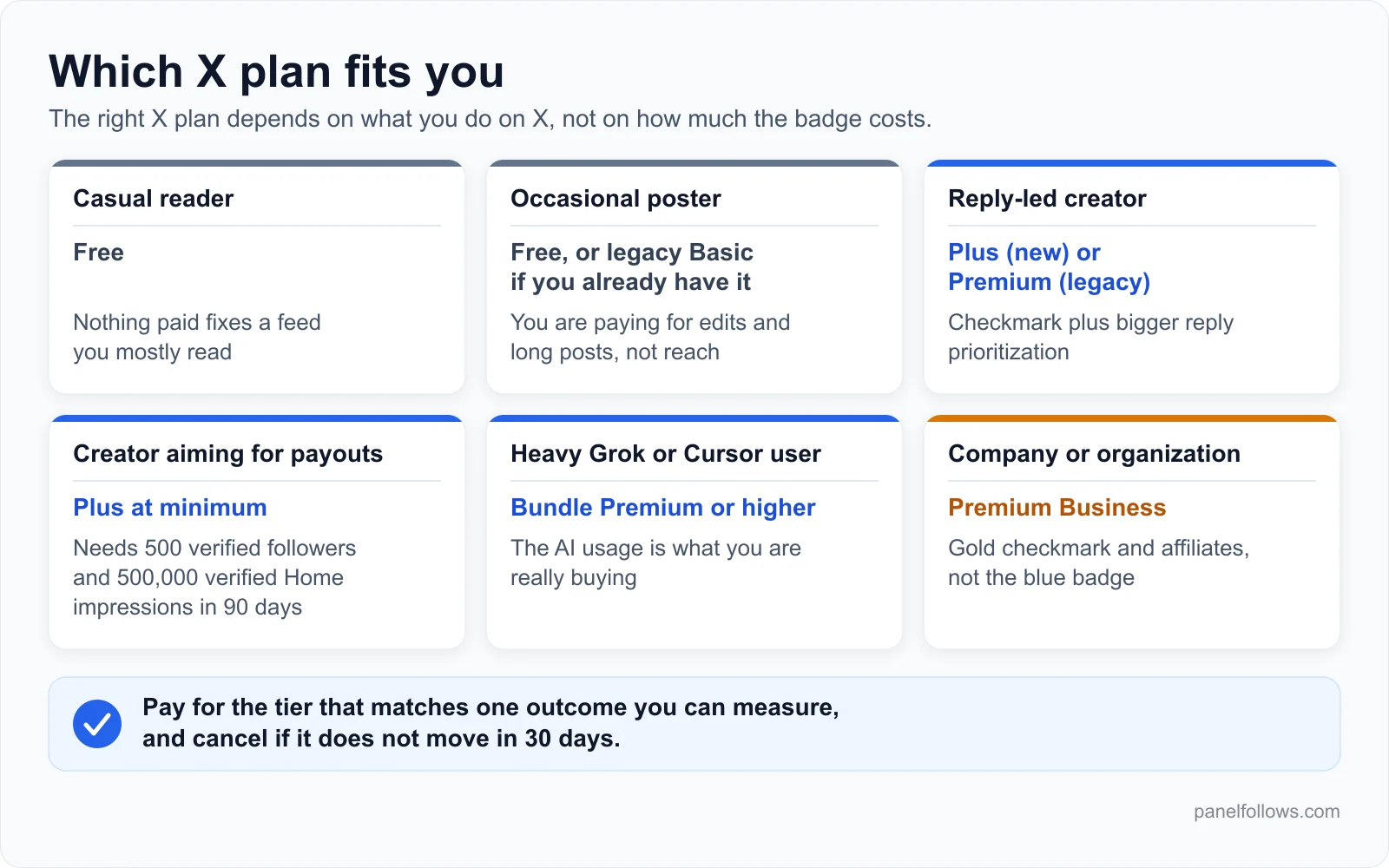
The right X plan depends on what you do on X, not on how much the badge costs.
If you run accounts for clients, the decision multiplies. An agency deciding which client handles get a subscription should treat it like any other line item with a measurable goal. Our playbook for scaling a social media agency covers how to budget per client.
Can X Premium pay for itself through creator payouts?
Sometimes, but only for accounts that already have a real audience of subscribers. In 2026, X replaced its ad revenue sharing program with Original Content Rewards. The new program pays on qualified impressions from Premium users, and its entry bar is higher than it looks.
According to X's Original Content Rewards page, you need:
- To be 18 or older, in an available country, with an account in good standing.
- A Personal or Business account (political and government organization accounts are excluded).
- An active Premium, Premium+ or Premium Business subscription, or a Plus, Premium, Super or Ultra plan on The X Subscription.
- At least 500,000 Home Timeline impressions from verified users in the last 90 days. Impressions on replies are excluded.
- At least 500 verified followers.
- Original content, as defined by the program.
Two points matter for the worth-it question. First, legacy Basic does not qualify, so the cheapest qualifying plan for a new buyer is Plus. Second, the impressions that count are narrow. Coverage of the launch reports that payouts depend on unique impressions from paid subscribers on the Home Timeline, with at least half the post visible, and that duplicate, fraudulent, paid or promoted impressions are stripped out (Android Headlines). Reply impressions, which are where Premium's boost works, do not count toward the threshold.
The practical math looks like this: if you are nowhere near 500 verified followers, do not count payouts as a reason to subscribe this year. Treat the checkmark as a growth and credibility tool, and treat payouts as a possible bonus later. Our guide to getting monetized on X goes deeper into payout timing and the original-content rules.
When X Premium is not worth the money
X Premium is not worth paying for when the thing you want from it is not something it delivers. These are the situations where we would tell a friend to keep their money:
- You want people to trust that you are really you. The checkmark says you pay. If identity matters, the separate ID verified label is what proves it, and most viewers will not tell the difference.
- Your audience is mostly in the EU. There, the badge is labeled "Premium" rather than "verified," which takes away much of its credibility value.
- You rebrand often. Every change to your name, photo or handle removes the checkmark until X reviews the account again.
- You post rarely and never reply. The main reach feature works on replies. Without daily replies, you are paying for edit buttons.
- You are a company that needs an official look. The blue badge does not signal a company. The gold one does, and it comes from Premium Business.
- You bought followers or engagement, or plan to. X's eligibility criteria exclude accounts with signs of platform manipulation. That conflict is serious enough to need its own section.
Why bought engagement and the checkmark do not mix
This one is awkward for a site that sells social media services, so here it is plainly: X's rules prohibit platform manipulation, the blue checkmark criteria exclude accounts that show signs of it, and Original Content Rewards strips artificially generated impressions out of its counts. Buying followers or views on X therefore works against both of the things you would subscribe for.
Panel Follows does list X services, such as X views and X followers on the X SMM panel page. None of those numbers count as qualified impressions, none of them help you clear the payout thresholds, and on an account where you hold or want a checkmark they are a risk you should not take. If you use them at all, keep them away from accounts that depend on the checkmark or on payouts, and accept that X's terms forbid buying engagement on any account. If you are weighing that trade-off on any platform, read our explainer on why followers drop and how refill guarantees work first, so you know what you are actually buying.
A 30-day test to decide whether X Premium is worth it for you
The only reliable way to know is to measure your own account before and after, with your behavior held constant. A monthly plan makes this cheap. If nothing moves, you cancel before the annual price would have locked you in.
- Record a baseline. Before subscribing, note four numbers from your last 28 days of analytics: total impressions, impressions on your replies, profile visits and net new followers.
- Fix your routine. Decide how many posts and how many replies you will make per day, and stick to it during both periods. Without this, you are measuring your own effort, not the subscription.
- Lock your profile. Do not change your name, photo or handle during the test, because that triggers a new checkmark review.
- Subscribe monthly on the web to the cheapest plan with a checkmark that you are offered.
- Start the clock when the checkmark appears, not when you pay. Reduced ads and the badge only begin after review.
- Run 28 days with the same routine. Reply to the same kinds of accounts you replied to before.
- Compare the four numbers. Look most closely at reply impressions and profile visits, because that is where the official boost works.
- Add one outcome metric. Count inquiries, sales, newsletter sign-ups or collaborations you can trace to X. Impressions are a means, not the goal.
- Decide using a rule you set in advance. For example: keep the plan only if reply impressions grew clearly and at least one real outcome came from X. Otherwise cancel.
Say you run a small coffee roastery account with about 900 followers, posting once a day and replying ten times a day. If after 28 days your reply impressions have doubled but no orders or wholesale inquiries mention X, you have learned the boost works and your audience is not on X. That result is worth knowing, and it cost one month.
Should you switch from legacy X Premium to The X Subscription?
Switch only if the bundle gives you something you will use, usually Grok or Cursor usage. Switching is optional and permanent. xAI says it cannot be undone and Support cannot reverse it. Your old plans are cancelled at checkout with a prorated refund for unused time.
How it shakes out by current plan:
- Legacy Basic: there is no Basic on the bundle, so switching means at least Plus. If you only use editing and long posts, staying where you are is the cheaper choice.
- Legacy Premium: Plus covers the checkmark, creator tools and fewer ads, and adds AI usage. Compare the exact X features on your subscribe screen before switching, because xAI's Plus description is brief.
- Legacy Premium+: xAI says you need bundle Premium or higher to keep Premium+ benefits. xAI pitches bundle Premium as replacing a SuperGrok, Cursor Pro and Premium+ stack that cost more combined, so heavy AI users may come out ahead.
Watch the billing channel. If you pay through the Apple App Store, xAI cancels X Premium and asks Apple to refund unused time, but Apple decides on the refund. If you pay through Google Play, xAI says to check Google Play after switching and cancel there if the subscription is still set to renew. A new billing cycle starts on the day you switch.
Open your account and order in minutes
Signing up is free and takes two steps. Top up with card, bank transfer or crypto, place your order and track delivery from the dashboard.
Frequently asked questions
Is X Premium worth it for a small account?
It can be, if you grow by replying to larger accounts in your niche, because reply prioritization is the one reach feature X officially offers. For a small account that posts rarely and does not reply, the checkmark adds little. Run a monthly test with a fixed routine before you buy an annual plan, and cancel if reply impressions and profile visits do not clearly move.
How much does the blue checkmark on X cost?
The cheapest way for new buyers to get a checkmark is the Plus plan on The X Subscription. Existing subscribers get it on legacy Premium or Premium+. Prices vary by country, by billing period and between web and app stores, so check X's help center pricing table and xAI's pricing page for your region. Legacy Basic never included a checkmark.
Can I still buy X Premium Basic?
New self-serve customers now start on The X Subscription, whose plans begin at Plus, so Basic is effectively a legacy tier kept for existing subscribers. X's help page still mentions Basic pricing, so the two sources are not fully consistent yet. If your subscribe screen does not offer Basic, the cheapest paid option you will see is Plus.
Does the blue checkmark mean an account is verified?
No. X's help center states that the blue checkmark means an active subscription plus basic eligibility, not ID verification. Identity is shown by a separate "ID verified" label, which Premium subscribers can request with a government-issued ID. In the EEA, after a European Commission decision, X now calls blue checkmark holders "Premium" users instead of "verified."
Does X Premium boost reply visibility?
Yes, that is its main official reach feature. Basic gets some reply prioritization, Premium gets larger, and Premium+ gets the largest. X says subscription status is one of several ranking inputs, alongside whether the original author replied to you and whether the reader follows you. It does not promise extra distribution for your ordinary posts.
Can you get paid on X with Premium?
Only if you meet the Original Content Rewards requirements. These include a paid plan (Plus or higher for new buyers), 500 verified followers, and 500,000 Home Timeline impressions from verified users in the last 90 days, with reply impressions excluded. Payouts are based on qualified impressions from Premium users, so artificial or promoted impressions do not count.
What is the difference between X Premium and Premium+?
On the legacy menu, Premium includes the checkmark, about 50 percent fewer ads in Home timelines, larger reply prioritization and creator program access. Premium+ adds an ad-free experience across most of X, the largest reply prioritization, X Pro and SuperGrok. Most creators only need Premium. Premium+ pays off mainly for people who use the AI features heavily.
Will I lose my checkmark if I change my name or photo?
Temporarily, yes. X removes the checkmark whenever you change your profile photo, display name or handle, and it comes back after X reviews the account again. During that review you cannot make further changes. If you are planning a rebrand, make all the changes before you subscribe, then leave your profile alone.
Can you get the blue checkmark on X for free?
Not through an application. The old notability-based program was wound down in 2023, and the blue checkmark comes with a paid plan. A few routes have let people hold one without paying for it themselves. In 2024, X gave complimentary Premium to accounts with a large number of verified followers. Affiliate accounts of a Premium Business organization get Premium+ benefits paid for by the organization. X has also let subscribers gift Premium to others. These programs change, so check X's help center for which ones still apply. The usual eligibility review applies either way.
Sources and further reading
- About X Premium (X Help Center): official tier feature lists, checkmark review rules, ad reduction details and the localized pricing table.
- About X Blue Checkmark (X Help Center): what the badge means, eligibility criteria, loss of the checkmark and the EU Digital Services Act note.
- What is The X Subscription? (xAI docs): how the October 2026 bundle works, who can switch, and what happens to old plans and refunds.
- X Premium customers moving to The X Subscription (xAI docs): which X benefits each bundle plan includes.
- The X Subscription pricing (xAI docs): current list prices for the bundle plans.
- Original Content Rewards (X Help Center): payout eligibility, impression thresholds and the original-content rules.
- Premium Business (X Help Center): the gold checkmark, affiliates and organization features.
- Android Headlines on the Original Content Rewards launch: news coverage of the switch from revenue sharing and how qualified impressions are counted.