
Good Audience Retention on YouTube: How to Read the Graph
What is good audience retention on YouTube? Learn to read the retention graph, compare it to the right benchmark and fix each curve shape.
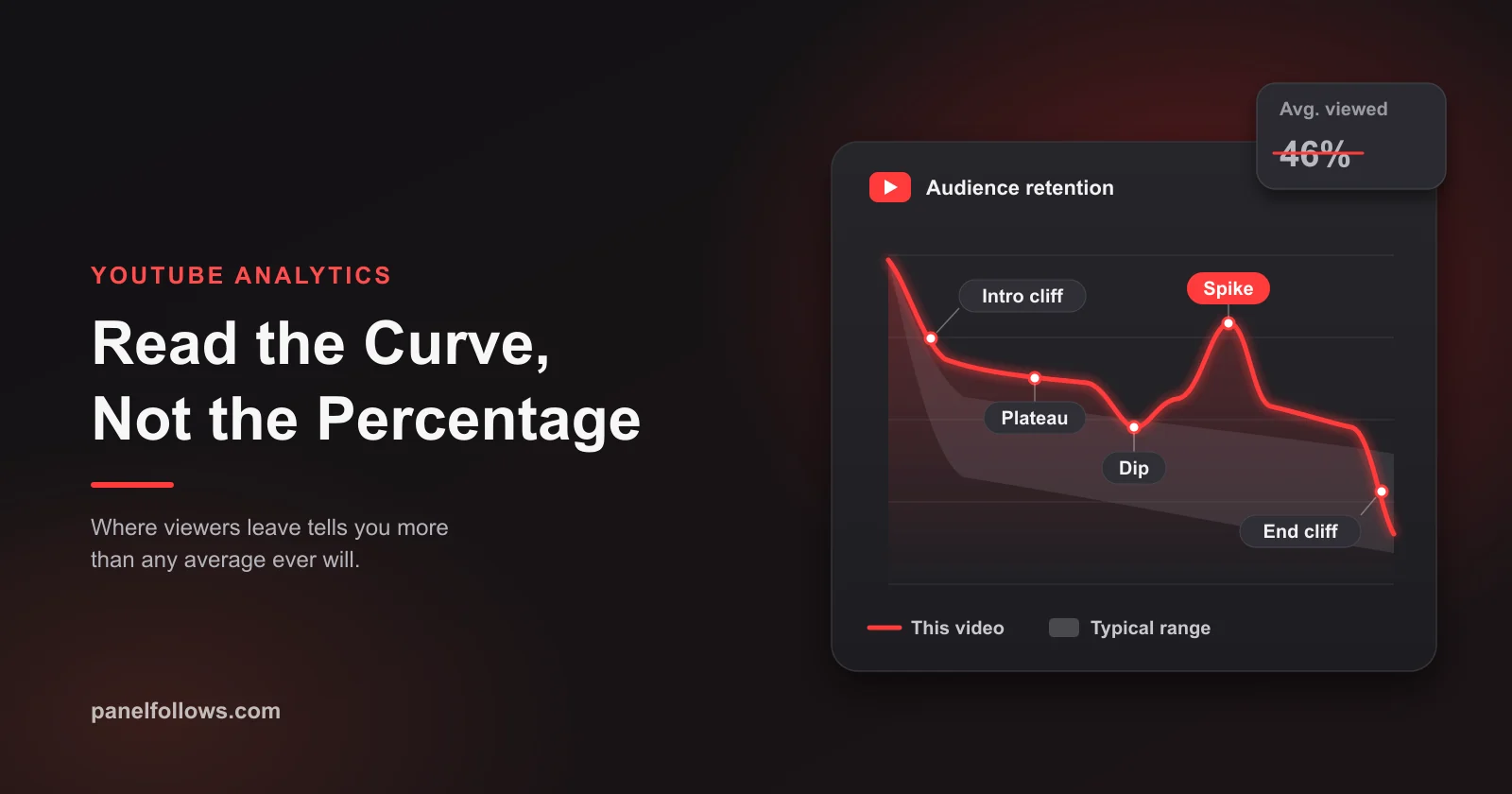
Good audience retention on YouTube is not a single percentage. A retention curve is good when it beats the gray "typical" band YouTube draws from your own recent videos of similar length, loses few viewers in the first 30 seconds, then settles into a long, flat plateau. A 35% average on a 20-minute video can be stronger than 70% on a 2-minute one, so always compare like with like.
This guide shows you how to find and read the audience retention graph, what YouTube's key moments report actually measures, why video length and format change what "good" means, and which fix matches each curve shape (intro cliff, slow slide, mid-video dip, spike, end cliff). It also covers Shorts, where the metrics work differently, and why bought or low-quality views poison this exact report. Facts in this guide were checked in October 2026.
What counts as good audience retention on YouTube?
Good audience retention means viewers stay longer than they usually do on your comparable videos and on similar-length videos across YouTube. It is a comparison, not a fixed number, and Studio builds the comparison in.
YouTube publishes no official "good" percentage. What it does give you is two reference points. The audience retention card has a SEE MORE view that, according to YouTube's help page on key moments for audience retention, compares your video with all YouTube videos of similar length. And the typical retention band compares the video with your 10 latest videos of similar length.
Figures like "aim for 50%" circulate widely on creator blogs, but none come from YouTube and they ignore length and format. A better working definition, which you can check in five minutes:
| Signal | Weak | Acceptable | Strong |
|---|---|---|---|
| Curve vs. your typical band | Below the band most of the video | Inside the band | Above the band for most of the video |
| Intro (still watching at 30 seconds) | Clearly below your typical intro | Around your typical intro | Above your typical intro |
| Shape after the first minute | Steady slide all the way down | Slow slide with small dips | Long flat plateau |
| Ending | Cliff well before the content ends | Drop at the outro only | Little drop until the end screen |
| Trend across your last 10 uploads | Falling | Flat | Rising |
If your curve sits above the band and is mostly flat after the opening, it is good retention for that video, whatever the headline percentage says.
Average view duration vs. average percentage viewed vs. the retention curve
These three are related but answer different questions. Average view duration (AVD) is how long, in minutes and seconds, the average viewer watched. Average percentage viewed (APV) is that duration divided by the video length. The retention curve shows where, second by second, people were still watching.
One detail changes how you read AVD, and it depends on format. On long-form videos, YouTube describes AVD as the estimated average minutes watched per view. On Shorts, YouTube's help center ties these averages to engaged views (viewers who stayed to watch) rather than every play. So Shorts averages do not simply blend in every instant swipe. That difference is covered in the Shorts section later.
Say you publish a 15-minute review with an AVD of 4:30. That is an APV of 30%, which sounds poor. But if the curve shows a sharp loss in the first 40 seconds and then a near-flat line, the problem is entirely the opening. The body of the video is working, and rewriting the whole script would be the wrong fix.
| Metric | Answers | Best used for | Main blind spot |
|---|---|---|---|
| Average view duration | How long did people watch? | Comparing videos of different lengths for total watch time | Hides where people left |
| Average percentage viewed | What share did people watch? | Comparing videos of similar length | Punishes long videos unfairly |
| Retention curve | When did people leave or rewatch? | Finding the exact seconds to fix | Needs enough views to be stable |
| Intro (30-second mark) | Did the opening match the promise? | Judging title, thumbnail and hook together | Says nothing about the rest |
AVD also feeds watch time hours, which matter for the Partner Program thresholds in our YouTube monetization requirements guide.
Where to find the YouTube audience retention graph
The audience retention graph lives inside each video's analytics, not at channel level, and YouTube says the data typically takes one to two days to process, so this morning's upload will not have a usable curve yet.
- Sign in to YouTube Studio.
- Open Content in the left menu.
- Hover over the video and select Analytics.
- Open the Overview or Engagement tab and find the audience retention card.
- Click SEE MORE to compare against YouTube videos of similar length and to switch between segments.
- Use the segment drop-down to compare new vs. returning viewers, subscribers vs. non-subscribers, and organic vs. paid traffic. Some of these views may require Advanced Mode.
The expanded report also has a detailed activity view showing absolute views for each part of the video. YouTube points out that a segment's view count can exceed the video's total views, because one viewer can watch the same part more than once. That is why a curve can briefly rise above 100%.
What YouTube's key moments for audience retention actually measure
Key moments for audience retention is YouTube's own annotation of your curve: it highlights the intro, top moments, spikes and dips so you do not have to eyeball them. According to the key moments help page, these moments only appear when they are detected, and the video must be at least 60 seconds long with at least 100 views.
Here is what each label means in YouTube's own terms, plus how to act on it:
| Key moment | YouTube's definition | What it usually means in practice | First thing to try |
|---|---|---|---|
| Intro | Share of viewers still watching after the first 30 seconds | Whether the opening confirmed the title and thumbnail | Cut the preamble, show the payoff sooner, or adjust packaging |
| Top moments | Parts where almost no one dropped off | The segment your audience came for | Move similar content earlier; build a future video around it |
| Spikes | Parts that were rewatched or shared | Something worth seeing twice, or something unclear | Check comments: praise means repeat it, confusion means clarify |
| Dips | Parts that were skipped or where viewers left | A tangent, sponsor read, slow setup or a false ending | Trim, tighten or reorder that segment |
Two of YouTube's notes deserve attention: its intro advice includes changing the title and thumbnail, so a weak intro is often a packaging problem, and it says a spike can mean the content was unclear. Spikes are not automatically good news.
The typical band itself has a history. When YouTube introduced it in 2021, Search Engine Journal's report on typical audience retention described it as a gray band based on similar-length videos from your channel over the past year. The current help center describes the comparison as your 10 latest videos of similar length. If you read older guides, expect that difference.
Why good retention depends on video length and format
Good retention depends on length because the percentage is a ratio, and viewers leave at a roughly steady rate after the opening. The longer the video, the more time there is for that slow leak to add up, so APV falls naturally even when every minute is solid.
Take two hypothetical videos. A 3-minute explainer at 70% APV gives an AVD of 2:06. A 20-minute deep dive at 35% APV gives an AVD of 7:00. The long video kept each viewer three times longer, yet it "loses" on percentage. That is why YouTube compares against similar-length videos, and why you should too.
Format matters as much as length:
- Tutorials and how-tos often show an early drop and scattered dips because viewers skip to the step they need. Judge them by whether viewers get their answer, not by APV.
- Story-driven videos and documentaries should show a long plateau. A steady slide here means the story is not pulling viewers forward.
- Live replays and podcasts have low APV by nature because people sample them. Compare them only with each other.
- Shorts use separate logic (stayed to watch, engaged views, loops) and should never be compared with long-form.
So "is my retention good?" always means "good for this length, format and channel." A cooking channel whose 10-minute videos usually hold 40% should celebrate a 48%; one that usually holds 55% should investigate it.
Test this on one post before you scale
The cheapest way to check the logic above is a small order on a single post, then compare the outcome against your own Insights data.
How to read the retention curve: the six common shapes
Most retention curves combine six recognizable shapes, and each points to a different part of the video. Name them and the graph becomes a to-do list.
- Intro cliff: a drop in the first 10 to 30 seconds that is steeper than your typical band.
- Slow slide: a line that keeps falling at a steady angle with no flat stretch. YouTube notes that videos generally taper off, so only a steep slide is a problem.
- Plateau: a flat section, which YouTube describes as viewers watching that part from start to finish. This is what good looks like.
- Sudden dip: a sharp, narrow drop at one timestamp.
- Spike: a bump upward from rewatching or from viewers jumping in via chapters or timestamp links.
- End cliff: a sharp drop in the final 20 to 60 seconds, when viewers sense the content is over.
Fix order matters: an intro cliff limits everything after it, so it comes first, then the biggest mid-video dip, then pacing, then the ending.
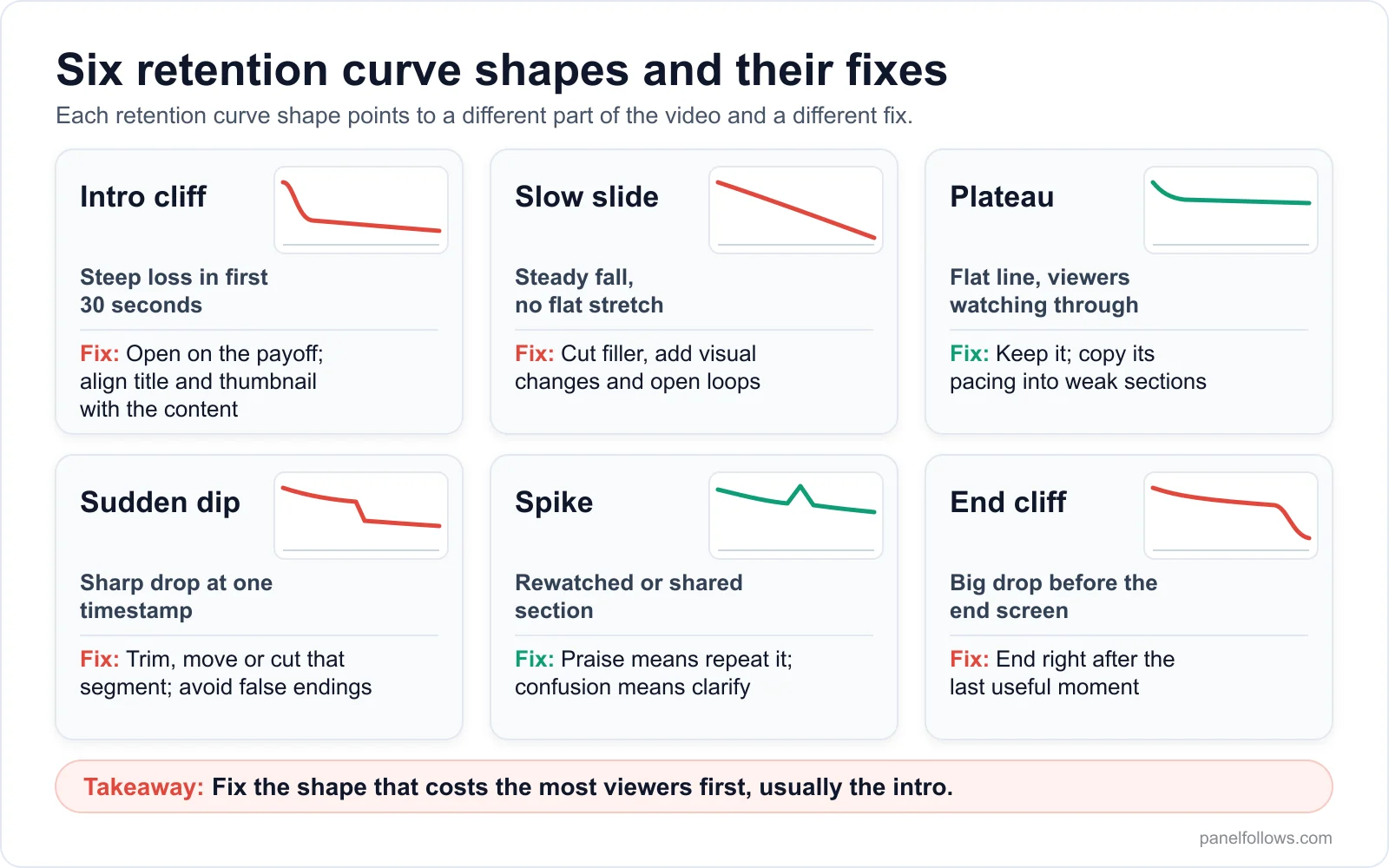
Each retention curve shape points to a different part of the video and a different fix.
How to improve audience retention: fixes for each curve shape
The fastest way to improve audience retention is to fix the single shape that costs you the most viewers, usually the opening, rather than applying generic tips to the whole video. Here is what each shape usually means and what to change in your next upload.
Intro cliff. The first 30 seconds broke the promise of the title and thumbnail, or delayed it. Common causes are a channel intro, a long greeting, or a thumbnail promising something the video reaches only at minute six. Fixes: open on the result or the most striking shot, state in one sentence what the viewer will get, and cut long logo stings. If the opening is already tight, the packaging is overpromising, and YouTube's own advice is to make the title and thumbnail reflect the content more accurately.
Slow slide. Every minute loses a few more viewers, which usually means low information density. Fixes: cut repeated points and filler, add visual changes (a new angle, an on-screen example) during long explanations, and add small open loops ("the third mistake cost me the most") that give people a reason to stay. If the slide steepens only in the second half, the video may be too long for the topic.
Sudden dip. Scrub to the exact timestamp and watch 20 seconds before it. Typical culprits: a sponsor read, an off-topic story, a technical setup that viewers find boring, a "so that's the main thing" sentence that sounds like an ending, or a jump in audio quality. Fixes: shorten, move or cut the segment; never say anything that sounds like a sign-off until you mean it.
Spike. Check the timestamp and the comments. If people are praising or quoting that moment, it is a top moment in disguise, and YouTube's suggestion is to bring that kind of content earlier and to consider building new videos around it. If comments ask questions about that part, your explanation was unclear, and the rewatches are confusion.
End cliff. Some drop at the end is unavoidable. A large one starting well before the end screen usually comes from a long outro, a recap of what viewers just watched, or a "thanks for watching" that starts 45 seconds early. Fixes: end within seconds of the last useful moment and let the end screen do the work while the final content is still playing.
Plateau. Do not touch it. Study what is on screen and the pacing, and copy that pattern into weak sections of future videos.
Say you run a home-repair channel with around 8,000 subscribers, and a 12-minute faucet video shows an intro cliff, a plateau through the repair, a dip at 7:40 and an end cliff at 11:00. Opening on the leaking faucet instead of a tools rundown, cutting the 7:40 tangent and ending right after the test run are three edits, none needing new footage. That is a curve-driven fix list.
How to read retention by audience segment
Segments tell you who is leaving, which often matters more than when.
| Segment pattern | Likely meaning | Action |
|---|---|---|
| Returning viewers hold, new viewers drop early | Video assumes context newcomers lack | Add a one-sentence setup; avoid inside jokes in the first minute |
| Subscribers drop early, non-subscribers hold | Topic or format drifted from what your audience expects | Check if the title attracted a different crowd; plan a bridge video |
| Both segments drop at the same timestamp | The content at that moment is the problem | Edit that segment, regardless of audience |
| Paid traffic retains far worse than organic | Ads reaching the wrong people or a mismatched ad hook | Tighten ad targeting or use a different opening for ad traffic |
YouTube's help center defines organic traffic as views that come directly from user intention, such as searching, clicking a suggested video or browsing a channel, and paid traffic as views from paid placements such as skippable video ads and display ads. That paid segment is the legitimate way to buy views that YouTube itself can see and separate in your analytics.
Shorts retention: stayed to watch, engaged views and loops
Shorts retention is read differently because the first decision is a swipe, not a click. The key opening metric is stayed to watch (the share of times viewers kept watching instead of swiping away), and the averages are calculated from engaged views, not total views.
The split exists because of a counting change. As PPC Land reported on the March 2025 change, since March 31, 2025, YouTube counts a Shorts view whenever the Short starts to play or replay, with no minimum watch time. The previous metric was kept and renamed engaged views, available in Advanced Mode. Several creator-analytics sources also report that YouTube continues to use engaged views for Shorts revenue sharing and Partner Program eligibility; check YouTube's current monetization documentation before relying on that.
What this means for reading Shorts:
- Public view counts after March 2025 are inflated relative to older Shorts, so year-over-year comparisons need care.
- A Short can have a poor stayed-to-watch rate and a strong average percentage viewed at the same time: many swiped, but those who stayed watched to the end. These need different fixes (first frame vs. pacing).
- Curves above 100% are common on very short Shorts because of loops. A loop is a good sign only if the content invites it; a confusing ending also produces rewatches.
- Shorts can run up to three minutes since October 2024, so compare a 2:50 Short only with other long Shorts.
For Shorts, fix the first frame before anything else. Our article on the YouTube reused content policy after the Shorts update covers the originality side, which also affects whether your Shorts are shown at all.
Does audience retention affect the YouTube algorithm?
Yes, but indirectly and alongside other signals. YouTube says its recommendations try to predict what each viewer will watch and be satisfied with; retention is one window into that, not a dial read in isolation.
In a 2025 interview summarized in Search Engine Journal's article on how YouTube's recommendation system works, YouTube described its system as pulling content for each individual viewer rather than pushing videos to everyone, and said that click-through rate and watch time still matter but are weighed alongside viewer satisfaction gathered through surveys and other feedback such as likes and dislikes. Time of day and device are also used as context.
What is confirmed and what is folklore:
| Claim | Status |
|---|---|
| YouTube shows creators a retention comparison against similar-length videos | Confirmed in YouTube Help |
| Watch time and satisfaction both inform recommendations | Confirmed by YouTube in public interviews |
| A specific retention percentage triggers recommendations | Not confirmed; no such threshold has been published |
| The first 30 seconds matter more than any other part | Partly supported: YouTube reports the intro separately, but publishes no weighting |
| Longer videos are favored because they generate more watch time | Not confirmed as a rule; satisfaction is weighed too |
The practical reading: optimize for the viewer's experience and the metrics follow. Optimize for the metric alone (padding, fake cliffhangers, bait endings) and satisfaction signals tend to catch it.
Why fake or low-quality views wreck your retention data
Bought views from bots or low-quality sources damage retention in two ways: they risk enforcement, and if any of them are counted they flood your analytics with viewers who never behave like your audience. Either way, the retention report stops telling you the truth about your content.
The policy side is clear. YouTube's fake engagement policy prohibits anything that artificially increases views, likes, comments or other metrics through automated systems or by serving videos to unsuspecting viewers. It warns that methods used by someone you hire can also affect your channel, and that artificial traffic will not be counted and can lead to strikes. Panel Follows sells YouTube views in its catalog, and we will not pretend otherwise: buying them is against YouTube's terms, and nothing in any SMM catalog, ours included, improves retention.
The data side matters just as much. Take a hypothetical 12-minute video. It earns 2,000 organic views with an AVD of 5:00 (about 42% APV). Now add 3,000 low-quality views averaging 20 seconds each. If they were all counted, the blended AVD would fall to about 2:12, and APV to roughly 18%. Every edit decision based on that curve would be wrong.
It compounds, too. The typical band is built from your recent similar-length videos, so polluted videos drag it down and future videos look better than they are. Views sold as "high retention" do not fix this: they come from accounts that are not your audience, never return or leave satisfaction feedback, and distort the segment comparisons you diagnose with. We go deeper on this in free YouTube views: real methods and fake view traps, and the same logic applies to subscribers in free YouTube subscribers: what works and what gets you banned.
If you want paid reach for a video, the route YouTube measures and separates is a Google Ads video campaign, which appears as paid traffic in the retention segments. Where people do use the YouTube views category of an SMM panel (every listing in our full services catalog shows its own start time, speed and refill terms), it is for surface-level social proof, accepting the policy risk, and never on a video whose analytics they intend to learn from.
A 10-video retention audit you can start Monday
A retention audit is a short, repeatable review of your last 10 videos that turns curves into a ranked fix list. It takes about an hour on any channel whose videos have at least 100 views each.
- List your last 10 long-form uploads with length, AVD, APV and the intro figure, grouped by length (under 5 minutes, 5 to 12, over 12). Shorts get their own list.
- Mark each curve as above, inside or below the typical band for most of its length.
- Name the dominant shape for each video: intro cliff, slow slide, sudden dip, spike, end cliff or plateau.
- Count the shapes. If six of ten videos show an intro cliff, your openings or packaging are the channel-wide problem.
- Open the worst dip on the three weakest videos, watch 20 seconds before each, and write down what happened on screen.
- Open the best plateau on the three strongest videos and write down what made it work.
- Pick one change for the next three uploads (for example, "open on the result, no intro sting"). Changing five things at once teaches you nothing.
- Wait two days after each upload for retention data to process, then compare the intro and band position with the previous ten.
- Repeat monthly. The trend across months is your most honest benchmark.
For the broader metrics around retention (engagement rate, reach, ratios), our guide to engagement rate and social media metrics explains which denominators to trust. If you manage several channels for clients, the same audit becomes a monthly report template, and our playbook on scaling a social media agency shows how to run it across accounts.
Open your account and order in minutes
Signing up is free and takes two steps. Top up with card, bank transfer or crypto, place your order and track delivery from the dashboard.
Frequently asked questions
What is a good audience retention percentage on YouTube?
There is no official good percentage, and YouTube does not publish one. Retention is good when your video stays above the typical band YouTube calculates from your 10 latest videos of similar length, and when it compares well against YouTube videos of the same length in the SEE MORE view. Percentages quoted online ignore length and format, so a long video at 35% can beat a short one at 70%.
What is a good average view duration on YouTube?
A good average view duration is one that is higher than your typical duration for videos of similar length and format, and that keeps rising across uploads. AVD is measured in minutes, so it is fairer than percentage for comparing a long video with a short one.
Why does my retention drop in the first 30 seconds?
A steep early drop usually means the opening did not confirm what the title and thumbnail promised, or took too long to get there. Channel intros, long greetings and setup before the payoff are the usual causes. YouTube's own guidance is to test different openings and to consider adjusting the title and thumbnail so they match the content more accurately.
Why does my audience retention graph go above 100%?
The curve can rise above 100% when viewers rewatch a section or jump to it, because a single viewer can watch the same part more than once. YouTube notes that segment views can exceed the video's overall view count for this reason. It is common on looping Shorts and on chapters people return to.
Why don't I see key moments for audience retention?
Key moments only appear when YouTube detects them, and the video must be at least 60 seconds long with at least 100 views. Retention data also takes one to two days to process, so new uploads show nothing at first. Some segment comparisons may require Advanced Mode in YouTube Studio.
Does audience retention affect monetization?
Retention affects monetization indirectly. Longer average view duration produces more watch time hours, which count toward the long-form Partner Program threshold, and longer viewing creates more opportunities for mid-roll ads on eligible videos. Retention itself is not a listed eligibility requirement. For Shorts, several sources report that engaged views, not total views, are used for revenue sharing and eligibility.
Is retention or click-through rate more important?
They work together. A high click-through rate with a poor intro means the packaging overpromised; strong retention with a low click-through rate means good content nobody chooses. YouTube has said that click-through rate and watch time both matter, alongside viewer satisfaction measured through surveys and feedback, so aim for honest packaging that the first 30 seconds confirm.
Do bought views hurt audience retention?
Bought views from bots or low-quality sources typically watch only seconds, so if they are counted they drag down average view duration and percentage viewed and distort the curve you use to make edits. They also violate YouTube's fake engagement policy, which says artificial traffic is not counted and can lead to strikes, and they pollute the typical band used for future comparisons.
Sources and further reading
- Measure key moments for audience retention (YouTube Help): official definitions of key moments, segments, minimums and average view duration.
- Understand your YouTube engagement (YouTube Help): where the retention report sits and what typical retention compares.
- Fake engagement policy (YouTube Help): what YouTube prohibits and how artificial traffic is treated.
- YouTube Introduces 'Typical Audience Retention' Data (Search Engine Journal, 2021): when the gray typical band launched and how it was first calculated.
- How YouTube's Recommendation System Works in 2025 (Search Engine Journal): YouTube's comments on satisfaction, watch time and context signals.
- YouTube changes how Shorts views are counted from March 31 (PPC Land): the 2025 Shorts view counting change and engaged views.