
Best Time to Post on Instagram: Why the Studies Disagree
The best time to post on Instagram depends on your audience. See why tool studies conflict and run a 3-week Insights test to find your own window.
There is no single best time to post on Instagram. The large 2026 studies from scheduling tools name "best" slots that range from midnight to 9 PM, and they don't even agree on the best day. Your real best time to post on Instagram is when your own followers are online, which Instagram's free Insights show you. Take the studies as starting guesses, then test three time slots against each other for three weeks.
This guide puts the big studies side by side and explains why they contradict each other: different samples, different metrics, different time zones and different formats. Then it covers what posting time can and cannot do for distribution, how to read the "Most active times" chart without fooling yourself, and a three-week self-test with a scoring table that tells you whether timing is even your bottleneck. Facts in this guide were checked in October 2026.
Nothing in this guide requires buying anything: timing is a free lever, and the test only works if every number comes from real viewers.
What do the big studies say is the best time to post on Instagram?
The big studies say very different things. Each top-ranking study is published by a company that sells scheduling or analytics software, and each analyzed posts published through its own product. Here is what the main ones reported.
| Study (publisher) | Sample described | "Best" time | Best day |
|---|---|---|---|
| Buffer, Sep 2026 | 9.6 million Instagram posts from 200,000+ accounts, Jan 2024 to Dec 2025 | Thursday 9 AM, then Wednesday 12 PM and 6 PM | Wednesday; Friday and Saturday weakest |
| Later, 2026 | 6 million+ posts and 975,000 Reels, plus Stories data | 5 AM in the audience's local time | Monday, especially 12 AM to 6 AM |
| SocialBee, 2026 | 455,062 posts, engagement normalized per account | Wednesday 9 PM; 9 to 11 PM strongest block | Saturday, then Wednesday and Sunday |
| Hootsuite, 2026 | Over 1 million social posts from businesses | Different window each day, e.g. Monday 3 to 9 PM, Wednesday 5 PM | No single day singled out |
| Sprout Social, Mar 2026 | Sprout's own platform data | Mon 2 to 4 PM, Tue 1 to 7 PM, Wed 12 to 9 PM, Thu 12 to 2 PM | Tuesday and Wednesday; avoid weekends |
| Dash Social, 2026 | 2.2 million posts, Reels and Stories | 12 AM local time | Not the headline finding |
| Iconosquare, 2026 | Its own customer data | Several windows a day, e.g. Wednesday 7 to 8 AM, 10 AM to 2 PM, 6 to 9 PM | Tuesday described as one of the strongest |
Read that table as a set of contradictions, not a consensus. Later's top hour is 5 AM, and SocialBee calls 4 to 8 AM the one block that performs below average on every day of the week. Dash Social's best hour is midnight, while Iconosquare's guide flags late night (roughly 11 PM to 4 AM on Mondays) as the weakest stretch. SocialBee's best day is Saturday, which Buffer ranks among the two worst days and Sprout tells you to avoid. Even within one publisher the answers can drift: Later gives Reels and nano accounts different best times from its overall 5 AM headline, as the sections below show.
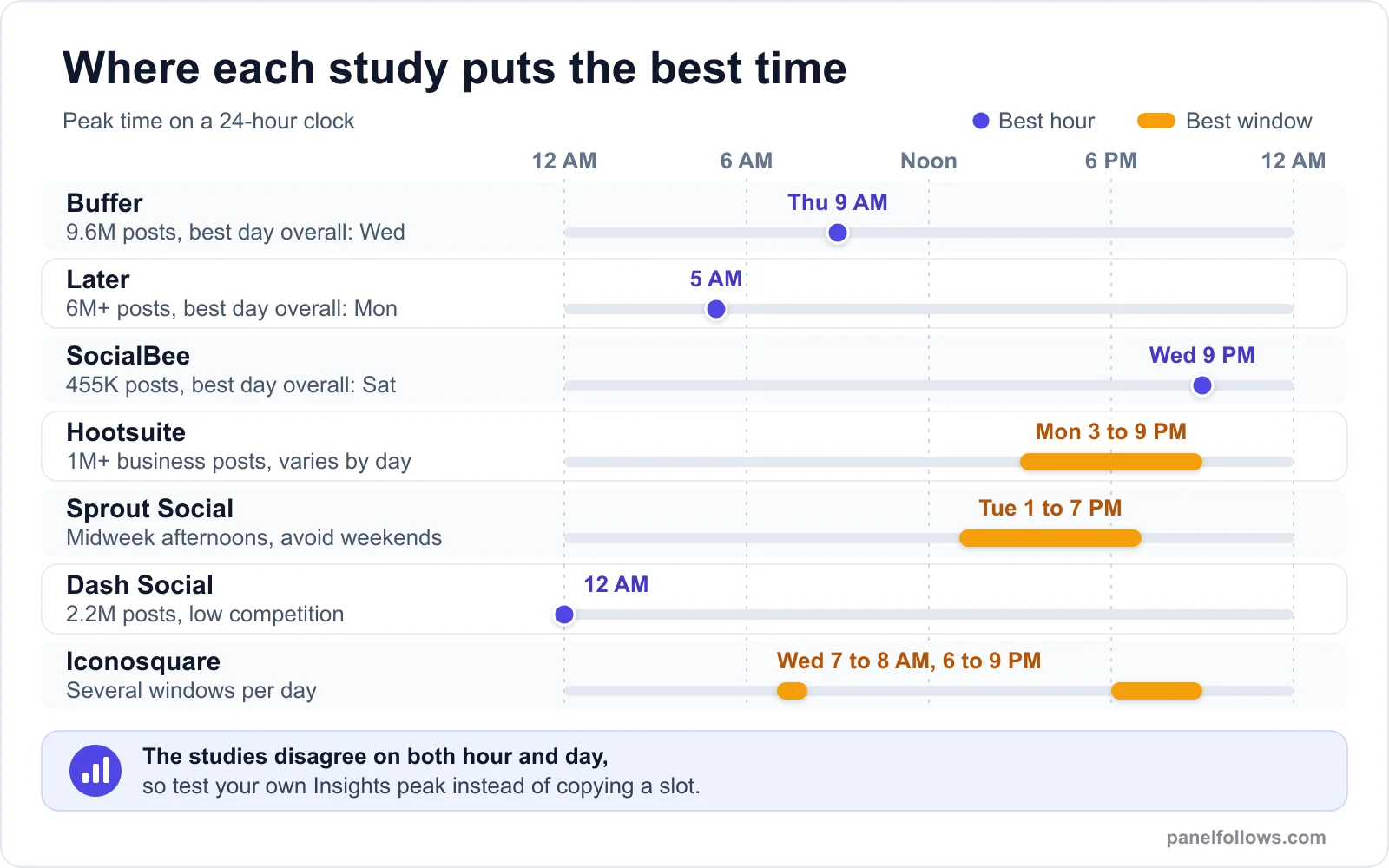
Each study measured its own customers' posts, so their best slots range from midnight to 9 PM.
None of the studies is dishonest. They measure different things on different populations, which is why a slot copied from any one of them is a weak plan.
Why do the Instagram timing studies disagree?
The studies disagree because each answers a slightly different question about a different group of accounts.
The sample is the tool's customer base
Every study analyzes posts published through the publisher's own product. Broadly, Hootsuite and Sprout lean toward brands and marketing teams, Later has a large creator and influencer base, and SocialBee and Buffer serve many small businesses and solo operators. A retail brand's audience and a nano creator's audience scroll at different hours, so the pooled "best" time inherits the customer mix. Later's own data shows this inside one dataset: it gives nano accounts (1,000 to 5,000 followers) weekdays at 5 PM, very different from its overall 5 AM answer.
Only scheduled posts are counted
These datasets mostly contain posts published by a scheduler, and people do not schedule at random hours. Most posts cluster around round, convenient times such as 9 AM, noon and 6 PM. The odd hours (5 AM, midnight) hold far fewer posts, and the people who deliberately schedule at 5 AM tend to be experienced operators with tested content. A small, skilled group posting at an odd hour can make that hour look magical, which is a selection effect, not proof that 5 AM works for you.
The metric is defined differently
"Engagement" is not one number. SocialBee explicitly normalizes engagement against each account's own typical post, so a score of 1.20 means 20% above that account's usual. Others report engagement rates or views, and the formulas are not always published in full. A per-account lift metric asks when an account beats its own average, while a raw-total metric can be dominated by large accounts posting at their preferred hours.
Time zones get flattened
Most studies convert each post to the account's local time, and Later states its figure in the audience's local time. Some guides publish fixed times in a single zone, such as US Eastern Time. But an account's local time is not its audience's local time. A London brand with a mostly American following posting at 2 PM UK time is really posting at 9 AM in New York. Pool millions of those mismatches and the curve smears.
Formats behave differently
Stories disappear after 24 hours, feed posts are mostly shown to followers, and Reels can keep collecting views from non-followers for days. A study weighted toward Reels will see timing differently from one weighted toward feed photos, and Later gives Reels their own answer (Mondays at 12 AM).
There is a sixth, quieter reason: the gaps are small. SocialBee notes that the difference between days is much smaller than the difference between individual times, and one of its strongest slots, Sunday at 9 PM, sits about 24% above an account's average. That is a real lift, but a single post's performance routinely swings far more than that because of topic and hook. When the signal is that modest, small methodology choices decide which slot "wins".
Does posting time actually matter to the Instagram algorithm?
Posting time matters, but less than most people think, and mainly through one mechanism: the first hours after you publish. Instagram has described recency (how long ago something was posted) as one of the signals its feed ranking uses, and Later's guide makes the same point. A post that goes live while your followers are scrolling collects early views and interactions sooner, and that early response helps decide how widely it travels.
That is the whole case for timing. It is a multiplier on the content's early response, not a substitute for it. If a post would get a weak reaction at 7 PM, it will get a weak reaction at 9 AM too.
Three things limit the effect further:
- Reels are not chronological. Reels shown to non-followers are recommended on predicted interest, so a strong Reel can pick up views days after posting. Timing shapes the first push from followers, not the long tail. Our Instagram Reels growth guide covers what drives that recommendation side.
- Feeds are ranked, not sorted by time. A follower who opens the app four hours after you posted can still see your post near the top if Instagram predicts they care about it. The penalty for "bad timing" is softer than it was in the chronological feed era.
- Peak hours are crowded. When your audience is most active, so is everyone they follow. That is the logic behind the low-competition answers (midnight, 5 AM), and why the test below includes a contrarian slot.
For the other ranking signals, see how the Instagram algorithm works and grows reach.
What is the best day to post on Instagram?
No day wins across studies. Buffer and Sprout favor midweek (Wednesday, Tuesday, Thursday), Later picks Monday, and SocialBee picks Saturday. The only pattern with some agreement is that Tuesday through Thursday rarely shows up as a bad choice, which makes midweek a reasonable default when you have no data of your own.
Weekends split the studies hardest. Business-heavy samples (Sprout, Buffer) find weekends weak, plausibly because office-hour scrollers disappear, while SocialBee's sample finds Saturday and Sunday strong. If you sell to consumers who browse at leisure, such as food, home decor, travel or hobbies, do not drop weekends just because a B2B-leaning study told you to.
SocialBee's finding that time of day moves results more than day of week is the useful part: if you can control only one variable, control the hour.
Test this on one post before you scale
The cheapest way to check the logic above is a small order on a single post, then compare the outcome against your own Insights data.
What is the best time to post Reels?
The studies again disagree on Reels: Later's Reels data points to Mondays at 12 AM, while Sprout says its best Reels windows simply mirror its overall windows (midweek afternoons). In practice, Reels timing matters least of all the formats because recommendations to non-followers continue long after the first hour.
What timing does affect is the first reaction from your followers: early watch-throughs, shares and saves give the recommendation system a clean read. Aim the first hour at a moment when your engaged followers are around, then judge each Reel on its 7-day views, not its 1-hour views.
How much timing matters by format:
| Format | How much timing matters | What to optimize instead |
|---|---|---|
| Reels | Low to moderate: long tail from recommendations | Hook in the first seconds, watch time, shares and sends |
| Feed photos and carousels | Moderate: shown mostly to followers, early window counts | Carousel depth, saves, posting when followers are active |
| Stories | Low: visible for 24 hours | Posting enough frames across the day, replies and sticker taps |
| Live | High: viewers must be present in real time | Announcing ahead, a consistent slot, your follower peak |
If you post Stories, our Instagram Story engagement guide explains the taps and exits that matter more than the minute you post. For what shares and saves actually do, read Instagram saves and shares signals.
How to find your best time to post in Instagram Insights
Instagram shows you when your own followers are online, for free, inside Insights. According to the Instagram Help Center, public accounts get insights on follower trends, including the "times they're most active on Instagram", alongside content performance data covering up to the past 90 days.
To find it:
- Make sure your account is public. A professional (business or creator) account gives you the fullest version of Insights.
- Open your profile and tap Professional dashboard (or Insights from the menu under "For professionals").
- Tap Total followers. Third-party guides report this follower breakdown needs at least 100 followers; the help center also says demographic views require engaging more than 100 accounts in the selected timeframe.
- Scroll to Most active times. Switch between Hours and Days, and tap each day to see its hourly bars.
- Note your top two or three hours on each day, and check Top locations on the same screen so you know which time zones your followers actually live in.
Labels shift between app versions; if a button reads differently on your phone, follow the same path: dashboard, followers, most active times.
How to read the chart without fooling yourself
The chart shows when followers are online, not when they engage with you. Those overlap but are not identical. Four habits keep the reading honest:
- Check the time zone. In our experience the hours are shown in your phone's time zone, not your followers'. If you travel, or your audience lives elsewhere, translate before you plan.
- Look for the climb, not just the peak. If activity peaks at 8 PM, a post published at 7 PM is already live and collecting reactions when the peak arrives. A post published at 8 PM starts at the top of the crowd.
- Expect a flat curve. Many accounts see bars that rise gently through the afternoon and evening with no sharp peak. A flat curve is itself a finding: timing will matter less for you than for an account with a spiky audience.
- Remember it describes followers only. Reels that travel to non-followers reach people whose habits this chart does not capture.
Scheduling tools such as Iconosquare build their own "best time to post" view from your post history. These are useful, but they only know the hours you have already tried, which is why a deliberate test beats passive observation.
The 3-week posting time test
The test compares three time slots on the same kind of content, with each slot rotated across days so that the day of week does not get credit for the hour. It takes nine posts over three weeks and costs nothing but discipline.
Step 1: Pick three slots.
- Slot A, the peak: the hour your Insights chart shows as most active.
- Slot B, the climb: one to two hours before that peak.
- Slot C, the contrarian: a slot far from A that some study favors, such as early morning (6 to 7 AM) or late night (10 to 11 PM). This is your test of the "low competition" theory.
Step 2: Fix everything else. Use one format for the whole test (all Reels, or all carousels). Keep topics in the same content pillars, keep captions and hashtag habits consistent, and do not boost, promote or add paid engagement to any test post.
Step 3: Rotate the slots across days. Post three times a week on the same three days and give each slot a turn on each day:
| Week | Monday | Wednesday | Friday |
|---|---|---|---|
| Week 1 | Slot A | Slot B | Slot C |
| Week 2 | Slot B | Slot C | Slot A |
| Week 3 | Slot C | Slot A | Slot B |
Each slot gets three posts, one on each day, so a strong Friday cannot flatter one slot. If you post more often, publish the extra content outside the three test slots.
Step 4: Record the same numbers for every post. At 24 hours and again at 7 days, open the post's insights and note views, accounts reached, the share of viewers who are non-followers, interactions (likes, comments, shares, saves) and follows from the post. Put them in a spreadsheet with the date, slot, day and topic.
Step 5: Note anything unusual, such as a trending topic, a collaborator's share or a holiday weekend. These explain outliers later.
Say you run a ceramics studio account in Austin with 1,800 followers. Your Insights chart peaks at 8 PM on weekdays, so Slot A is 8 PM, Slot B is 6:30 PM and Slot C is 7 AM. You post a carousel every Monday, Wednesday and Friday for three weeks, rotating the slots as shown, and log the numbers each evening. By the end you have nine comparable posts and an answer specific to your audience rather than to someone else's customer base.
How to score the test and decide
Score each post relative to your own normal, not in absolute numbers. Take your median views per post from the 30 days before the test, then divide each test post's 7-day views by that median to get an index (1.0 means a typical post, 1.3 means 30% above typical). Compare slots on their median index, not their average, because one breakout post can distort an average badly.
Then apply the decision rules below. The thresholds are our working rules of thumb from running these tests, not platform figures, and nine posts is a small sample, so treat the result as direction rather than proof.
| What you see | What it means | What to do |
|---|---|---|
| One slot has the highest index in at least 2 of 3 weeks and a median index about 20% or more above the others | Timing likely matters for your audience | Adopt that slot as your default and retest in three months |
| All three slots are within about 15% of each other | Timing is not your bottleneck | Pick the slot most convenient for you and work on hooks, topics and formats |
| The winner changes every week | Content variation is swamping timing | Run three more weeks with tighter topic control |
| One slot "wins" only because of one viral post | An outlier, not a pattern | Compare medians without that post |
| Slot C (contrarian) wins | Lower competition may help your account | Keep it, and check whether non-follower share is what drove the gain |
| Follower reach is similar but non-follower share differs | Timing is affecting early momentum into recommendations | Favor the slot with the higher non-follower share for Reels |
The second row is the most common outcome on small accounts, and a useful one: stop worrying about the clock and spend that energy on your hooks. If you want to understand which numbers to compare, our guides to Instagram views, reach and impressions and Instagram engagement rate benchmarks explain each metric and the denominator traps that come with them.
How to build an Instagram posting schedule you can keep
A good Instagram posting schedule is one you can sustain for months, built around your tested slot. A brilliant slot you hit twice and abandon is worth less than a decent slot you hit every week, and consistency gives you a steady stream of comparable data.
A practical way to set it up:
- Choose a frequency you can produce at quality. Three good posts a week beat seven rushed ones. Increase only when the slower pace feels easy.
- Anchor your most important post type to your best slot. If a weekly Reel drives most of your growth, give it the winning hour.
- Spread lighter content around it. Stories through the day, a carousel in your second-best slot, and Lives at your clearest follower peak, announced in advance.
- Schedule ahead. Instagram lets professional accounts schedule posts and Reels from the app's advanced settings before sharing, and Meta Business Suite and third-party tools do the same. Scheduling means you can hit 7 AM without being awake at 7 AM.
- Be online after it goes live. Replying to comments in the first hour keeps the conversation going while the post is being evaluated, and a scheduler cannot do that part for you.
- Retest each quarter or after big changes. A viral Reel that brings in followers from another country, a seasonal business shift or a switch in format can all move your best slot.
Best time to post for global audiences, local businesses and small accounts
These three cases need different approaches, because "most active" means something different for each.
Global audiences. Check Top locations first. If two regions dominate, for example the US and the UK, look for the overlap: late morning US Eastern is mid-afternoon in London. If no overlap is good, alternate posts between the two windows and run the test separately for each region's content. The gap is easy to underestimate: a post published at 3 PM Pacific lands at 11 PM in London for most of the year.
Local businesses. A café, salon or gym should post when locals decide what to do: before lunch for lunch spots, late afternoon for evening plans, Thursday or Friday for weekend bookings. Your Insights chart and booking calendar beat any global study here.
Accounts under 100 followers. You may not see the follower breakdown at all yet. Use a midweek default (Tuesday to Thursday, around midday or early evening, in your target audience's time zone), post consistently, and run the test once Insights unlocks. At this size, content quality and posting regularly matter far more than the hour.
Can paid engagement make up for a bad posting time?
No. Paid likes or views do not change when your real audience is online, and buying engagement to "fix" timing misunderstands what timing does. Instagram's terms prohibit artificially inflating likes, follows and views, so any purchase carries platform risk, and no seller can honestly promise it is risk-free.
Paid engagement also ruins the test in this guide. If a post receives purchased likes or views, its numbers no longer measure how your audience responded at that hour, and your slot comparison becomes meaningless. Keep every test post clean.
If you use paid services for other reasons, such as social proof on a launch post, the timing question becomes delivery pacing, which our guide to Instagram drip-feed and auto services covers: drip-feed controls timing, it does not make anything safe. Panel Follows lists each service's start time, speed and refill terms in the services catalog, and the no-password samples on the free services page are samples, not a growth method.
Open your account and order in minutes
Signing up is free and takes two steps. Top up with card, bank transfer or crypto, place your order and track delivery from the dashboard.
Frequently asked questions
What is the best time to post on Instagram in 2026?
There is no single best time. The major 2026 studies disagree: Buffer names Thursday at 9 AM, Later names 5 AM, SocialBee names Wednesday at 9 PM and Dash Social names midnight. Each analyzed its own customers' posts with its own metric. The reliable answer is the hour your own followers are most active, shown in Instagram Insights, confirmed by testing a few slots against each other over several weeks.
What is the best day to post on Instagram?
Midweek, Tuesday through Thursday, is the safest default because it rarely shows up as a bad day in any study. Beyond that the studies conflict: Buffer favors Wednesday, Later favors Monday and SocialBee favors Saturday. Consumer accounts in leisure niches often do fine on weekends, while B2B-heavy audiences tend to drop off. Time of day usually moves results more than the day of week.
How do I find my best time to post using Instagram Insights?
Open your Professional dashboard, tap Total followers and scroll to Most active times. Switch between Hours and Days and note your top hours for each day, then check Top locations to confirm which time zones your followers live in. The chart shows when followers are online, not when they engage, so use it to choose slots to test rather than as a final answer.
What is the best time to post Reels on Instagram?
Later's 2026 data points to Mondays at 12 AM for Reels, while Sprout Social says its best Reels windows match its general midweek afternoon windows. Because Reels are recommended to non-followers over several days, timing matters less for them than for feed posts. Publish when your engaged followers are around for the first hour, then judge each Reel on its 7-day views.
Does posting time really affect Instagram reach?
Yes, but modestly. Recency is one of the signals Instagram uses to rank feed content, so a post published while followers are scrolling gets early reactions sooner. That early response helps the post travel further. Timing cannot rescue weak content, and in many accounts the gap between good and average slots is far smaller than the gap between a strong and a weak hook.
Is it better to post in the morning or evening on Instagram?
The studies split. Buffer's top slot is Thursday at 9 AM and Iconosquare lists early-morning windows. SocialBee and Hootsuite lean toward late afternoon and evening, while Later and Dash Social favor the very early hours. Audiences with office jobs often scroll before work and after it, and both windows can work. Test one morning slot and one evening slot against your Insights peak for three weeks, and let your own numbers decide.
How often should I post on Instagram?
Post as often as you can while keeping quality steady, and keep the rhythm consistent. For most small accounts, three to five posts a week plus regular Stories is sustainable and gives you enough data to learn from. Raising frequency at the cost of quality usually lowers the average performance of each post, which hurts more than a slightly off posting time does.
Does it matter if I schedule posts instead of posting manually?
Scheduling lets you publish at your best slot even when you are busy or asleep, and Instagram offers native scheduling for professional accounts as well as through Meta Business Suite. What a scheduler cannot do is reply to comments. Plan to check in during the first hour after a scheduled post goes live, because quick replies keep the conversation going while the post is gaining early traction.
Sources and further reading
- About Instagram insights (Instagram Help Center): official description of follower insights, including most active times and the 90-day content window.
- Best Time to Post on Instagram: Data from 9.6M Posts (Buffer): Buffer's September 2026 analysis, with sample size and date range.
- Best time to post on Instagram in 2026 (Later): Later's 6 million post study, including Reels and follower-tier breakdowns.
- Best Times to Post on Instagram (SocialBee): the 455,062 post study with per-account normalized engagement.
- The best time to post on Instagram (Hootsuite): day-by-day windows from Hootsuite's business-focused dataset.
- Best times to post on Instagram (Sprout Social): midweek afternoon windows and industry breakdowns, updated March 2026.
- Best Time to Post on Instagram (Dash Social): the 2.2 million post study that favors midnight local time.
- Best Time to Post on Instagram (Iconosquare): day-by-day windows and guidance on finding your own best time.