
SMM Telegram Bot: Build an Order Bot on a Panel API
Build an SMM Telegram bot the right way: architecture, catalog markup, the standard reseller API, status polling, refunds, rate limits and fraud controls.
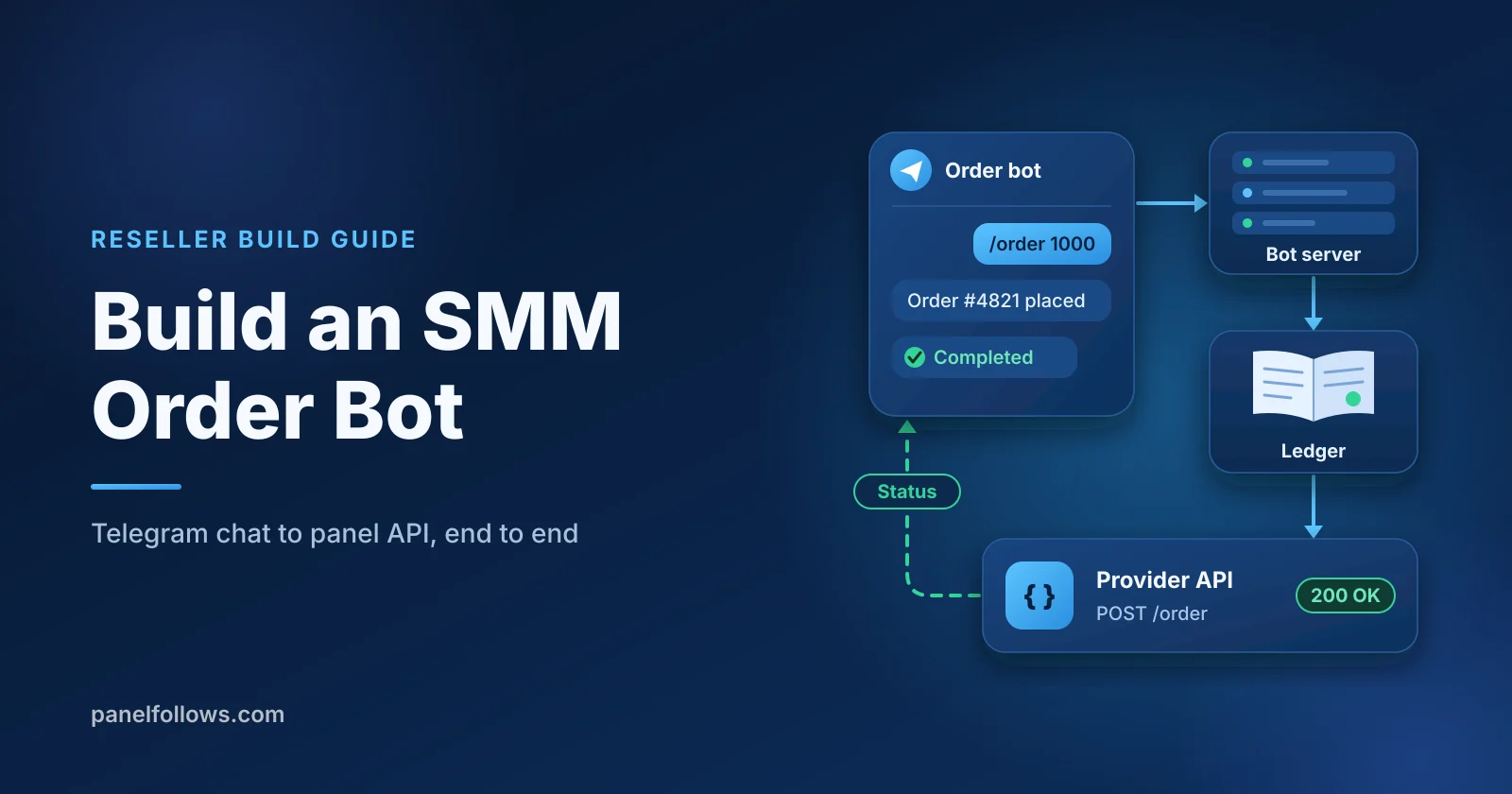
An SMM Telegram bot is a storefront that runs inside a Telegram chat. Users browse services, hold a balance and place orders through buttons, while your server forwards each order to a provider through the standard reseller API (services, add, status, refill, cancel, balance). Writing the chat interface is the quick part. Whether the bot survives its first month depends on three other things: a proper ledger, a background status worker, and Telegram's payment rules.
This is a build guide for developers and resellers who want the bot to be the shop itself, not just a promotion channel (that use case is covered in our guide to getting the first 100 customers for an SMM panel). We will go through the architecture, the catalog cache and markup math, placing orders without double charging, polling status and pushing updates, refills and partial refunds inside the chat, rate limits, fraud controls, and the payment question most GitHub repos skip. The Python is pseudocode built on the standard reseller API actions. The last section explains when a white-label child panel beats maintaining a bot.
Facts in this guide were checked in November 2026.
What is an SMM Telegram bot, and what is it not?
An SMM Telegram bot is a front end and nothing more. The services themselves come from a provider: a bot cannot add members, likes or views by itself. It takes a request in chat, checks the user's balance in your database, sends an add call to a provider's API, and reports back. Everything a user sees is a view of records in your database.
That framing matters because most failures happen outside the chat code: a user charged twice after a timeout, an order stuck at "In progress" because nothing polls it, a refund paid twice, a top-up credited from a screenshot. None of these is a Telegram problem. They are bookkeeping problems the bot puts on display.
Be clear about what you sell, too. Instagram, TikTok and YouTube prohibit buying engagement in their terms, and your customers carry the enforcement risk. Say so on the service screen, never promise "safe" or "permanent" results, and show only the refill and cancellation rules the provider actually offers.
What architecture does an SMM order bot need?
A working SMM order bot has five parts: the Telegram interface, your own database with a ledger, a provider API client, a background worker, and a payment intake. The chat process only reads and writes your database. The worker does the slow work of talking to the provider, and the payment intake credits balances only after a verified confirmation.
| Component | Job | Failure it prevents |
|---|---|---|
| Bot process (webhook or long polling) | Menus, input validation, showing state | Slow provider calls blocking every chat |
| Database with an append-only ledger | Balances, orders, refunds, audit trail | Lost money, double refunds, "where did my balance go" tickets |
| Provider API client | services, add, status, refill, cancel, balance |
Scattered HTTP code with no error handling |
| Background worker | Catalog sync, status polling, notification queue | Orders stuck at the last status anyone saw |
| Payment intake | Credits balances from confirmed payments | Balances credited for payments that never settled |
For receiving updates, Telegram supports two methods. Its Bots FAQ lists long polling and webhooks, and notes that you cannot use long polling while a webhook is set. Long polling works well for a first version on a small server. A webhook needs a valid SSL certificate on one of the supported ports (443, 80, 88 or 8443), and redirects are not followed.
If you choose webhooks, set a secret_token when you register the webhook. The Bot API reference says Telegram then includes it in an X-Telegram-Bot-Api-Secret-Token header on every request (the token can be 1 to 256 characters). Reject any request without it. Return a 200 response quickly and process the update from a queue, so a slow provider call never holds up Telegram's request.
The order of events for a single purchase is always the same: catalog sync, balance hold, add call, status polling, user notification, then refill or refund if the outcome calls for it. Every step writes to your database before it talks to the user.
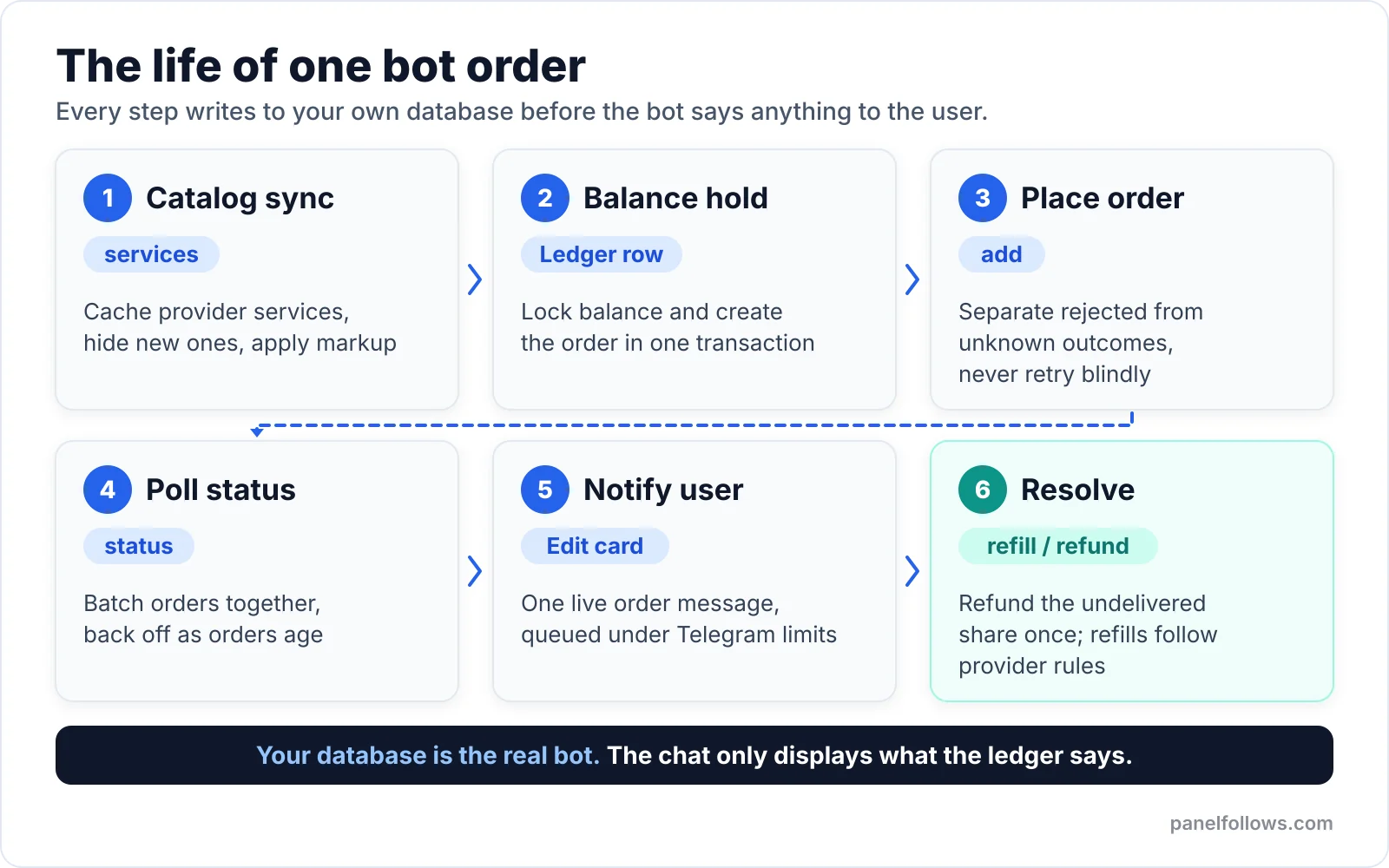
Every step writes to your own database before the bot says anything to the user.
Which standard reseller API actions does the bot use?
The standard reseller API (often called API v2) uses a single endpoint. Every request is a form-encoded POST with your key and an action, and the response is JSON. The DEV Community walkthrough of connecting to an SMM panel API shows this same pattern in PHP and Python. Panel Follows exposes this API at the SMM panel API page, and it also offers a REST API (v3) documented on the API docs page.
| Action | Key parameters | Typical response | Where the bot uses it |
|---|---|---|---|
services |
none | List of services with id, name, category, rate per 1,000, min, max, and refill/cancel flags | Catalog sync job |
add |
service, link, quantity (plus extras for some types) |
{"order": 12345} |
Order placement |
status |
order, or orders as a comma-separated list |
charge, start_count, status, remains, currency |
Status worker |
refill |
order |
A refill id | "Request refill" button |
refill_status |
refill |
Refill state | Refill follow-up |
cancel |
orders |
Per-order acceptance or error | "Cancel" button |
balance |
none | balance, currency |
Low-balance alerts |
Field names and batch limits differ a little between panels. Many v2 providers accept up to 100 orders per status call, but check your provider's documentation. Treat every response as untrusted input, including JSON bodies with an error key and responses that are not JSON at all.
A minimal client looks like this:
import os
import httpx
from decimal import Decimal

API_URL = os.environ["PROVIDER_API_URL"]   # copy from your provider's API page
API_KEY = os.environ["PROVIDER_API_KEY"]   # never commit this

class ProviderRejected(Exception):
    """Provider answered and refused. Safe to refund."""

class ProviderUnknown(Exception):
    """No reliable answer. The order may or may not exist."""

def call(action, **params):
    try:
        r = httpx.post(API_URL, data={"key": API_KEY, "action": action, **params}, timeout=30)
    except (httpx.TimeoutException, httpx.NetworkError) as e:
        raise ProviderUnknown(str(e))
    if r.status_code >= 500:
        raise ProviderUnknown(f"HTTP {r.status_code}")
    try:
        body = r.json()
    except ValueError:
        raise ProviderUnknown("non-JSON response")
    if isinstance(body, dict) and "error" in body:
        raise ProviderRejected(body["error"])
    return body
The two exception types are the most important design decision in the bot. A rejection means the provider said no, so you can refund. An unknown outcome means the order may exist, so you must neither refund nor retry automatically. Many open-source bots treat both as one "error" and either double-place orders or hand out free refunds.
For the full integration side (key rotation, mapping service ids, handling several providers), see our SMM provider API integration guide.
How do you cache the service catalog and set a markup?
Sync the provider catalog into your own table on a schedule, then show users only the services you have approved, with your markup applied. Do not call services every time someone opens a menu. The response can be large and slow, and a live price feed means a provider price change shows up in your shop before you have reviewed it.
from decimal import Decimal, ROUND_UP

DEFAULT_MARKUP = Decimal("0.60")          # 60 percent, your choice
MIN_ORDER_PRICE = Decimal("0.10")         # floor so tiny orders are worth handling
REPRICE_ALERT = Decimal("0.15")           # cost moved more than 15 percent

def sync_catalog(db):
    for s in call("services"):
        cost = Decimal(str(s["rate"]))    # provider price per 1,000
        row = db.services.get(provider_id=s["service"])
        if row is None:
            db.services.insert(provider_id=s["service"], name=s["name"],
                               category=s["category"], cost=cost,
                               min=int(s["min"]), max=int(s["max"]),
                               refill=bool(s.get("refill")), cancel=bool(s.get("cancel")),
                               visible=False)          # new services start hidden
            continue
        if row.cost and abs(cost - row.cost) / row.cost > REPRICE_ALERT:
            db.services.update(row.id, visible=False)  # pause, alert admin
            notify_admin(f"Cost change on {row.name}: {row.cost} -> {cost}")
        db.services.update(row.id, cost=cost, min=int(s["min"]), max=int(s["max"]),
                           refill=bool(s.get("refill")), cancel=bool(s.get("cancel")))
    db.services.mark_missing_as_hidden()   # removed upstream, hide locally

def sell_price(row, quantity):
    markup = row.markup if row.markup is not None else DEFAULT_MARKUP
    per_1000 = row.cost * (1 + markup)
    price = (per_1000 * quantity / 1000).quantize(Decimal("0.01"), rounding=ROUND_UP)
    return max(price, MIN_ORDER_PRICE)
A worked example, with invented numbers: say a provider lists a service at 0.80 per 1,000 and you apply a 60 percent markup. Your price is 1.28 per 1,000, so a 2,500 order costs the user 3.20 and costs you 2.00. Always use Decimal, never floats, and round up on the sell side. Floating-point totals drift by fractions of a cent, and across thousands of orders that turns into real reconciliation work.
Four habits from running panels:
- Store cost and sell price separately, and save both on every order row at the moment of purchase. Refunds must use what the user paid, not today's price.
- Hide new services by default. Read the provider's description (start time, speed, refill period, cancellation) before switching a service on, and copy those terms into your own description.
- Never show a refill period you have not verified on the provider's service listing. Panel Follows lists the start time, speed, min and max, refill period and cancellation for each service, and services without refill are clearly marked.
- Keep the catalog short. A menu with 400 services is unusable. Pick a few dozen per platform and show the price per 1,000 on each button.
Telegram limits button callback data to 64 bytes, so use short tokens such as svc:4821 or ord:99120 instead of JSON, and look up the details server-side.
Resell the same services at your own price
Send orders from your own site through the reseller API and set your own margin. You can also run a child panel under your own brand.
Can a Telegram bot take crypto top-ups? What Telegram's payment rules say
Telegram's own documentation says no. Its page on the Bot Payments API for digital goods and services states that payments for digital goods and services inside Telegram apps must be made exclusively in Telegram Stars (currency code XTR). Asked directly whether a bot can accept cryptocurrency instead of Stars, the documentation answers: "No." It gives the App Store and Play Store rules as the reason.
The same page closes the obvious workaround: the requirement applies to sales inside Telegram apps "regardless of any other web portals" you run, and Telegram warns that a bot selling digital goods through other currencies or third-party providers cannot be shown to mobile users. Many GitHub SMM bots post crypto invoice links in chat anyway. That is a real risk to your storefront, not a technicality.
| Top-up model | How users pay | Fit with Telegram's published rules | Practical trade-off |
|---|---|---|---|
| Stars invoices in the bot | sendInvoice in XTR, credit on successful_payment |
Matches the documented requirement | You earn Stars, but your provider balance is funded separately, so you carry the conversion and timing gap |
| Crypto gateway link posted in the bot | User pays an external invoice | Telegram's FAQ says no for digital goods inside Telegram apps | Risk of the bot being hidden from mobile users or actioned |
| Web storefront with crypto, bot for tracking only | Checkout on your own domain, bot sends status and support | The bot does not sell; the sale happens on the web | Two surfaces to run, but the money path stays off Telegram |
This is not legal advice, and some cases (a bot that only links to a website) are not spelled out. The conservative reading: if the purchase happens in the chat, use Stars. If you want crypto, sell on the web.
On the provider side, a Panel Follows balance is funded with cryptocurrency (USDT and other coins through crypto gateways) or international bank transfer. If your bot collects Stars, keep a buffer in your provider balance, because user payments and provider funding move on different rails. Our SMM panel payment gateway guide compares the options for the web side.
Whatever the rail, the ledger rules are the same:
- Credit a balance only from a verified, server-to-server confirmation: the
successful_paymentupdate for Stars, or a signed gateway callback for crypto on your website. Never from a user-submitted transaction hash or screenshot. - Make the credit idempotent. Store the payment id (for Stars, the
telegram_payment_charge_id, which Telegram says you may need for refunds) under a unique constraint, so a repeated callback cannot credit twice. - Write every movement as a ledger row (
topup,order_hold,refund_partial,refund_cancel,admin_adjust) and reconcile balances against it nightly. - Build
/paysupporton day one. Telegram requires bots selling digital goods to handle payment disputes through it, and providesrefundStarPaymentfor refunds.
How do you place an "add" order without double-charging?
Take a hold on the user's balance and create the order row in one database transaction, and only then call add. Then handle three outcomes separately: success, explicit rejection, and unknown. The unknown case is the one most bots get wrong.
def place_order(db, user_id, service_id, link, quantity):
    svc = db.services.get_visible(service_id)
    validate_link(svc, link)                      # platform, format, not private
    if not (svc.min <= quantity <= svc.max):
        raise UserError(f"Quantity must be {svc.min} to {svc.max}")
    if db.orders.active_exists(link=link, service_id=svc.id):
        raise UserError("An order for this link is already running")

    price = sell_price(svc, quantity)
    with db.transaction():
        balance = db.balances.lock(user_id)       # SELECT ... FOR UPDATE
        if balance < price:
            raise UserError("Not enough balance")
        order = db.orders.insert(user_id=user_id, service_id=svc.id, link=link,
                                 quantity=quantity, price=price, cost_rate=svc.cost,
                                 state="submitting")
        db.ledger.add(user_id, -price, kind="order_hold", ref=order.id)

    try:
        resp = call("add", service=svc.provider_id, link=link, quantity=quantity)
        db.orders.update(order.id, provider_order=int(resp["order"]), state="pending")
    except ProviderRejected as e:
        refund_once(db, order, price, kind="refund_rejected")
        db.orders.update(order.id, state="rejected", note=str(e))
        raise UserError("The provider rejected this order. Your balance was restored.")
    except ProviderUnknown:
        db.orders.update(order.id, state="unknown")
        notify_admin(f"Order {order.id} outcome unknown, reconcile before refunding")
        raise UserError("Order received. We are confirming it with the provider.")
The sequence, step by step:
- Validate before money moves. Check the link format for the platform, the quantity range, and whether the same link already has an active order for the same service. Overlapping orders on one link make start counts and delivery hard to verify, and some providers refuse them.
- Lock and hold in one transaction. The row lock stops two fast taps from spending the same balance twice.
- Call
addoutside the transaction. Never hold a database lock while waiting on a network call. - On rejection, refund once.
refund_oncewrites a ledger row with a unique key such as(order_id, kind), so it can never run twice. - On unknown, freeze. Put the order in a reconciliation queue. An admin checks the provider dashboard for an order on that link at that time, then either records the provider order id or refunds. Retrying automatically is how you end up with two orders and one payment.
Also debounce the confirm button. Disable it when it is tapped (edit the message to remove the keyboard) and ignore a second callback for the same order token.
How do you poll order status and push updates to the user?
The standard reseller API has no webhooks, so a background worker calls status for open orders in batches, compares the result with the last stored state, and queues a chat message only when something changed. Poll new orders often and older ones less often, because delivery times vary widely by service type.
Delivery time depends heavily on the service. Some services start within minutes, while others (drip-fed orders, custom comments, some YouTube services) can run for days. On Panel Follows every service lists its own start time and speed, so copy those terms into your catalog and set polling expectations per service, not one global timeout. A worker that checks every two minutes forever wastes calls, and one that gives up after a day misses slow services.
BACKOFF = [120, 300, 600, 1800, 3600, 3 * 3600, 6 * 3600]   # seconds

def status_worker(db):
    due = db.orders.open_and_due(limit=500)    # states: pending, in_progress, processing
    for chunk in chunks(due, 100):
        ids = ",".join(str(o.provider_order) for o in chunk)
        try:
            result = call("status", orders=ids)
        except (ProviderUnknown, ProviderRejected):
            continue                            # try again next cycle
        for o in chunk:
            st = result.get(str(o.provider_order))
            if not isinstance(st, dict) or "error" in st:
                db.orders.flag(o.id, "status_error")
                continue
            apply_status(db, o, st)
            db.orders.schedule_next(o.id, BACKOFF[min(o.polls, len(BACKOFF) - 1)])
apply_status stores status, remains and start_count, and if the status or a meaningful share of remains changed, it queues a notification. Rather than sending a new message for every change, edit the original order message (editMessageText) so the chat holds one live order card. Users see progress, and you send far fewer messages against Telegram's limits.
How do refills, cancels and partial refunds work inside the chat?
Refills, cancels and partial refunds are driven by the provider's status, and your bot should offer each button only when the provider allows that action. Showing a "Refill" button on a no-refill service, or a "Cancel" button on an order already running, produces tickets you cannot resolve.
| Provider status | What it means | What the bot does |
|---|---|---|
| Pending | Accepted, not started | Show "Queued". Offer Cancel only if the service is marked cancellable |
| In progress / Processing | Delivery running (exact meaning varies by provider) | Update the card from remains. No cancel button |
| Completed | Delivered in full | Show Refill if the service has refill and the period has not expired |
| Partial | Stopped early, remains not delivered |
Refund the undelivered share once, notify the user |
| Canceled | Not delivered | Refund the full amount once, notify the user |
| Error or unknown id | Provider cannot find it | Flag for admin, never auto-refund |
The partial refund formula uses what the user paid, not your cost: refund = price * remains / quantity. A hypothetical case: a user paid 3.20 for 2,500 and the order ends as Partial with 600 remaining. The refund is 3.20 × 600 / 2,500 = 0.768. Pick a rounding rule and publish it. Rounding to 0.77 in the user's favor costs you almost nothing and avoids arguments.
def apply_status(db, o, st):
    status = st["status"]
    remains = max(0, min(int(st.get("remains") or 0), o.quantity))
    db.orders.update(o.id, status=status, remains=remains, start_count=st.get("start_count"))
    if status == "Partial":
        amount = (o.price * remains / o.quantity).quantize(Decimal("0.01"), rounding=ROUND_UP)
        refund_once(db, o, amount, kind="refund_partial")
    elif status in ("Canceled", "Cancelled"):
        refund_once(db, o, o.price, kind="refund_cancel")
    queue_card_update(o.id)
Clamp remains to the order quantity. A malformed provider response should never be able to refund more than the user paid.
Refills follow the provider's rules exactly. On Panel Follows, services with a refill guarantee top up drops for free during the stated refill period, and a refill can be requested once every 24 hours per order. Your bot should enforce the same 24-hour window before calling refill, store the returned refill id, and check refill_status from the worker. For a deeper explanation of why counts drop in the first place, see our guide on why followers drop and how refill guarantees work.
Cancellation is a request, not a refund. On Panel Follows, only services marked cancellable can be canceled, and only before delivery starts. Call cancel, tell the user "Cancellation requested", and refund only after status returns Canceled.
Every button handler must check that the order in the callback belongs to the user who tapped it. Tokens like ord:99120 are easy to guess.
What rate limits does a Telegram SMM bot hit?
You hit two sets of limits: Telegram's message limits and your provider's API limits. Telegram's FAQ says that in a single chat you should avoid sending more than one message per second, that bots cannot send more than 20 messages per minute in a group, and that bulk notifications are capped at about 30 messages per second. Short bursts may be allowed, but going over eventually produces 429 errors.
What this means in practice:
- Route every outgoing message through one queue with a per-chat limit of one per second and a global limit below 30 per second. When Telegram returns 429, wait for the
retry_aftervalue in the error response before retrying. - Edit, do not append. One order card that you update is one message per change, not a stream.
- Batch announcements. A "new services added" broadcast to 20,000 users at about 30 per second takes over 11 minutes. Telegram offers paid broadcasts up to 1,000 messages per second, but its FAQ says this requires at least 100,000 Stars on the bot's balance and at least 100,000 monthly active users, and each message above the free 30 per second costs 0.1 Stars.
- Respect the provider. Batch
statuscalls, cacheservices, back off on errors, and stay well under any documented request limit.
Which fraud and abuse controls does a reseller bot need?
A reseller bot needs controls on money coming in, money going out, and the actions users can trigger. Telegram accounts cost nothing to create, so assume any reward, bonus or refund path will be tested by someone automating it.
| Risk | What it looks like | Control |
|---|---|---|
| Forged top-ups | "I paid, here is the hash" | Credit only from verified callbacks, unique payment id |
| Race conditions | Two taps spend one balance twice | Row lock on balance, debounced confirm |
| Double refunds | Two workers process the same Partial | Unique (order_id, kind) on refund ledger rows |
| Referral farming | One person, twenty accounts, self-referrals | Pay referral credit only on completed paid orders, cap per referrer, hold period |
| Refund laundering | Top up, order, cancel, request payout | No cash-out of balance, refunds go back to bot balance only |
| Link abuse | Private profiles, wrong platform, illegal content | Validate format per platform, block-list, admin review for flagged links |
| Admin takeover | Anyone can type /addbalance | Admin commands restricted to listed Telegram user ids, logged in the ledger |
| Provider balance runs out | Orders fail at add |
Hourly balance check, alert at a threshold, pause sales below it |
| Key leakage | API key in a public repo | Keys in environment variables, rotate on any suspicion |
Give new accounts a daily spend cap for their first few days, and hold referral credit until the referred user's first paid order completes. Keep in-bot referral bonuses separate from what you earn upstream: the Panel Follows affiliate program pays a tiered 5% to 10% commission on completed orders of users you refer, a different relationship from bonuses you give your own users. The chargeback and fraud prevention playbook covers the payment side in more depth.
A launch checklist for your first week
Before announcing the bot, run these tests on a staging copy with a small real balance.
- Cut the network during an
addcall: the order must land in the reconciliation queue, not be refunded or retried. - Tap Confirm twice quickly: only one hold may be created.
- Force a Partial and a Canceled status: exactly one refund row each.
- Send a webhook request without the secret header: it must be rejected.
- Edit a callback token to point at another user's order: refill and cancel must fail.
- Drop the provider balance below your alert threshold: sales must pause.
- Check that
/paysupportresponds and every service screen shows start time, refill terms, cancellation rules and a plain note that platforms prohibit bought engagement.
Is SMM panel Telegram bot source code from GitHub worth using?
Open-source SMM panel bot code on GitHub is useful for reading and risky to deploy unchanged. Quality ranges from documented projects to short scripts with the token hardcoded, so audit before you give any of them your provider key and your users' money.
- Search for hardcoded secrets and any URL the code calls besides Telegram and your provider. A bot that sends your API key to a third-party "license server" is a backdoor.
- Check money types. Floats for balances mean drift. Look for
Decimalor integer minor units. - Look for transactions and locks around balance changes. No locks means race conditions.
- Find the timeout handling on
add. If a timeout triggers either a refund or a retry, the code will lose money. - Check how top-ups are confirmed. Manual approval of user-submitted receipts, or "AI receipt verification", is a fraud magnet.
- Check the payment rail against Telegram's rules. A bot built around crypto invoice links for digital goods conflicts with Telegram's published payment rules.
- Read the license. Some "free" bots forbid commercial use or require a paid key.
A repo that passes all seven is a reasonable starting point. One that fails several is usually faster to rewrite than to fix.
When is a white-label child panel simpler than a bot?
A child panel is simpler when what you need is a storefront and not a Telegram-specific experience. A Panel Follows child panel gives you a white-label SMM panel on your own domain, powered by the Panel Follows catalog, so the storefront, catalog and order flow come ready-made instead of being code you write and maintain.
| Situation | Better choice | Why |
|---|---|---|
| You want to start selling this month with no developer | Child panel | No ledger, worker or reconciliation code to write |
| You want off-Telegram checkout (such as crypto) without arguing with Telegram's rules | Web storefront: a child panel or your own site (bot optional for alerts) | The sale happens on your website; confirm which payment methods your setup supports |
| Your audience lives in Telegram and rarely opens links | Bot with Stars | The chat is the shop |
| You already run a panel and want a companion bot | Bot for status, support and reorders | Sales stay on the panel, the bot adds convenience |
| You resell several providers with custom routing | Your own panel or bot backend | You need logic a child panel does not expose |
The hybrid holds up best in practice: sell on a child panel or your own site, and run a small bot for status updates, refill requests and support. It keeps money off the chat and uses Telegram for what it does well, fast notifications.
Open your account and order in minutes
Signing up is free and takes two steps. Top up with card, bank transfer or crypto, place your order and track delivery from the dashboard.
Frequently asked questions
Are Telegram bots free to create and run?
Registering a bot through @BotFather does not cost anything, and Telegram's FAQ says bots can message their users at no cost within the standard rate limits. What you pay for is everything around it: a server to run the bot and worker, a database, a domain and SSL certificate if you use webhooks, and your provider balance. Paid broadcasts above about 30 messages per second cost Stars, but most reseller bots never need them.
Can I accept crypto payments in an SMM Telegram bot?
According to Telegram's Bot Payments documentation, no. Payments for digital goods and services inside Telegram apps must use Telegram Stars, and the FAQ answers the crypto question with a direct "No," citing App Store and Play Store rules. If you want crypto checkout, the cleaner setup is a web storefront on your own domain (your own site, or a child panel once you have confirmed the payment methods it supports), with the bot handling order status and support rather than taking the payment.
What is the standard SMM panel API that bots use?
It is the standard reseller API, often called API v2: a single endpoint that accepts form-encoded POST requests with your API key and an action name. The common actions are services, add, status, refill, refill_status, cancel and balance. Responses are JSON. Because most panels follow the same convention, a bot written against one provider can usually be pointed at another by changing the endpoint and key, with small adjustments for field differences.
Can a Telegram bot add members to my channel by itself?
No. A Telegram bot cannot pull users into a channel on its own. SMM bots that sell Telegram members work as storefronts: they take the order and pass it to a provider through an API, and the provider handles delivery. If you are growing your own channel, consistent content and cross-promotion with related channels do more for long-term reach than any member count.
How do I handle a Partial order refund in chat?
Calculate the refund from what the user paid: price multiplied by remains divided by quantity. Write it as a single ledger entry with a unique key tied to the order, so a repeated status check can never refund twice, and clamp remains so it cannot exceed the order quantity. Then edit the order card to show the delivered amount, the refunded amount and the new balance, so the user does not need to open a ticket.
Is it safe to use a free SMM panel bot script from GitHub?
Treat any free script as unreviewed code that will hold your API key and your users' money. Some are well built, while many have hardcoded tokens, floating-point balances, no database locks, and timeout handling that refunds or retries orders blindly. Audit for those issues, check every outbound URL the code calls, read the license, and test failure cases on a staging copy before connecting real funds.
Should I build a bot or open a child panel?
Open a child panel if you want a working shop quickly, want checkout to happen on your own domain instead of inside Telegram, or do not have a developer to maintain a ledger and status worker. Build a bot if your customers live in Telegram and you are prepared to use Telegram Stars for in-chat payments. Many resellers run both: the panel sells, and a small bot handles notifications, refills and support.
Sources and further reading
- Telegram Bots FAQ: update methods, webhook ports, broadcast limits and paid broadcasts.
- Telegram Bot Payments API for Digital Goods and Services: the Stars requirement, the crypto answer,
/paysupportand refunds. - Telegram Bot API reference:
setWebhook, thesecret_tokenheader and callback data limits. - How to Connect Your App to an SMM Panel API (DEV Community): a third-party walkthrough of the v2 request format in PHP and Python.