
TikTok Shadowban: Real Restriction or Normal Drop?
Is it a TikTok shadowban or a weak video? Check what TikTok actually shows you, run a 10-minute diagnostic, and follow a realistic recovery timeline.
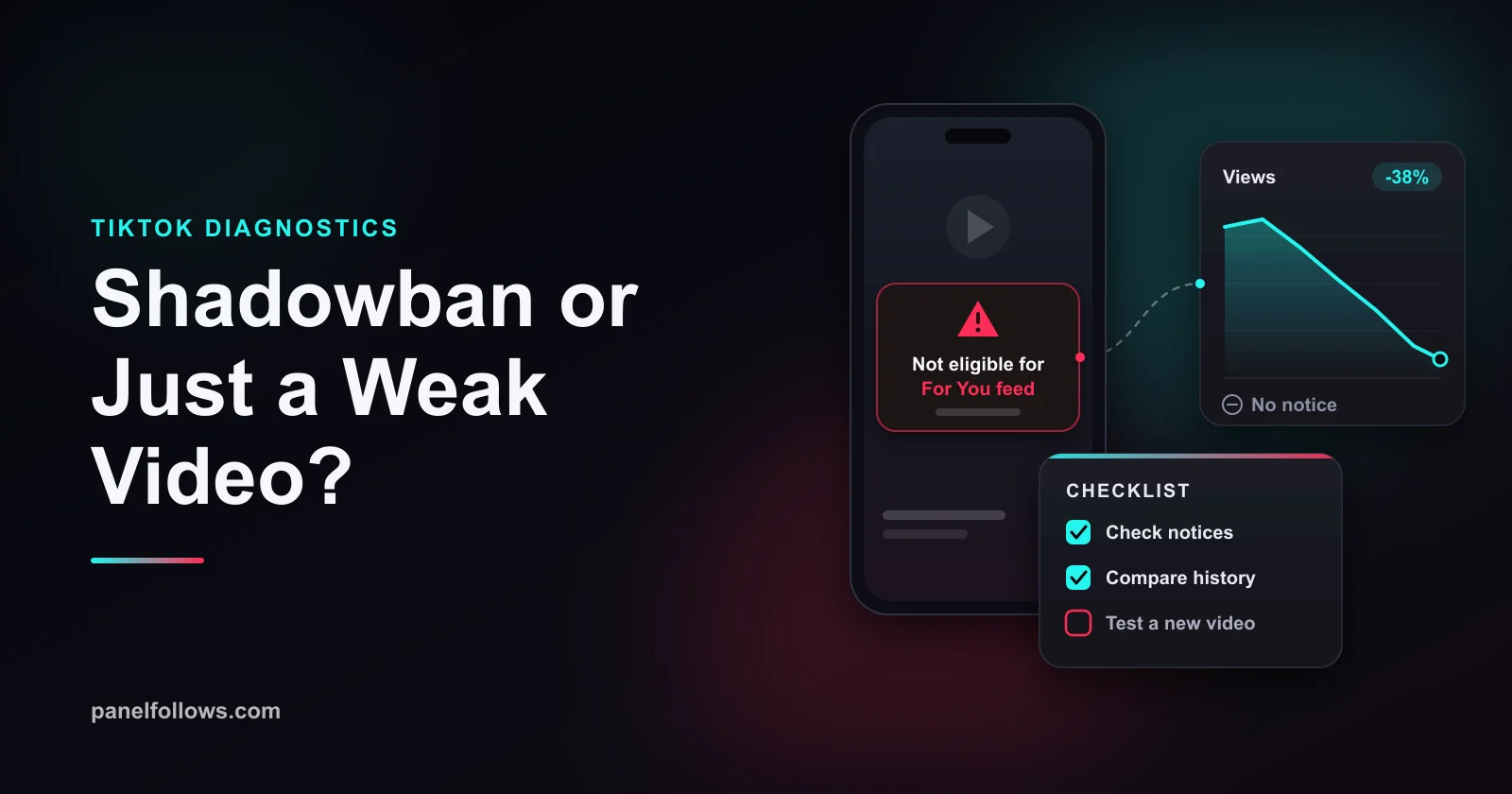
A TikTok shadowban in the usual sense (secret suppression with no warning) is not something TikTok admits to. What TikTok does document is this: a post or a whole account can be made "not eligible for the For You feed," content can be removed with a strike, and features can be restricted. Each of these comes with a notice you can check. If you find no notice anywhere, the drop is usually a weak video, not a penalty.
This guide covers what TikTok actually shows creators and where to find each signal in the app. You also get a checklist for telling a restriction apart from a video that didn't land, how long each restriction lasts according to TikTok's own pages, and the myths that waste recovery time. Nothing here requires a purchase, and no paid service fixes a restriction. Facts in this guide were checked in October 2026.
Is a TikTok shadowban real?
TikTok does not use the word "shadowban." Its official pages describe a system built on notices, not silent penalties. Many people have seen reach drops they could not explain, and some of those were real enforcement. But the enforcement TikTok documents is visible to you if you know where to look.
The key line comes from TikTok's For You feed Eligibility Standards. TikTok says content that is ineligible for the For You feed can still be found through search or by people who follow the account. It also says a video with few views may simply lack community engagement rather than be ineligible. So TikTok itself separates "restricted" from "unpopular," and most creators who think they are shadowbanned are in the second group.
The frustration is still real. Restrictions exist, notices are easy to miss, and an account-level restriction feels exactly like a ban. The rest of this guide shows you how to answer the question for your own account in about ten minutes.
What TikTok actually shows creators when something is restricted
TikTok shows enforcement in three places: a notice on the post itself, a notification in your inbox, and a summary on your account status page. Each type of restriction has a different scope and a different fix.
| What happens | Scope | What you see | Can you appeal? |
|---|---|---|---|
| Post marked "not eligible for the For You feed" | One video | A notice in the post's analytics, plus a notification | Yes, from the post |
| Account temporarily ineligible for recommendation | Whole account | Notification that the account has been restricted; content also harder to find in search | Yes |
| Content removed for a Community Guidelines violation | One video, plus a strike | Removal notice naming the rule | Yes |
| Warning strike | One video (usually a first violation) | Notice that does not count toward your strike tally | Yes |
| Feature restriction (for example posting, commenting, LIVE) | One feature | Notice of the restriction | Depends on the case |
| Permanent ban | Whole account | Banned account screen | Yes, through the ban notice |
The post-level case is the most common. TikTok's support page on content violations and bans says content can be reviewed when it is uploaded, when it gets popular, or when someone reports it. The outcome can be removal or For You ineligibility. You can see the reason, give feedback and appeal.
The account-level case was added in TikTok's 2024 guideline update. In the newsroom announcement, TikTok said it can make an entire account temporarily ineligible for recommendation if the creator keeps posting content that breaks the For You feed standards. The same post said the account and its content would be harder to find in search, that TikTok would notify the creator, and that the creator could appeal. Variety's coverage reported the same change and its May 17, 2024 start date.
This is the closest thing to a real "shadowban" on TikTok, with one big difference: TikTok says it tells you.
How to know if you are shadowbanned on TikTok: the 10-minute check
You find out whether you are restricted by checking three places in the app: your account status, the analytics of the affected posts, and your inbox. If all three are clean, you are not under a documented restriction. Do these steps in order on the latest version of the app, since menu labels change between versions.
- Open your account status page. In recent versions it is under Settings and privacy, then Account, then Account status. TikTok launched it as "Account Check" in 2024, a way to check your account and your last 30 posts and see your standing at a glance. Note any warning, strike or restriction it lists.
- Open analytics on the video that stalled. Tap More insights at the bottom of the post, or the More options (three dots) button, then Analytics. TikTok's support page says an ineligible post shows a notification here that you can tap to see the reason, with an Appeal option at the top.
- Read your inbox notifications. Removal notices, warning strikes, account restrictions and feature restrictions all arrive as notifications. Scroll back at least a few weeks, because a restriction can come from a video you posted earlier.
- Compare traffic sources with your last ten videos. If the For You share collapses on several posts at once while profile and Following views look normal, that fits an account-level restriction. If For You traffic is small but present, the video was shown and did not hold attention.
- Write down what you found, one line per check. You will need it for an appeal, and it stops you from deciding based on a feeling. Searching for your own video from a second account is weak evidence at best, because search results are personalized.
If step 1, 2 or 3 shows a notice, you have a documented restriction, and the rest of this guide tells you what to do. If none of them shows anything, use the diagnostic table below and the no-notice fixes later on, because that is where your fix is.
Restriction or a weak video? A diagnostic table
A real restriction leaves a notice and usually hits several videos at once. A weak video leaves no notice and shows normal traffic sources with poor retention. That difference settles most cases.
| What you observe | Notice in app? | Most likely cause | What to check next |
|---|---|---|---|
| One video flat, others normal | No | Weak hook or topic mismatch | Average watch time and the retention curve |
| One video flat, notice on the post | Yes | Post ineligible for For You feed | Read the stated reason, appeal if wrong |
| Every new video near zero For You traffic, starting on one day | Usually yes | Account-level ineligibility | Account status and inbox |
| Video removed, "violation" message | Yes | Community Guidelines violation, strike | Strike count, appeal window |
| Gradual decline over weeks, no notice | No | Audience fatigue, worn-out format, competition | Compare hooks and topics of best and worst posts |
| Huge spike, then a return to old numbers | No | Normal: one video broke out, the next did not | Nothing is wrong |
| Views fine, likes and comments down | No | Content drawing a different audience | Comment quality, follower vs non-follower split |
| Creator is under 16 | Not needed (fixed rule) | Content from under-16 creators is ineligible for For You by policy | Date of birth on the account |
The last row surprises people. TikTok's eligibility standards say content created by anyone under 16 is not eligible for the For You feed. If a teenager runs the account, that is a fixed rule, not a shadowban.
The most common false alarm is the spike-and-return pattern. Say you run a home baking account that usually gets 800 to 1,500 views per video, and one clip of a collapsing cake hits 90,000. The next three get 1,100, 900 and 1,300. That feels like punishment, but it is just your normal range. The breakout reached people outside your usual audience, and the next videos did not. Our guide on why TikTok videos stall covers retention and traffic sources in detail.
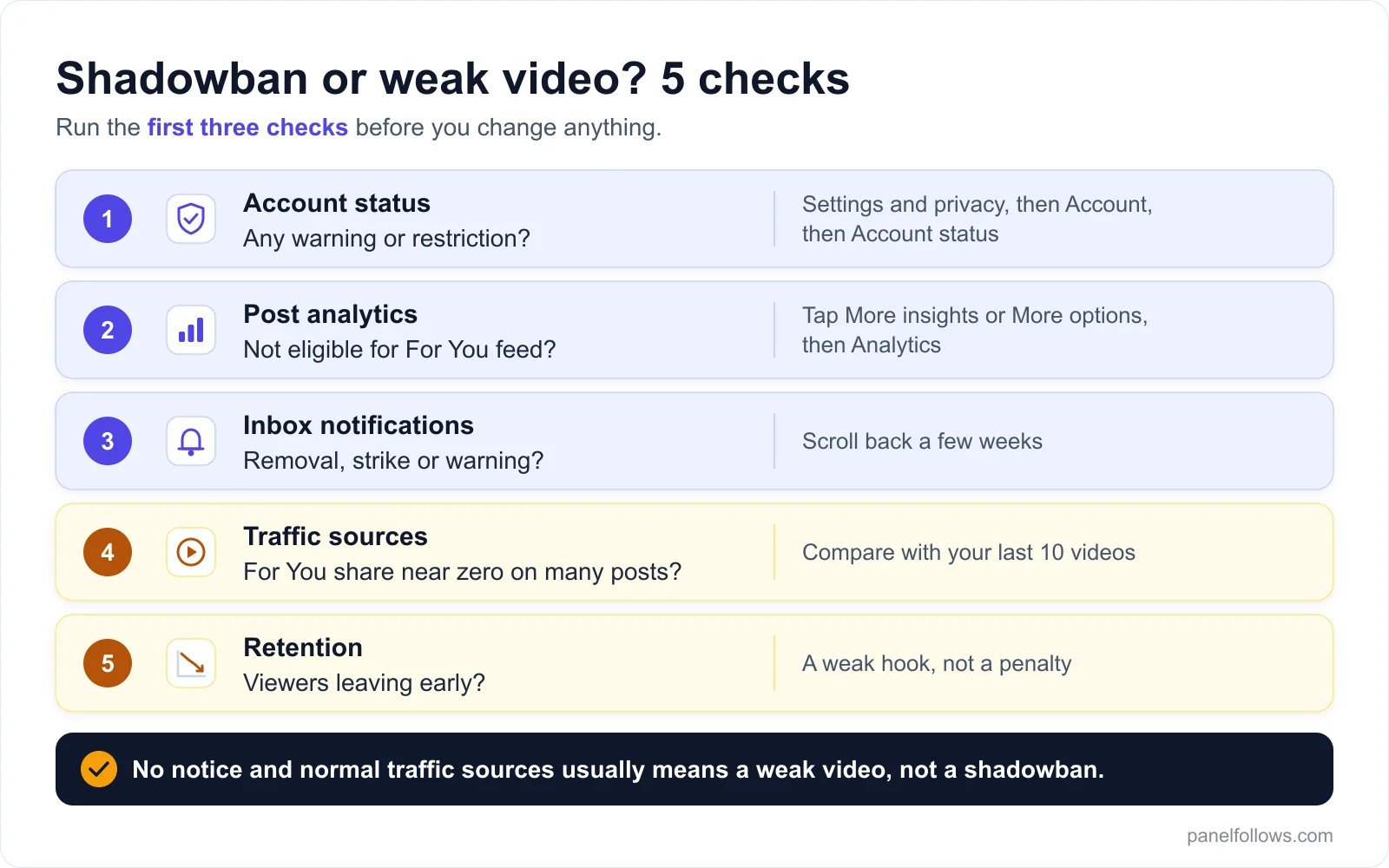
Run the first three checks before you change anything. A documented restriction always leaves a notice somewhere.
If your check comes back clean and the video is just weak, the fix is your next video, not a purchase. Panel Follows has a few small free samples, but they are only a sample, not a growth method, and they do nothing for an account that is actually restricted.
Test this on one post before you scale
The cheapest way to check the logic above is a small order on a single post, then compare the outcome against your own Insights data.
Why TikTok makes a video "not eligible for the For You feed"
A video becomes ineligible for the For You feed when it is allowed on TikTok but does not meet the separate, stricter standard for being recommended. TikTok's Community Guidelines have two layers: rules for what is allowed on the platform at all, and standards for what can be recommended. A video can pass the first and fail the second.
TikTok's reasoning is that the For You feed serves everyone from teenagers to great-grandparents. Content that may not suit that broad audience can be made ineligible and harder to find in search. The categories are listed on the standards page and change over time, so read the live page rather than a summary. The ones creators hit most often are unoriginal or reposted content, engagement bait, unverified health or finance claims, and sensitive topics that are allowed but not recommended.
There is also a quieter mechanism that looks like a shadowban but isn't one. TikTok's standards say some content is fine when seen occasionally but a problem when seen in clusters. Its examples are dieting, extreme fitness, sexual suggestiveness, sadness (such as hopeless statements or sad quotes), and overgeneralized mental health content like quizzes that claim to diagnose. This content can still be eligible, but TikTok breaks up repetitive patterns so viewers don't see too much of it.
Say you run a fitness account and every video is an intense diet update. Nothing is removed and no notice appears, but the feed may avoid showing one viewer several of those videos in a row. Your reach is limited by topic, not by a penalty, and the fix is a wider content mix, not an appeal.
Things that are usually not a shadowban
Most shadowban explanations you see online are not confirmed by TikTok, and several of them push creators into making things worse. The table separates what TikTok has said from what people repeat.
| Common claim | Status | What to do instead |
|---|---|---|
| Using #fyp or #foryou triggers a penalty | Not confirmed; no TikTok source says this | Use hashtags that describe the video |
| Deleting old videos resets the algorithm | Not confirmed | Keep posts; deleting one also removes your appeal route for it |
| Deleting and reposting the same video fixes it | Not confirmed, and reposts can count as unoriginal content | Make a genuinely new version |
| A VPN gets you shadowbanned | Not confirmed as a penalty; country settings do affect who sees content | Post from your real location for the audience you want |
| Editing a caption after posting kills reach | Not confirmed | Fix real errors; do not edit hoping for a reset |
| TikTok punishes you after a viral hit | Not confirmed; usually just a return to your normal range | Compare against your median before the spike |
| "Shadowbans last exactly 14 days" | Not confirmed by any TikTok page we checked | See the timeline section below |
| Device-level shadowbans | Claimed by third parties, not documented by TikTok as a shadowban | Do not create new accounts to get around a restriction |
The deletion point matters. TikTok's appeal for an ineligible post starts from the post itself. If you delete the video in a panic, you lose that appeal and the notice that names the standard it broke. Screenshot every notice before you change anything. Posting time works the same way as the other myths: a bad hour can give you a weaker video, but it does not put a restriction on your account.
How long does a TikTok shadowban last?
There is no single duration, because each type of restriction runs on its own clock:
- Strikes expire after 90 days.
- A post marked ineligible usually stays that way unless an appeal succeeds.
- An account-level For You restriction is "temporary," but TikTok hasn't published a fixed length for ordinary accounts.
- A weak video has no duration at all. Your next upload is judged on its own.
| Situation | How long it lasts | Source and confidence |
|---|---|---|
| Post ineligible for For You feed | Applies to that post; eligible again if your appeal succeeds | TikTok support page |
| Strike from a removed video | Expires after 90 days and stops counting toward a permanent ban | TikTok support page and Creator Academy |
| Warning strike (first violation) | Does not count toward your strike tally | TikTok newsroom |
| Account temporarily ineligible for recommendation | "Temporary"; no fixed length published for ordinary accounts in the pages we checked | TikTok newsroom; duration unconfirmed |
| Government, politician or political party accounts at the strike limit | 90 days ineligible for For You and Following feeds | TikTok support page |
| Feature restriction (posting, commenting, LIVE) | Stated in the notice | Notice in app |
| Weak or underperforming video | None; each new video starts fresh | TikTok eligibility standards (low views can reflect low engagement) |
TikTok's Creator Academy page on moderation and appeals says strikes drop off your record after 90 days because most people need a reminder, not a punishment. The same page says the number of strikes that leads to a permanent ban varies by policy and by product feature. A strike on comments or LIVE counts against that feature, and some policies count more heavily than others.
Be careful with the political accounts row. That 90-day rule applies only to government, politician and political party accounts, and people often misquote it as the length of every account-level restriction.
A typical recovery looks like this (an example, not a promise):
- Day 0: screenshot the notice, and appeal the same day if the decision looks wrong.
- The days after: post only content that clearly meets the standards, and keep checking account status.
- When the restriction lifts or the appeal succeeds: For You traffic comes back on new posts first, often unevenly.
- Day 90: strikes from that period expire.
If you never got a notice, none of this applies. Recovery starts with your next video.
TikTok shadowban fix: what to do once you know the cause
The fix depends on what you found. Appeal a decision that was wrong, fix the pattern behind one that was right, and don't change anything drastic if there was no restriction at all. Work in this order.
- Screenshot every notice in account status, post analytics and your inbox, with dates.
- Decide honestly whether the decision was wrong. Compare the stated reason with the standard it cites. Appealing a clear violation wastes time.
- Appeal mistakes quickly. For an ineligible post: open the post, tap More insights or More options, then Analytics, tap the notification, and tap Appeal at the top. For removals and account restrictions, use the appeal option in the notice.
- If the decision was right, fix the pattern, not the file. Re-uploading with a filter or a crop does not help. Remove the unverified claim, add your own commentary to borrowed footage, drop the engagement-bait caption.
- Keep posting compliant content at your normal pace. Nothing TikTok has published says going quiet speeds recovery, and new eligible videos are the only way to see whether your reach has come back.
- Take the optional policy training if the app offers it. The Creator Academy mentions it is available in some cases.
- Do not open a second account to get around the restriction. It splits your audience, and creating accounts to dodge enforcement can itself count as a violation.
If there was no notice at all, your list is shorter:
- Tighten the first two seconds.
- Make the video shorter.
- Post on topics your viewers already responded to.
- Compare results with your own median, not your best video.
Our guide on how the For You feed weighs likes and watch time covers which signals TikTok has confirmed. Getting your first 1,000 TikTok followers is the better read if you are starting from a small base.
Can buying views or followers get you shadowbanned on TikTok?
Buying engagement breaks TikTok's rules, so it can lead to enforcement, and it cannot fix a restriction you already have. TikTok's Community Guidelines count fake engagement, including paid followers, likes and views, as a violation of its integrity rules. Panel Follows sells these services, and we would rather you hear this from us than find out after an order.
Three practical points:
- It does not lift a restriction. If your account is ineligible for recommendation, the For You feed is not showing your videos to new viewers. A higher counter doesn't change that, because TikTok's recommendations are driven by what viewers do, not the number on the video.
- Never order during a restriction. It adds risk while you are already flagged. It also makes it harder to tell whether For You traffic is coming back, because real numbers get mixed with delivered ones.
- Low-quality delivery muddies your analytics. Views with no watch time drag down average retention, the number you most need to read clearly.
If you still decide to buy for social proof or a launch, read our guide to choosing a site to buy followers first (the vetting steps apply to TikTok too). Check each service's refill and cancellation terms on the TikTok views service page, and read why bought followers drop. None of this is risk-free.
Does a TikTok restriction affect LIVE and monetization?
A For You feed restriction limits recommendations. LIVE and monetization run on separate feature rules, so one restriction does not automatically switch off the others. TikTok's Creator Academy says strikes are counted per product feature (such as comments or LIVE) and per policy, so repeated LIVE violations lead to LIVE-specific penalties. Monetization programs usually require an account in good standing, so a recent strike can matter even when your videos still get views. Our guides on the TikTok Creator Rewards Program requirements and how many followers you need to go live cover those requirements.
A 14-day protocol to confirm you are back to normal
You confirm recovery by tracking For You traffic share and retention across a set of new videos, not by watching one post. A single video tells you very little either way. Two weeks of records tell you whether your reach came back.
- Days 1 to 2: record a baseline. For your last ten videos before the drop, write down views, For You traffic percentage, average watch time, and whether a notice was attached.
- Days 3 to 11: post at your usual pace, but only content that clearly meets the eligibility standards and fits your normal topics. For each video, record the same four numbers at 24 hours and at 72 hours. Stopping new posts on day 11 means every video has its 72-hour numbers by the time you compare.
- Every other day: check account status and your inbox for new or lifted notices.
- Days 13 to 14: compare.
- If For You share on new posts is back near your baseline, the restriction (if there was one) is over.
- If For You share is normal but views are low, distribution is working and the content is the problem.
- If For You share is still near zero and there is a notice, keep the appeal open and keep posting compliant content.
Change one thing at a time (hook, length, topic or posting hour) so the numbers can actually tell you something. Our explainer on engagement rate helps if you want a consistent way to compare videos with different view counts.
Instagram creators face a similar question. The Instagram shadowban guide covers how Meta's account status tools compare.
Open your account and order in minutes
Signing up is free and takes two steps. Top up with card, bank transfer or crypto, place your order and track delivery from the dashboard.
Frequently asked questions
How do I know if I'm shadowbanned on TikTok?
Check three places: your account status page (Settings and privacy, then Account, then Account status), the analytics screen on the affected video, and your inbox notifications. TikTok notifies creators when a post is ineligible for the For You feed, when content is removed, and when an account is restricted from recommendation. If none of those shows anything and your traffic sources look normal, the video is probably just underperforming, not restricted.
What does "not eligible for For You feed" mean on TikTok?
It means the video can stay on TikTok but will not be recommended in the For You feed. People can still find it through your profile, in their Following feed and through search. TikTok applies this to content that misses its For You feed eligibility standards, which are stricter than the general rules. The reason appears in the post's analytics, and you can appeal from there.
How long does a TikTok shadowban last?
It depends on which restriction you have. Strikes expire after 90 days. A post marked ineligible stays that way unless an appeal succeeds. TikTok describes an account-level For You restriction as temporary, but it has not published a fixed length for ordinary accounts in the pages we checked. Claims of exactly 14 days or two weeks are not confirmed by TikTok.
Does deleting videos fix a TikTok shadowban?
No TikTok source says deleting videos restores reach, and it can hurt you. The appeal for an ineligible post starts from the post itself, so deleting it removes your appeal route and the notice explaining the reason. If a video broke a rule, it is better to understand why, appeal if it was a mistake, and make a genuinely new version rather than re-upload the same file.
Can I appeal a For You feed restriction on TikTok?
Yes. For a single post, open the video and tap More insights or the More options button, then Analytics. Tap the notification about the ineligible post, then tap Appeal at the top. For account-level restrictions and removals, use the appeal option in the notification. TikTok says a successful appeal makes the post eligible for recommendation again.
Why did my TikTok views suddenly drop to zero?
If several new videos drop to near zero at once and your For You traffic share collapsed overnight, that fits an account-level restriction, which should show up in account status or your inbox. If only one video shows zero, check whether it is still processing, whether it is set to public, and whether it has an eligibility notice.
Do hashtags like #fyp cause a shadowban?
No TikTok page says using #fyp or #foryou causes a penalty, and there is no confirmed list of banned growth hashtags. Hashtags are one of the content signals the recommendation system reads, so the useful approach is to pick tags that accurately describe the video.
Can buying followers or views get my TikTok account restricted?
Yes. TikTok's Community Guidelines prohibit fake engagement, which includes paid followers, likes and views, so buying them carries real enforcement risk. Buying also cannot remove an existing restriction, because recommendation eligibility does not depend on the number on your counter. If you are currently restricted, do not place any orders until your account status is clear.
Sources and further reading
- TikTok Support: Content violations and bans: how review, For You ineligibility, appeals and strikes work, including the 90-day strike expiry.
- TikTok Community Guidelines: For You feed Eligibility Standards: TikTok's official list of what can be made ineligible, plus the clustering rule and the under-16 rule.
- TikTok Creator Academy: Guidelines, moderation status and appeals: strike expiry, strike limits per feature and policy, and optional policy training.
- TikTok Newsroom: More updates to help the TikTok community create and share safely: the 2024 announcement of account-level For You ineligibility, warning strikes and Account Check.
- TikTok Newsroom: Supporting creators with an updated account enforcement system: background on TikTok's move to a strike-based enforcement system.
- Variety: TikTok will block users from For You feed for problematic content: independent news coverage of the 2024 eligibility changes and when they took effect.