
How Long Should YouTube Shorts Be? Length vs. Swipe Rate
How long should YouTube Shorts be? The 3-minute max explained, plus a length framework for loops, tutorials and stories and a test for your channel.
YouTube Shorts can be up to 3 minutes long: any square or vertical video uploaded on or after October 15, 2024 that runs three minutes or less is treated as a Short. The best length, though, is the shortest cut that still delivers the whole idea. As a starting point, that usually means roughly 6 to 40 seconds for loops and single tips, 35 to 75 seconds for tutorials, and 1 to 3 minutes only for stories that keep people watching.
A large share of the advice that still ranks for this question was written when Shorts were capped at 60 seconds, so it answers a question that no longer exists. This guide covers the current rules (including the copyright catch that applies only to Shorts over one minute), what the "viewed vs. swiped away" metric actually measures, how the 2025 change to view counting distorts length comparisons, a length framework by content type, and a test you can run on your own channel so you stop relying on anyone's universal number, including ours.
Facts in this guide were checked in October 2026.
What is the maximum length of a YouTube Short right now?
The maximum length of a YouTube Short is three minutes. According to YouTube's help page on three-minute Shorts, videos uploaded on or after October 15, 2024 with a square or vertical aspect ratio and a length of up to three minutes are categorized as Shorts and can earn through the Shorts revenue sharing model. Videos uploaded before that date stay long-form, even if they are vertical and under three minutes.
There are a few edges to the rule that most quick answers skip. Here they are in one place.
| Rule | What YouTube says | Why it matters for length |
|---|---|---|
| Maximum length | Up to 3 minutes for square or vertical videos | Anything longer is a regular long-form video |
| Cutoff date (standard channels) | Uploads on or after October 15, 2024 | Older 1 to 3 minute vertical videos remain long-form and keep long-form monetization |
| Cutoff date (Official Artist Channels) | Uploads on or after December 8, 2025 | Artist channels moved to the 3-minute rule later |
| Copyright claims | A Short over one minute with an active copyright claim of any type is blocked globally | The 60-second line still matters if you use claimed music or clips |
| Music from the Shorts Audio Library | Most songs can be used for up to 90 seconds in a 3-minute Short, some only 60 or 30 | A licensed track will not cover a full 3-minute Short |
| Avoiding Shorts classification | Use a wider aspect ratio such as 16:9 | Horizontal uploads stay long-form at any length |
| Minimum length | YouTube does not publish one | Very short clips are allowed; whether they work is a content question |
The copyright row is the one that catches people. YouTube's help page says a blocked Short is not playable, not recommended and not eligible for monetization, though there is no penalty to the channel, and the block lifts once the claim is removed or resolved. Under one minute, nothing changed: the limitations that applied before still apply. The music eligibility page for Shorts adds that when you pick a track in YouTube's tools, it shows how many seconds the music will cover.
In practice this gives you a simple rule. If a Short leans on a commercial song or any third-party clip that Content ID might match, keep it under 60 seconds or replace the audio with your own sound or a track from the royalty-free YouTube Audio Library, which YouTube says will not receive a Content ID claim.
Why so much advice still says 60 seconds or less
Most of the length advice you find was written for a format that had a hard 60-second ceiling, so "under 60 seconds" was a rule, not a choice. Shorts launched with that cap, and for a period, clips recorded in the Shorts camera with licensed music were held to 15 seconds, which is where the persistent "15 seconds is ideal" advice comes from.
The change was announced in October 2024. Variety's report on the change quotes Todd Sherman, YouTube's director of product management for Shorts, calling it a top-requested feature, and notes that YouTube said it was working to improve recommendations for longer Shorts "in the coming months." That line matters: at launch, YouTube itself did not claim that longer Shorts would be recommended as well as short ones.
So check the date on any guide that says "keep every Short under 60 seconds." Before October 2024, that number was a platform limit dressed up as strategy. Today the honest version is narrower: under 60 seconds is the safe zone for claimed music, and short is a sensible default for formats that do not need more time.
Does YouTube favor shorter or longer Shorts?
YouTube has not said that it favors either. It has not published a preferred length, a completion-rate threshold or a weight for average view duration in Shorts recommendations, and the 2024 statement about improving recommendations for longer Shorts is the closest thing to an official position on length. Anyone who tells you "the algorithm prefers 30-second Shorts" is reporting an observation or a guess.
What you can reason about is the tension between two numbers. A 12-second loop can easily show an average percentage viewed above 100 percent because people rewatch it, while a 2-minute story that holds viewers for 70 seconds shows a much lower percentage but far more total watch time per viewer. Which one the feed rewards more in a given case is not something YouTube discloses, and creator reports point both ways.
So treat length as an output of the content, not an input. Do not decide "this will be a 45-second Short" and then fill it. Decide what single idea the Short delivers, cut everything that does not serve it, and let your analytics tell you whether what is left held people.
| Claim you will see | Status |
|---|---|
| Shorts can be up to 3 minutes | Confirmed by YouTube Help |
| Shorts over 1 minute with an active copyright claim are blocked | Confirmed by YouTube Help |
| YouTube was improving recommendations for longer Shorts after the change | Stated by YouTube at launch (October 2024) |
| Shorter Shorts always get more views | Not confirmed; a common observation that depends heavily on format |
| There is a magic length such as 34 or 58 seconds | Not confirmed; no official source |
| A specific "viewed" percentage triggers wider distribution | Not confirmed; YouTube publishes no benchmark |
What does "viewed vs. swiped away" measure?
"Viewed vs. swiped away" is a Shorts metric in YouTube Studio that shows the percentage of times viewers who were served your Short in the feed stayed to watch rather than swiping to the next video. Newer versions of Studio label the positive side "Stayed to watch," and some guides call the card "How many chose to view." In all its versions, it measures the decision viewers make in the first moments, not whether they finished.
That makes it almost independent of length. A viewer deciding whether to swipe in the opening second has not experienced your middle or your ending yet. If your swipe rate is bad, cutting a 90-second Short down to 30 seconds will not fix it, because the problem lives in the first frame, the first line and the first visual change. If your swipe rate is good but the retention curve sags, then length and pacing are the levers.
There is no official "good" number. Analytics write-ups such as 1of10's Shorts analytics guide say plainly that YouTube publishes no benchmarks for this metric or for any other Shorts metric, and that published target tables come from creator-reported data. Treat the figure as relative: compare it with the median of your own recent Shorts in the same format, not with a screenshot from someone else's channel.
Here is how the main Shorts numbers divide the job:
| Metric (Studio name may vary) | Question it answers | Is length the lever? |
|---|---|---|
| Shown in feed | How many times the feed served your Short | No, this is distribution |
| Viewed / Stayed to watch | Did the opening stop the scroll? | Rarely; fix the hook first |
| Average view duration | How many seconds a typical viewer watched | Partly |
| Average percentage viewed | What share of the Short a typical viewer watched (can exceed 100% with rewatches) | Yes, strongly |
| Audience retention graph | Where exactly people left | Yes, this tells you where to cut |
| Engaged views | Views from people who kept watching past the first seconds | Indirectly |
| Subscribers gained | Did the Short convert viewers into followers? | Sometimes; longer formats can convert better |
If you want the wider picture of how engagement metrics relate to each other, our guide to engagement rate and social media metrics covers the denominators that trip people up.
See live pricing in the panel
Unit prices for follower, like, view and engagement services are listed live. Registration is free and you can browse the list before adding any balance.
How the view count change distorts length comparisons
Since March 31, 2025, a Shorts view counts every time a Short starts to play or replays, with no minimum watch time. TechCrunch's coverage of the change explains that the earlier metric was kept under the name "engaged views" in the Advanced Mode of YouTube Analytics, and that earnings and Partner Program eligibility continue to be based on engaged views.
This matters for length because the public view counter now rewards replays. A 9-second loop that people watch three times in a row can rack up views that a 2-minute story never will, even if the story held more people for more total minutes. If you compare lengths by public view count, short loops will look like winners almost by definition.
The fix is to compare length buckets by engaged views, average view duration, retention shape and subscribers gained, not by headline views. Third-party coverage such as Chartlex's explainer on view counting also reports that YouTube moved long-form videos, podcasts and live streams to the same start-of-playback definition in August 2026, keeping the old definition as engaged views. That extension is reported by outside sources; check the labels in your own Studio before you build a reporting template around it.
What is the best length for YouTube Shorts by content type?
The best length for YouTube Shorts depends on the format, because each format has a different amount of information that has to land before the payoff. The ranges below are editorial working ranges from producing and reviewing Shorts, not YouTube data. Use them as starting points for the test later in this guide, then let your retention curves move them.
| Format | Starting range | What the length must contain | Main risk if too long |
|---|---|---|---|
| Loop, visual gag, satisfying clip | 6 to 20 seconds | One visual idea and a clean restart point | The loop breaks and viewers leave instead of rewatching |
| Single tip, fact or answer | 15 to 40 seconds | The claim, one proof or demo, the payoff | Throat-clearing intros and a repeated summary |
| Reaction, opinion, hot take | 20 to 45 seconds | Context in one line, the take, one reason | Arguing the same point twice |
| Tutorial, recipe, how-to | 35 to 75 seconds | Result first, then the steps that are not obvious | Showing every step at real speed |
| Before and after, transformation | 15 to 45 seconds | The before, compressed process, the reveal | Dragging the middle so the reveal comes too late |
| Story, mini-documentary, explainer | 60 seconds to 3 minutes | A setup, rising stakes, a resolution | Losing tension in the middle third |
| Clip from a long video or podcast | 30 to 60 seconds | One self-contained moment with its own ending | Cutting mid-thought so the clip has no payoff |
Notice that only one row starts above a minute, and only tutorials occasionally run slightly past it. Stories and explainers earn their extra time because they create a reason to stay (what happens next?), while a single tip has nothing left to say after the payoff. If your content is mostly tips and tutorials, the 3-minute limit is mainly useful as breathing room so you do not have to butcher a step to squeeze under 60 seconds.
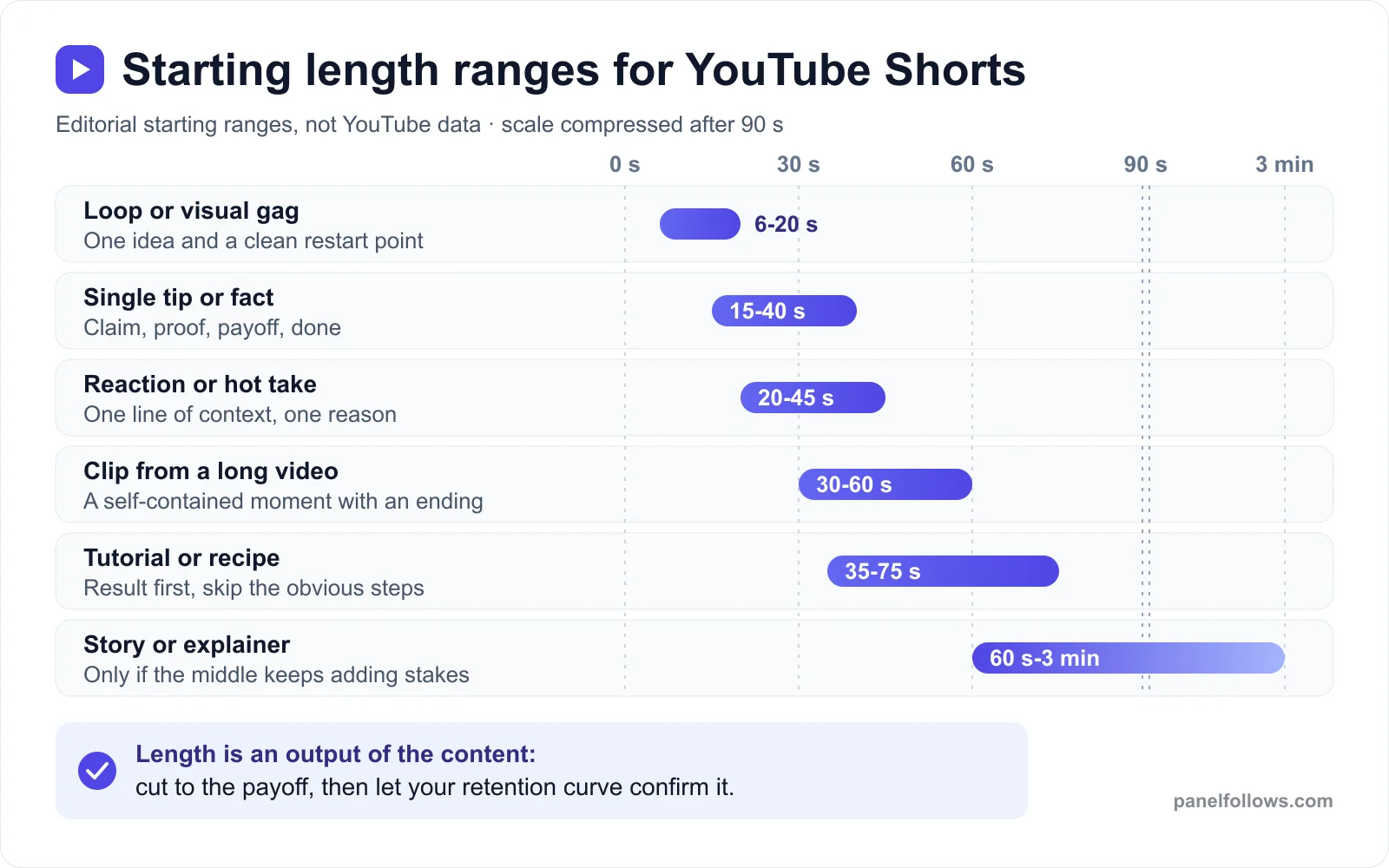
These are editorial starting ranges, not YouTube data. Test them against your own retention curves.
Say you run a home-cooking channel with about 4,000 subscribers. A "one mistake that ruins fried rice" Short probably wants 25 to 35 seconds: show the clumpy rice, name the mistake, show the fix, show the result. An "I cooked my grandmother's recipe from a handwritten card" Short might genuinely need 90 seconds or more, because the card, the confusion and the final taste test are the story. Same channel, same subject, different correct lengths.
How to read your retention curve to find the right cut
The retention graph for each Short shows where viewers left, and it is the most direct evidence of whether your length is right. Open the Short in YouTube Studio, go to its analytics and look at the audience retention chart alongside "stayed to watch" and average view duration. Then match the shape to one of the patterns below.
| What the curve shows | What it usually means | What to change |
|---|---|---|
| Steep drop in the first second or two, low "stayed to watch" | The opening did not earn attention | Rework the first frame and first line; length is not the issue |
| Good start, then a steady slide to the end | Pacing is slightly slow throughout | Trim 20 to 30 percent; remove pauses, repeated words and setup |
| Good start, then a sudden cliff in the middle | One section bored or confused people | Cut or compress that section, or move the payoff earlier |
| Flat line that ends near or above 100 percent | People finished and some rewatched | The length works; consider whether a loop ending would add more |
| Big drop right before the end | Viewers sensed it was over (a wrap-up, an outro, a "follow for more") | End on the payoff; delete the outro |
| Long Short with a flat middle and a late drop | The story held but the ending dragged | Keep the length, tighten the resolution |
Read the curve against the edit itself: scrub to the exact second where a cliff starts and watch what is on screen. And look at several Shorts of the same format before acting, because one curve can be shaped by an unusual audience.
When does a 3-minute Short make sense?
A 3-minute Short makes sense when the content has a narrative engine that keeps creating a reason to stay, and when it genuinely could not be told in less time without losing the point. Most content does not meet that bar, and stretching a 40-second idea to two minutes produces a retention curve that slides from start to finish.
Use this checklist before you publish anything over 60 seconds:
- Can a stranger explain why they kept watching at the 45-second mark? If the honest answer is "they were waiting for the point," the point should come sooner.
- Does every 20-second block add new information or new stakes? If one block could be removed without changing the ending, remove it.
- Is the audio free of third-party claims? Over one minute, any active claim blocks the Short globally. Use your own audio or a track from the royalty-free Audio Library, and remember that licensed Shorts Audio Library songs usually cover at most 90 seconds.
- Would it work better as a long-form video? If the material runs past three minutes or needs chapters, a horizontal long-form upload with a related Short pointing to it is often the better product.
- Have you published shorter versions of this format first? You need a baseline to know whether the extra length helped.
Remember too that a vertical 2-minute video is now a Short, not a brief long-form upload, and the two earn differently. If you are working toward the Partner Program, the Shorts path and the watch-hours path count different things; our guide to YouTube monetization requirements lays out both routes. And if you build longer Shorts from existing footage, check the rules in our article on the YouTube reused content policy for Shorts before you start cutting compilations.
How to cut a Short down without losing the point
The fastest way to improve most Shorts is to remove material rather than add it, and a repeatable edit pass makes that less painful. Run this sequence on your next rough cut.
- Write the one-sentence payoff. Before touching the timeline, write what the viewer should know, feel or see by the end. Everything that does not serve that sentence is a candidate for deletion.
- Start at the most interesting moment. Delete greetings, "so today," and context the viewer can infer. If the result is the hook (a finished dish, a fixed bug, a surprising number), show it first and explain after.
- Cut every pause and filler word. Jump cuts are normal in Shorts. In our experience, a talking-head Short can often lose a noticeable share of its runtime here without losing a single idea.
- Speed up process footage. Real-time stirring, typing or walking is almost never needed. Show the start, the key moment and the end of each process.
- Remove the second explanation. Creators often explain something, then rephrase it "to be clear." Keep the better version.
- Kill the outro. "Follow for more" and recap endings trigger the pre-end drop in the retention curve. End on the payoff, or on a frame that flows back into the opening if you want a loop.
- Watch it muted, then with sound only. Muted, check that captions and visuals carry the idea. Sound only, check that the narration does not lean on visuals that move too fast. Fix whichever fails.
A useful mental model is that every second has to buy the next second. If you can point to a second where nothing new happens, that second is costing you viewers.
How to test Short length on your own channel
You can find your own best length with a simple bucket test: publish comparable Shorts in two length ranges, then compare medians on the metrics that are not inflated by replays. Do not upload the same video twice in two lengths, since near-duplicate uploads compete with each other and muddy the data. Vary the length across different topics within the same format instead.
- Pick one format. Tutorials, stories or tips. Mixing formats makes the comparison meaningless.
- Define two buckets. For example, 20 to 35 seconds versus 50 to 75 seconds for tutorials, or 45 to 60 seconds versus 90 to 150 seconds for stories.
- Plan at least 8 to 10 Shorts per bucket. Fewer than that and one outlier will decide the result. Alternate buckets so both get similar days, times and topics.
- Keep everything else steady. Same hook style, same caption style, same posting time window, no promotion that only one bucket gets.
- Record each Short's numbers at 7 days. Early hours are noisy and Shorts can be picked up again later, so use a fixed window for every Short.
- Compare medians, not averages. One breakout Short can wreck an average; the median tells you what is typical.
- Decide on the metrics that matter for your goal. For growth, weight subscribers gained per 1,000 engaged views. For reach, weight engaged views per time shown in feed. For quality, weight average view duration and the shape of the retention curve.
- Adopt, then retest in a few months. Audiences and feed behavior change. A length that won in spring is a hypothesis by autumn.
A simple tracking sheet keeps you honest:
| Column | Where to find it | Note |
|---|---|---|
| Length (seconds) | Your edit | Record the exact runtime |
| Bucket | Your plan | A or B |
| Shown in feed | Shorts analytics | Distribution context |
| Stayed to watch (%) | Shorts analytics | Hook check; should not differ much by bucket |
| Engaged views | Advanced Mode | Use instead of public views |
| Average view duration | Content analytics | Seconds held |
| Average percentage viewed | Content analytics | Expect higher for short bucket |
| Subscribers gained | Content analytics | Conversion |
| Retention note | Retention graph | One line: "cliff at 0:22, recipe step 3" |
If the stayed-to-watch rate differs a lot between buckets, your hooks changed, not your length, so run another round. A typical clean result (hypothetical) has the short bucket winning on average percentage viewed and the long bucket on view duration and subscribers; you then pick based on this quarter's goal.
Where paid views fit (and where they do not)
Paid views do not answer the length question and can ruin a length test. YouTube's policies prohibit artificially inflating engagement, and a purchased view does not represent a real feed viewer deciding whether to stay, so it tells you nothing about whether your 40-second cut beats your 90-second cut. If you run the test above, keep every Short in it free of paid promotion of any kind, including ads, so both buckets are measured on the same footing.
Panel Follows sells YouTube views and other YouTube services; an order needs only a public link, never a password, and each service lists its own start time, speed, limits and refill terms. People who buy usually want social proof on a launch, not a ranking fix, and platform terms forbid it, so it carries risk. A small no-signup sample exists on the free YouTube likes page, but it is a sample, not a growth method. For what free and fake views do to a channel, read free YouTube views: real methods and fake view traps.
The order of priority stays the same either way: fix the first second, cut to the payoff, test length by format, and only then think about anything else. The same logic applies on other platforms; our guide to why TikTok videos stall runs a similar diagnosis for TikTok's feed.
Open your account and order in minutes
Signing up is free and takes two steps. Top up with card, bank transfer or crypto, place your order and track delivery from the dashboard.
Frequently asked questions
Can YouTube Shorts be longer than 60 seconds?
Yes. Since October 15, 2024, square or vertical videos up to three minutes long are classified as Shorts on standard channels, and Official Artist Channels followed for uploads from December 8, 2025. The catch is copyright: a Short longer than one minute with any active copyright claim is blocked globally until the claim is removed or resolved. If your Short uses commercial music or third-party clips, keeping it under 60 seconds avoids that block.
What happens if my vertical video is longer than 3 minutes?
A square or vertical video that runs longer than three minutes is treated as a regular long-form video, not a Short. It will not appear as a Short in the Shorts feed and is monetized under long-form rules if your channel is eligible. If you want something over three minutes to reach Shorts viewers, publish the long video and cut a separate Short of up to three minutes that points to it.
Is there a minimum length for YouTube Shorts?
YouTube does not publish a minimum length for Shorts, and very short clips of a few seconds can be uploaded as Shorts. Whether a tiny clip works is a content question rather than a rule. Loops and visual gags can succeed at well under 10 seconds because people rewatch them, while a tip or tutorial that short usually cannot deliver its payoff and leaves viewers confused.
Are 3-minute Shorts monetized?
Shorts up to three minutes that appear in the Shorts feed can be monetized through the Shorts revenue sharing model, subject to YouTube's Shorts monetization policies and your channel's Partner Program status. A Short that is blocked globally because of a copyright claim over one minute is not eligible for monetization. Vertical videos of one to three minutes uploaded before October 15, 2024 remain long-form and keep long-form monetization.
What is a good viewed vs. swiped away percentage?
YouTube does not publish a benchmark for viewed vs. swiped away, so any target number you see comes from creators sharing their own data. The useful comparison is internal: track the "stayed to watch" percentage for your recent Shorts in the same format and treat your median as the baseline. A Short that is clearly below your median has an opening problem, which no amount of trimming the middle will solve.
Do shorter YouTube Shorts get more views?
Shorter Shorts often show higher public view counts, partly because replays have counted as views since March 31, 2025, so a looping 10-second clip can collect several views per person. That does not mean short is better for your goals. Compare length options by engaged views, average view duration and subscribers gained, which are not inflated by replays, before deciding that shorter wins on your channel.
Can I turn my old vertical videos into Shorts?
Vertical videos of one to three minutes that were uploaded before October 15, 2024 stay classified as long-form, and YouTube's help page says they remain that way. If you want that material in the Shorts feed, you would need to edit and upload a new version, keeping in mind YouTube's rules on reused content and making sure the new Short adds something rather than simply duplicating the old upload.
Why was my 2-minute Short blocked?
The most common reason is an active copyright claim. YouTube blocks any Short longer than one minute that carries an active copyright claim of any type, including manual claims, and it will not be playable, recommended or monetized. There is no penalty to your channel. You can remove the claimed audio or footage, dispute the claim if you think it is wrong, or re-cut the Short to under 60 seconds.
How long should a YouTube Shorts hook be?
The hook has to work in roughly the first one to two seconds, because that is when the viewed vs. swiped away decision happens in the feed. YouTube does not state an exact window, but the metric measures whether viewers stayed past the opening moments. Start with the most interesting frame, the result or the surprising claim, and save context for after the viewer has decided to stay.
Sources and further reading
- Understand three-minute YouTube Shorts (YouTube Help): the official rules on the 3-minute limit, cutoff dates, blocked Shorts over one minute and music use.
- Music eligibility for YouTube Shorts (YouTube Help): how much Shorts Audio Library music a 3-minute Short can use and how claims affect longer Shorts.
- YouTube Shorts will boost max video length to 3 minutes (Variety): October 2024 report on the announcement, including YouTube's note about improving recommendations for longer Shorts.
- YouTube is changing how Shorts views are counted (TechCrunch): coverage of the March 2025 view counting change and the engaged views metric.
- YouTube Shorts analytics: the metrics that matter (1of10): third-party walkthrough of Shorts analytics that notes YouTube publishes no official Shorts benchmarks.
- How YouTube counts views in 2026 (Chartlex): third-party report on the August 2026 extension of start-of-playback view counting to all formats.