
Instagram Deactivated Accounts in Followers: What to Do
What Instagram's deactivated accounts in your followers list mean, whether they still count, when to remove them, and why your follower count dropped.
Instagram's "Deactivated accounts" category in your followers list shows people who still follow you but whose accounts are currently switched off. Most are users who paused Instagram themselves and can return by logging back in. Instagram has not documented whether they still count in your follower number. They cannot see or engage with your posts, so removing them is optional cleanup. It will not grow your reach.
This guide covers what the category shows, how it differs from deleted, disabled and removed accounts, what it does to your engagement rate, how to clean it up, how to diagnose a follower drop, and what the visible list changes for buyers and resellers of followers. Organic cleanup comes first.
Facts in this guide were checked in November 2026.
What does "Deactivated accounts" in your Instagram followers list mean?
It is a filtered view of your followers that groups accounts which are currently deactivated. It is not a penalty, a warning or a sign that anything is wrong with your own profile. When you open your followers list, the category appears next to other filters as its own row, and inside it each account has a Remove button.
The feature first showed up in November 2024. Creator economy analyst Lindsey Gamble reported at the time that Instagram had added a "Deactivated Accounts" category that lets you see followers whose accounts have been deactivated and remove them. The same report noted that it sits alongside "Flagged for review", the older category for followers Instagram suspects are spam or bots.
The key word is currently. A deactivated account is paused, not gone. Instagram's own help page on temporary deactivation says the person's photos, comments and likes are hidden until they reactivate by logging back in. So someone in this list today could be back in your normal followers list next week, with no action from you.
Why is the category back, and does everyone have it?
We could find no Instagram announcement of the return, and there is no official rollout date. The best public record comes from a third party. SocialBee's weekly newsletter Shareable TL;DR for November 12, 2026 reported that Instagram had brought back the "Deactivated Accounts" category in the Followers section. Its running Instagram updates roundup, updated November 23, 2026, carries the same item. The newsletter's source is a Threads post by someone who tracks app features, not a Meta announcement.
The second data point is about availability. A MakeUseOf guide updated in November 2026 describes the category, but its author found it on two of their three accounts and not on the third. One of the accounts that had it was private and the other was public, so privacy settings were not the deciding factor.
Put together, here is what can and cannot be said:
| Claim | Status as of November 2026 |
|---|---|
| A "Deactivated accounts" category exists in the followers list | Confirmed by multiple screenshots and reports since November 2024 |
| It was missing for a while and has returned | Reported by SocialBee (November 12, 2026), not announced by Instagram |
| Every account has it | Not true, at least one tester saw it on some accounts and not others |
| It depends on public vs private account | Not supported, it appeared on both in the same test |
| There is a fixed rollout date or region list | Not published by Instagram |
If you do not see it, nothing is wrong with your account. Update the app, check again in a few days, and use the manual checks in the diagnosis section below until then. Features like this often reach accounts in waves, and Instagram rarely says when a wave is finished.
How to see deactivated accounts in your Instagram followers
If the category is available to you, checking takes under a minute. The path below matches the screenshots in the reports cited above. Instagram moves labels around, so expect small differences between app versions.
- Open the Instagram app and tap your profile picture in the bottom-right corner.
- Tap Followers at the top of your profile.
- Look at the category rows above the list (where you may also see "Flagged for review"). Tap Deactivated accounts.
- Scroll the list. Each row shows a grayed-out or placeholder profile with a Remove button.
- Repeat from Following if you want to see deactivated accounts you follow. Some app versions show the category there too.
Write down how many accounts are in the list before you change anything. If a name you care about is there, that is good news: the person paused their account rather than blocking you.
How do Instagram accounts get deactivated, and where do they end up?
Accounts become deactivated in one main way: the owner chooses it. Instagram's help page describes temporary deactivation as something the owner does from Accounts Center. It also says you can only deactivate once a week and must be able to log in to do it. People do it during exam season, after a breakup, for a digital detox or because they plan to delete later.
Other things can make a follower vanish, and people often confuse them with deactivation. Deletion is the owner leaving for good. A disabled or suspended account is Instagram acting against an account that broke its rules. Spam and fake account removal is Instagram stripping inauthentic accounts or follows from the platform. Then there are the ordinary cases: someone unfollows you, or someone blocks you and disappears from your view.
The table below sorts these cases by what you see and whether the follower can come back. Where something is not documented, the table says so.
| What happened | Who did it | What you see | Can the follower come back? |
|---|---|---|---|
| Temporary deactivation | The account owner | Account appears under "Deactivated accounts" | Yes, when they log back in |
| Deletion | The account owner | Account disappears from your lists once deletion completes | No |
| Disabled or suspended | Profile unavailable; whether it is listed under "Deactivated accounts" is not documented | Possibly, if an appeal succeeds | |
| Fake or spam removal | Follower disappears, often in batches | No | |
| Flagged for review | Instagram's spam filter | Account sits under "Flagged for review" until you act | Only if you approve it |
| Unfollow | The follower | Profile still live, you are simply not in their following | Only if they follow again |
| Block | The follower | Profile not visible from your account | Only if they unblock |
The third row is the gap most guides on this topic skip over. Some say the category includes disabled or banned accounts, but nobody outside Instagram has shown that, and other guides say the list excludes blocked and deleted accounts. Until Instagram says otherwise, treat the category as "accounts that are switched off right now, mostly by their owners".
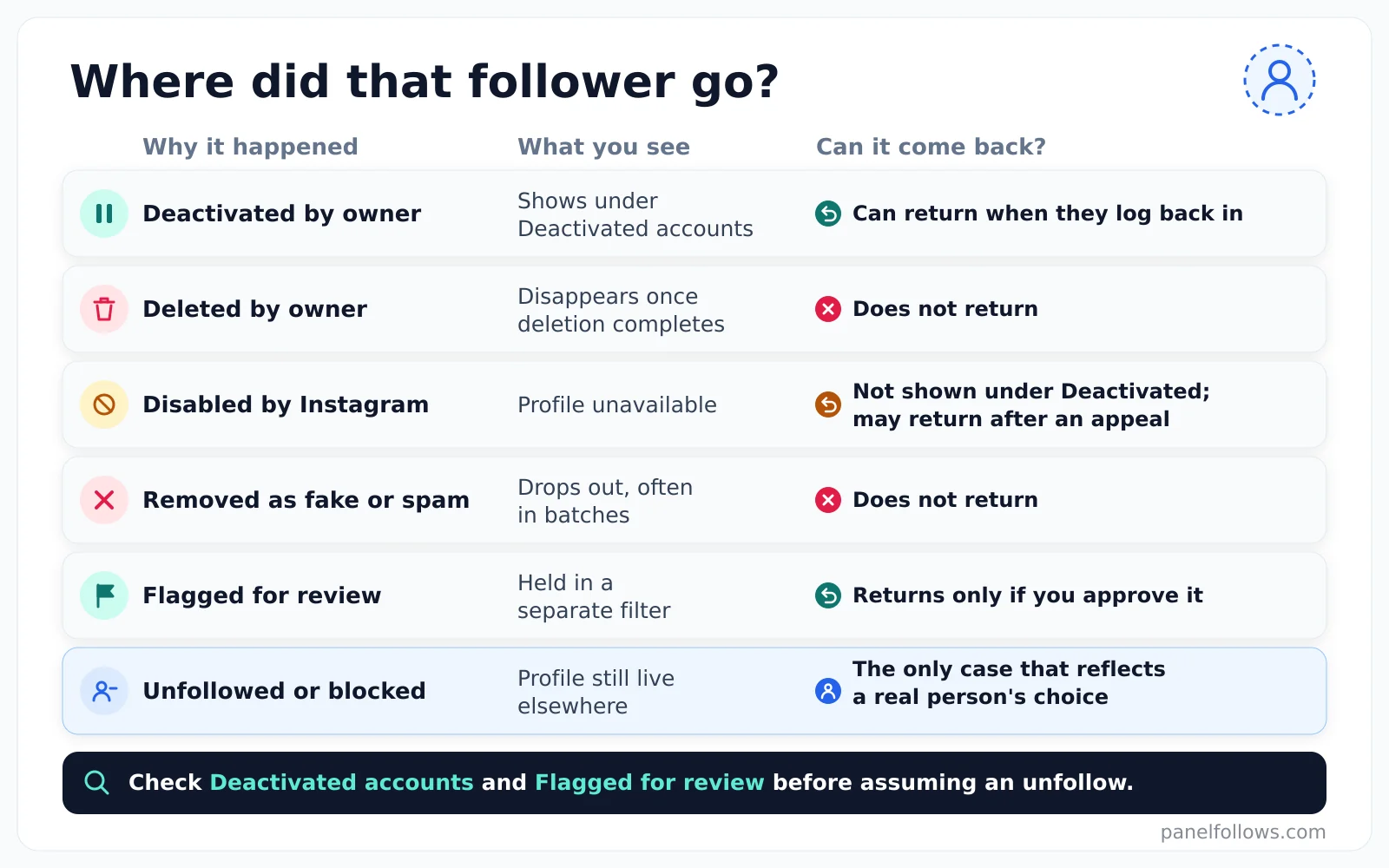
Most missing followers are paused, deleted or removed accounts, not people who decided to unfollow you.
Do deactivated accounts count as followers on Instagram?
Instagram has not published a clear answer, and the reports disagree. Some guides say a deactivated follower drops out of your count and comes back when the person reactivates. Others say deactivated accounts inflate your follower number. Both could be true at different times or for different account states. Instagram's help pages describe what deactivation hides (photos, comments and likes) but say nothing about how follower counts are calculated.
The follow itself clearly survives deactivation. That is the whole point of the category: the account still follows you, which is why there is a Remove button. Whether the number on your profile includes those follows right now is a separate question.
You can settle it for your own account in two minutes:
- Open your profile and write down your exact follower count.
- Open Deactivated accounts and remove one account you are sure you do not need (an unknown name with no history with you).
- Close the app fully, reopen it and look at your count again.
- If the count dropped by one, deactivated followers are being counted on your account right now. If it did not change, they were already excluded.
Counts sometimes update with a delay, so check again after an hour if the result is unclear. On an active account, new follows and unfollows can move the number during the test. Run it at a quiet time, such as late at night or between posts, and repeat it with a second account if the first result looks off. Whatever you find, a deactivated account cannot see your posts, so it adds nothing to reach or engagement while it stays deactivated.
What deactivated followers do to your engagement rate
They only affect follower-based engagement rate, the version brands and media kits usually quote. That formula divides interactions by follower count, so any follower who cannot engage pulls the rate down. Reach-based engagement rate, built from your own Insights, is unaffected because deactivated accounts are never reached. Our guide on engagement rate benchmarks and the denominator trap explains why the two formulas give such different numbers.
Here is how big the effect is in a hypothetical example. Say you run a bakery account with 2,300 followers and your posts average 92 likes and comments. Your follower-based engagement rate is 92 divided by 2,300, or 4.0 percent. Now say 120 followers sit in your Deactivated accounts list and the count test showed they are being counted. Remove them, and the same 92 interactions over 2,180 followers gives about 4.2 percent.
That improvement is small and only on paper. Your posts reached exactly the same people before and after. Cleaning the list is reasonable housekeeping before a brand pitch, but it does nothing for distribution.
What actually tells you something is the share. A handful of deactivated accounts among a few thousand followers is normal on any social network. If a large share of your list is deactivated, flagged or empty, run a manual fake follower audit. That pattern usually says more about how the followers arrived than about people taking breaks.
Test this on one post before you scale
The cheapest way to check the logic above is a small order on a single post, then compare the outcome against your own Insights data.
Should you remove deactivated followers?
Usually it is optional, and the answer depends on who the accounts are. If you remove someone who paused for a month, you lose a real follower when they come back, and they will not be told why. Removing an obviously dead or junk account costs you nothing.
| Your situation | Suggested action | Why |
|---|---|---|
| A few deactivated accounts, all real people you recognize | Leave them | They are likely to return and follow you again automatically |
| Unknown names, no profile photo history, no shared context | Remove gradually | They add nothing now and probably never will |
| Many deactivated accounts that arrived in one burst | Investigate first, then remove | A burst usually means a giveaway, follow-for-follow or bought batch |
| You are preparing a media kit or brand pitch | Clean the list, then re-measure | Follower-based rate is what the brand will compute |
| You have an active refill window on a purchased order | Wait or ask your provider first | Removing accounts yourself can complicate a refill claim |
| You are small and still building | Spend the time on content instead | The change in any metric that matters will be close to zero |
Do not use third-party "cleaner" apps for this. They need your login, and any service that asks for your password is a bigger risk than a few dead followers. The in-app list does the job.
How to remove deactivated accounts from your Instagram followers
You remove them inside the category, one account at a time. None of the reports cited above show a bulk "remove all deactivated" button.
- Go to Profile > Followers > Deactivated accounts.
- Tap Remove next to an account. Removed followers are not notified.
- Work in small batches with a break between them. Instagram publishes no safe number, so treat something like 20 to 30 at a time as a cautious habit, not a known limit.
- To stop following deactivated accounts yourself, open Following and use the same category if it appears there, or open the profile and tap Following > Unfollow.
- Next, open Flagged for review if you have it. Instagram's help page on potential spam followers covers that separate filter, which is where suspected bots go.
Why batches? Instagram does not publish a limit for follower removals, but many users report temporary blocks after repeating the same action quickly. Our explainer on Instagram action blocks covers what those look like and how long they tend to last. Spreading a few hundred removals over several days is slower, but it lowers the chance of a temporary block that stops you from following or removing people for a while. It is not a guarantee.
A removed account that reactivates can follow you again. If the same junk accounts keep coming back, block them instead.
Why did my Instagram follower count drop? A diagnosis in order
A drop usually has one of five causes, and about ten minutes is enough to tell which. Work through them in this order, because the first checks are the quickest and catch the most common causes.
- Check Deactivated accounts. If that category grew around the time of the drop, people paused their accounts. Those followers can come back.
- Check Flagged for review. If Instagram's spam filter moved accounts there, they may have dropped out of what you see.
- Look at the timing. If many followers vanished in one day while likes and comments held steady, Instagram often removed accounts it considered fake or spam. Our guide on why followers drop and how refills work covers this pattern in detail.
- Check recent posts. A slow drop after a change of topic, a controversial post or a long posting gap means real people are unfollowing. Of the five causes, this is the only one that tells you what your audience thinks.
- Check for blocks. If one specific person vanished, search for them from a second account. If they appear there but not from yours, they blocked you.
A follower drop is almost never a shadowban. Losing followers and losing reach are separate problems, and mixing them up leads to the wrong fix. If your reach fell too, look into that on its own before you change anything.
Bought followers and the Deactivated accounts list
If you have ever bought followers, the Deactivated accounts list may be where you notice it. Purchased followers vary a lot in quality. Some come from accounts that are later deactivated by whoever runs them, disabled by Instagram or removed in spam sweeps. When that happens, the batch can show up as a cluster of grayed-out profiles or simply disappear from your count.
Be clear about what that means. Instagram's Community Guidelines ask users not to artificially collect likes, followers or shares, and its terms prohibit buying engagement. Nothing protects purchased followers from removal, and no honest provider will tell you otherwise. Our follower quality buying guide explains what the different tiers actually are. For the legal side, especially for US businesses, see our explainer on the FTC fake followers rule.
If you still choose to buy, the visible list changes how you should judge an order:
- Read the service page before you order, not after. On Panel Follows every service lists its start time, speed, minimum and maximum quantity, refill period (if any) and whether it can be cancelled. The Instagram followers category shows these for each service.
- A refill guarantee covers drops, not quality. Services with refill top up drops for free during the stated refill period, and you can request a refill once every 24 hours per order. A refill restores the number. It does not bring deactivated accounts back to life or turn them into customers.
- A no-refill service means what it says. These services are clearly marked, and you confirm a warning before ordering. Any drops after delivery are your loss.
- Ask before cleaning your list during a refill window. If you remove accounts yourself, that drop comes from your own action rather than from the delivery, which can complicate a refill request. Open a support ticket first if you plan to clean up while a refill period is running.
What the Deactivated accounts list changes for SMM resellers
For anyone running a panel, a visible list of deactivated followers changes the support conversation. Before, a customer saw a number fall and wrote "followers dropped". Now they can screenshot a list of grayed-out accounts and ask whether they were sold fake followers. The complaint is more pointed even when the facts are the same.
Three things matter more now than they used to.
Refill windows have to be explicit at the point of sale. If your service description says 30-day refill, the customer needs to see that before paying, not in a ticket reply. A deactivation on day 45 of a 30-day window falls outside the guarantee, and you want the customer to have agreed to that in advance. If you resell from a provider, use exactly the provider's refill period. If you promise a longer window than your source offers, you pay for the difference yourself.
No-refill warnings need to be impossible to miss. A cheap no-refill service is a legitimate product for customers who understand it. Disputes start when they don't. A warning the customer has to confirm before ordering, the same pattern Panel Follows uses, puts that understanding on record.
Support replies need to separate deactivated from removed. A customer whose delivered accounts sit in Deactivated accounts is in a different position from one whose count fell because Instagram removed accounts. In the first case some accounts may come back on their own. In the second they will not. Ask for the order ID, the current count and a screenshot of the category before you decide anything. Then check whether the order is inside its refill period and whether the service has refill at all.
A template that works in practice:
| Customer reports | First question to ask | Likely outcome |
|---|---|---|
| "My followers are in Deactivated accounts" | Is the order inside its refill period? | If yes and the count dropped, request a refill; if not, explain the window |
| "My count dropped overnight" | Did the Deactivated or Flagged lists change? | Platform removal or deactivation, refill if covered |
| "I removed the dead ones, now refill me" | When were they removed and by whom? | Customer-initiated removal, handle according to your stated policy |
| "These are all fake, I want a refund" | What did the service description promise? | Answer against the listing, not against expectations set in chat |
Write a policy for the third row before you need it. Decide how your panel treats followers the customer removed themselves, state it in your terms, and apply it the same way every time.
Disputes that turn into payment reversals are a separate topic. Our chargeback prevention playbook covers what evidence to keep. If you are setting up your own catalog, the SMM reseller panel page explains how Panel Follows works as a provider layer.
What to do this week
The main thing to take from this guide is the order: look before you delete, measure before you draw conclusions, and fix your content before you fix your numbers.
- Open your followers list and check whether you have the Deactivated accounts category. Note the count.
- Run the one-account count test so you know whether deactivated followers are included in your number.
- Remove obvious junk in small batches and leave real people alone.
- Check Flagged for review and handle it the same way.
- If you quote engagement rate to brands, recalculate it after cleanup and use the new figure.
- If you hold purchased followers, check each order's refill period before touching the list.
- Set a monthly reminder to repeat steps 1 and 4.
Open your account and order in minutes
Signing up is free and takes two steps. Top up with card, bank transfer or crypto, place your order and track delivery from the dashboard.
Frequently asked questions
What does deactivated accounts mean in Instagram followers?
It is a category in your followers list that groups people who still follow you but whose accounts are currently deactivated. Usually the owner paused their account and can come back by logging in. While it is paused, their photos, comments and likes are hidden. It is not a penalty on your account, and you only need to act if you want to remove some of them.
Do deactivated accounts count as followers on Instagram?
Instagram has not documented this, and reports disagree. The follow itself clearly survives, because the account appears in your list with a Remove button. To check your own account, note your follower count, remove one unknown deactivated account, restart the app and compare. If the number fell by one, deactivated followers are being counted. Either way, they cannot see or engage with your posts while deactivated.
How do I remove deactivated accounts from my Instagram followers?
Open your profile, tap Followers, then tap the Deactivated accounts category and use the Remove button next to each account. The versions reported so far have no bulk option. Work in small batches with breaks to avoid temporary action blocks, and skip people you know, because they may return. Removed followers are not notified, and they can follow you again if they reactivate.
Why can't I see the Deactivated accounts category on Instagram?
Not every account has it. SocialBee reported the category's return on November 12, 2026, but Instagram has not announced a rollout schedule, and one tester found it on two of their three accounts. Whether the account was public or private made no difference. Update the app and check again later. Until then, check individual people by searching from a second account or looking in your DMs.
Do you lose followers when you deactivate your Instagram account?
No, deactivating does not delete your followers. Instagram's help page says deactivation hides your photos, comments and likes until you reactivate by logging back in. Your follows are kept, so when you return, your profile and followers come back with it. While you are away, other people may see you in their Deactivated accounts list, and some of them may remove you from there.
Does Instagram delete deactivated accounts after a while?
Instagram's help page on temporary deactivation says it lasts until the person logs back in and does not mention an automatic deletion deadline. Deletion is a separate process the owner requests from Accounts Center. If you are unsure about a specific account, assume it can come back at any time. That is also a good reason not to remove real people from your list.
Is a deactivated follower the same as someone blocking me?
No. A deactivated account appears in your Deactivated accounts category and is unavailable to everyone. A person who blocked you disappears from your followers list, and their profile is hidden only from you. To tell the two apart, search for the username from a second account. If the profile shows up there but not from your main account, you were blocked.
Why did my follower count drop with no unfollows?
The usual causes are followers deactivating their accounts, Instagram removing accounts it considers fake or spam, and accounts moved into Flagged for review. If many followers vanish in one day while likes and comments hold steady, it is often a platform cleanup. A slow decline after a change in content is more likely real unfollows. Check the Deactivated and Flagged categories first, because they explain many drops.
Will a refill bring back followers that were deactivated?
A refill tops up a count. It does not reactivate accounts. On Panel Follows services with a refill guarantee, drops during the stated refill period are topped up for free, and you can request a refill once every 24 hours per order. Services without refill are marked, and you confirm a warning before ordering. Removing followers yourself during a refill window can complicate a claim, so ask support first.
Sources and further reading
- Shareable TL;DR by SocialBee, November 12, 2026: the newsletter item reporting that Instagram brought back the "Deactivated Accounts" category, with its Threads source.
- SocialBee: Instagram updates, news and features: running roundup updated November 23, 2026, which includes the same item.
- Lindsey Gamble: Instagram adds a Deactivated Accounts category: the November 2024 report on the original launch and its relationship to "Flagged for review".
- MakeUseOf: How to tell if someone has deactivated or deleted their Instagram account: hands-on walkthrough updated November 2026, including the author's finding that the category was missing on one of their accounts.
- Instagram Help Center: Temporarily deactivate your Instagram profile: official description of what deactivation hides, the once-a-week limit and how reactivation works.
- Instagram Help Center: Remove potential spam accounts from your followers: official page on the spam follower filter behind "Flagged for review".